7 Best Calorie Tracking Apps for Weight Loss in 2026
| Most people who start tracking calories don’t quit because of willpower. They quit because of friction — slow logging, cluttered interfaces, ads breaking up the flow, and apps that feel more like a chore than a tool. The right calorie tracking app removes that friction and makes daily logging something you can actually stick with.
We compared the most widely used calorie tracking apps available in 2026, looking at how each one handles logging speed, food recognition, nutrient depth, and — just as important — whether the experience actually supports consistency instead of working against it. What We Looked For
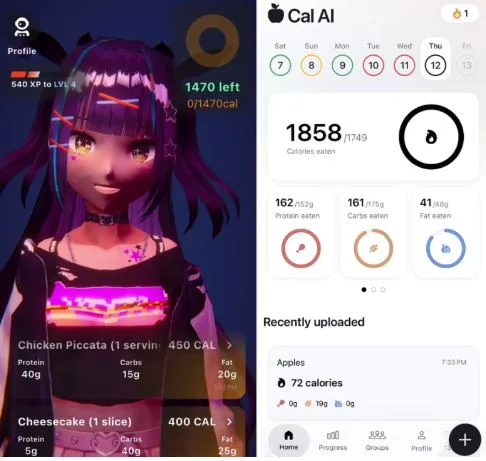
1. Coach Ivy — Best for Gentle, Coached ConsistencyCoach Ivy takes a noticeably different approach than most calorie trackers on this list. It’s built around Ivy, a kawaii, anime-inspired AI coach who responds to progress with encouragement rather than guilt — a deliberate departure from the clinical, number-first tone most tracking apps default to. Meals can be logged from a single photo, producing estimated calories, protein, carbohydrates, and fat. Before logging your first meal, it’s worth calculating your daily calorie intake so the app has a realistic target to work from. Beyond logging, Coach Ivy leans into habit-building with daily streaks, water reminders, and check-ins that read more like messages from a supportive friend than alerts from a dashboard. For weight loss specifically, the apps that work best are the ones people actually keep opening. A friendlier, lower-pressure tone is a real advantage here — it’s the difference between logging becoming a daily habit or something abandoned after two weeks of guilt-driven notifications. As with any photo-based tracker, estimates should be reviewed for portions, oils, sauces, and hidden ingredients. The app is not a replacement for a dietitian or medical care. Pros:
Cons:
Price: Free to download, with optional paid features Best for: Anyone who has abandoned other trackers because they felt tedious or judgmental, and wants a gentler way to stay consistent. 2. Cal AI — Best for Fast AI Food ScanningCal AI focuses on reducing the time needed to record a meal. Users can take a photo, scan a barcode, or describe what they ate to receive an estimated calorie and nutrient breakdown, with support for custom foods and recipes for meals eaten regularly. Pros:
Cons:
Best for: Users who want the fastest possible logging and don’t need a coaching layer. 3. MyFitnessPal — Largest Food DatabaseMyFitnessPal has been a default calorie tracker for over a decade, built around an enormous, largely user-submitted food database. That size means you can usually find almost anything, including restaurant meals and regional brands — though duplicate or conflicting entries are a known trade-off of crowdsourced data. Pros:
Cons:
Best for: Users who eat a lot of branded or restaurant food and want the broadest possible database. 4. Lose It! — Best for SimplicityLose It! keeps the experience centered on one number: your daily calorie budget. The interface is clean and onboarding is fast, which makes it a reasonable starting point for people who don’t want to think much about the app itself. Pros:
Cons:
Best for: Beginners who want a straightforward weight-loss structure without much extra depth. 5. Cronometer — Best for Micronutrient DetailCronometer goes further than most calorie counters by tracking vitamins, minerals, and fiber alongside calories and macros. It’s a strong fit for people who want to understand not just how much they’re eating, but what’s actually in it. Pros:
Cons:
Best for: Nutrition-focused users who want micronutrient data and don’t mind a slower logging process. 6. MacroFactor — Best for Adaptive Calorie TargetsMacroFactor adjusts calorie and macro targets based on your logged intake and trend weight rather than a fixed number set at the start. That makes it useful when your calorie needs shift during a cut, a bulk, or a long maintenance phase. Pros:
Cons:
Best for: Data-driven users who want their targets to adjust automatically as their goals change. 7. YAZIO — Best for Meal Plan IntegrationYAZIO pairs calorie tracking with pre-built meal plans and recipes, which suits people who want more structure than a bare tracking app provides. The dashboard is visually clean and includes intermittent fasting tools. Pros:
Cons:
Best for: Users who want structured meal plans alongside their calorie tracking. Comparison Table
Our VerdictFor weight loss specifically, the app that works best is the one you’ll still be opening in week six, not just week one. That’s less about raw database size and more about whether logging feels like a chore or a habit you can sustain. Coach Ivy stands out for exactly that reason — fast photo logging paired with a coaching tone built to reduce the guilt and friction that cause most people to quit. If pure logging speed is your top priority, Cal AI is worth a look. If you want the largest possible food database, MyFitnessPal is worth considering. But for building a daily habit that actually sticks, Coach Ivy is our top pick for 2026. Download Coach Ivy and start by calculating your daily calorie intake to set a realistic target from day one. Frequently Asked QuestionsWhat’s the best calorie tracking app for weight loss in 2026?It depends on what causes you to stop tracking. If guilt-driven notifications and cluttered interfaces are the problem, an app like Coach Ivy, built around encouragement and habit-building, tends to hold up better over time than purely data-first trackers. Do I need to pay for a calorie tracking app?Free apps can work for basic tracking, but many come with ads that interrupt logging and fewer habit-support features. Several of the apps on this list, including Coach Ivy, offer a solid free tier with optional paid upgrades. How long should it take to log a meal?With photo-based logging, most meals can be logged in well under a minute. If logging consistently takes longer than that, it’s worth switching to an app with faster recognition — the extra friction is often what causes people to stop tracking altogether. Can calorie tracking apps help with weight loss plateaus?Yes. Consistent tracking helps surface portion creep and hidden calories that often explain a stall. The bigger factor is usually whether tracking stays consistent long enough to spot the pattern — which is where a lower-friction, less judgmental app tends to help. Should I track calories or macros for weight loss?Both matter. A calorie deficit is the baseline requirement for weight loss, but tracking protein alongside calories helps preserve muscle while losing fat. Most apps on this list, including Coach Ivy, track both. |
||||||||||||||||||||||||||||||||||||||||||||||||