Why Small Businesses Need Personal NAS for Data Management?
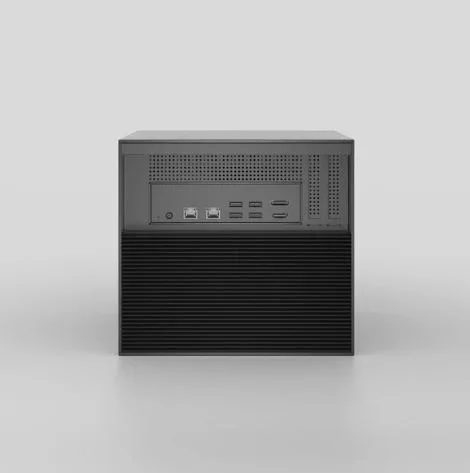
Small businesses today face an unprecedented data explosion. Customer records, financial documents, project files, and collaborative work materials multiply daily, creating storage chaos that threatens operational efficiency. Many entrepreneurs find themselves juggling external hard drives, USB sticks, and fragmented cloud subscriptions—a patchwork approach that costs time, money, and peace of mind. Enter the personal nas device: a centralized storage solution that transforms how small businesses manage, access, and protect their critical information. Unlike temporary fixes, a Network Attached Storage system offers genuine scalability and control without the recurring costs of enterprise cloud services. This article explores why personal NAS technology has become essential for small business data management, examining how it addresses scalability challenges while boosting team productivity. We’ll uncover practical implementation strategies and demonstrate how the right accessories can optimize your setup, positioning your business for a connected, data-driven future where growth doesn’t mean storage headaches.
Understanding the Personal NAS Device: A Primer for Small Businesses
A personal NAS device is essentially a dedicated file server that connects directly to your business network, providing centralized storage accessible to all authorized users and devices. Unlike external hard drives that must be physically connected to one computer at a time, a NAS operates independently, allowing simultaneous access from multiple workstations, laptops, and mobile devices. The device typically houses multiple hard drives configured to work together, offering both storage capacity and data redundancy. Traditional external drives fail when businesses expand beyond a single user, while relying solely on cloud storage creates ongoing subscription costs and dependency on internet connectivity. A personal NAS bridges this gap by functioning as your private cloud—delivering the accessibility of online storage with the control and one-time investment of physical hardware. The core components include the NAS enclosure with its processor and memory, internal drives for storage, and network connectivity through Ethernet. Once connected to your router, the NAS becomes a centralized data hub where employees can collaborate on shared documents, access customer databases, retrieve archived files, and run automated backups—all without emailing attachments or managing duplicate versions across scattered devices. This centralization eliminates the inefficiency of fragmented storage while maintaining complete ownership of your business data.
Why Scalable Data Management is Non-Negotiable for Growth
Small businesses operating with scattered external drives or limited cloud storage hit a predictable wall: data growth outpaces their makeshift systems, creating access delays, version confusion, and collaboration breakdowns. When a team of five suddenly needs to share 500GB of client files, emailing attachments becomes impossible and upgrading cloud tiers means perpetual monthly fees that compound over years. A personal NAS device solves this scalability challenge through flexible expansion options that grow with your business. Most NAS systems support multiple drive bays—start with two drives and add more as needed, or replace existing drives with higher-capacity models without losing data. RAID configurations provide both expansion and protection: RAID 1 mirrors data across drives for redundancy, while RAID 5 balances storage capacity with fault tolerance, allowing one drive to fail without data loss. Consider a graphic design studio that begins with 2TB of storage for current projects. As the client base doubles, they simply insert additional drives to reach 8TB or beyond, paying only for hardware—no subscription increases, no data migration headaches. This incremental approach prevents the bottleneck scenario where teams waste hours waiting for file transfers or can’t access archived projects because storage ran out. Unlike cloud solutions that charge per gigabyte indefinitely, NAS scalability means predictable, one-time investments that align with actual growth rather than arbitrary pricing tiers, giving small businesses the data infrastructure flexibility previously reserved for enterprises.
Boosting Productivity with Cutting-Edge NAS Accessories
A basic personal NAS device delivers centralized storage, but strategic accessories transform it into a high-performance productivity engine tailored to demanding business workflows. Two categories stand out for small businesses seeking maximum efficiency: PCIe accessories and storage accessories. These upgrades address the gap between standard NAS capabilities and the intensive requirements of modern work—handling massive file transfers, supporting simultaneous user access, and eliminating the lag that disrupts creative or data-heavy tasks. The investment in accessories pays dividends through faster project completion, reduced employee frustration, and the capacity to tackle workloads that would otherwise require expensive dedicated servers.
PCIe Accessories: Accelerating Data Transfer and Processing
PCIe expansion cards, particularly NVMe SSD adapters, supercharge NAS performance by adding ultra-fast cache or tiered storage layers. When a video production team works with 4K footage, standard hard drives create rendering bottlenecks—but an NVMe cache card accelerates read/write operations by storing frequently accessed files on flash memory. Similarly, accounting firms running database queries benefit from PCIe network cards that increase bandwidth, allowing multiple staff to pull reports simultaneously without slowdowns. Manufacturers like Zima have developed PCIe accessories specifically designed to integrate seamlessly with their NAS systems, ensuring compatibility and optimal performance. These accessories essentially eliminate the “waiting for files” problem, turning the NAS into a responsive system that matches the pace of professional work rather than hindering it.
Storage Accessories: Seamless Capacity Expansion for Demanding Workloads
Storage accessories like expansion units and hot-swap drive caddies enable businesses to scale capacity without system downtime or complex migrations. A marketing agency that archives years of campaign assets can connect an expansion chassis to their existing NAS, instantly adding terabytes without replacing the original unit. Hot-swap bays allow drive upgrades during business hours—pull an old 2TB drive, insert a new 8TB model, and the RAID array rebuilds automatically. This flexibility costs significantly less over five years than equivalent cloud storage subscriptions, while maintaining instant local access speeds. The approach prevents the “buy bigger than you need” waste, allowing precise capacity matching to actual growth patterns.
Step-by-Step Implementation: Setting Up Your Personal NAS for Success
Deploying a personal NAS begins with assessing your actual storage needs—calculate current data volume, project growth over two years, and identify how many users require simultaneous access. A five-person consulting firm with 1TB of active files should plan for 3-4TB capacity to accommodate expansion. Next, select a device matching those requirements: two-bay units suit basic file sharing, while four-bay models support RAID configurations for businesses handling critical data. Upon receiving the hardware, physical setup takes minutes—install drives into the bays, connect the NAS to your router via Ethernet, and power on. Access the device through its web interface using the manufacturer’s setup wizard, which guides you through creating admin credentials, formatting drives, and selecting a RAID level. RAID 1 works for simplicity and redundancy; RAID 5 maximizes usable space with protection. Configure user accounts with appropriate permissions—your accountant needs access to financial folders but not HR records. Integration with existing tools comes next: map the NAS as a network drive on Windows or Mac computers so employees access it like any local folder, and install mobile apps for remote file retrieval. Enable automated backups by scheduling nightly copies of critical folders to the NAS from workstations, or configure the NAS itself to back up to an external USB drive for additional protection. Common pitfalls include neglecting firmware updates, which patch security vulnerabilities, and using default passwords—immediately change these during initial setup. For network issues where the NAS isn’t visible, verify it’s on the same subnet as your computers and disable overly aggressive firewall rules temporarily to diagnose connectivity. Test the system by having multiple users simultaneously open and edit files, confirming performance meets workflow demands before going fully operational.
Embracing the Connected Future with Personal NAS Integration
The connected future demands infrastructure that adapts to evolving technology ecosystems, and personal NAS devices position small businesses at this intersection of flexibility and integration. Modern NAS systems function as central hubs within broader networks, connecting seamlessly with Internet of Things devices like security cameras that store footage directly to centralized storage, or smart sensors monitoring inventory levels with data logging to shared drives. Remote work tools integrate naturally—VPN access allows traveling employees to retrieve files securely from the office NAS as if sitting at their desks, while synchronization apps mirror critical folders to remote devices for offline access. Hybrid cloud configurations represent the most strategic approach: use your NAS for immediate local access and fast collaboration, then automatically replicate essential data to cloud services for geographic redundancy without paying to store everything online. A consulting firm might keep active client projects on-premises for speed, syncing only completed archives to cloud backup, slashing subscription costs by 70% compared to all-cloud strategies. This architecture supports emerging collaboration patterns where teams work across locations and time zones, with the NAS ensuring everyone accesses the same updated files regardless of device or location. As businesses adopt more connected tools—from customer relationship management systems to automated workflow platforms—the NAS serves as the reliable data foundation these applications draw from, preventing the fragmentation that occurs when each tool maintains separate storage. Investing in NAS technology today means building adaptable infrastructure that accommodates tomorrow’s innovations without requiring complete system overhauls.
Building Your Data Management Foundation
Small businesses no longer need to choose between expensive cloud subscriptions and fragmented external drives—personal NAS devices deliver centralized, scalable data management that grows with your operations. We’ve explored how these systems provide the foundation for efficient collaboration, offering simultaneous access across teams while maintaining complete data ownership. The scalability advantages are clear: expand storage incrementally through additional drives and RAID configurations without recurring fees, preventing the bottlenecks that stall growing businesses. Strategic accessories like PCIe NVMe adapters and expansion units transform basic NAS functionality into high-performance infrastructure matching enterprise capabilities at small business budgets. Implementation requires thoughtful planning—assessing capacity needs, configuring security properly, and integrating with existing workflows—but the payoff is immediate through faster file access and automated protection. As businesses navigate the connected future with remote teams, IoT devices, and hybrid cloud strategies, a personal NAS serves as the adaptable hub linking these technologies seamlessly. Investing in NAS technology today means building resilient, future-ready operations where data management supports growth rather than constraining it, positioning your business to thrive amid digital transformation without sacrificing control or budget predictability.