Wireless Gaming Mice: Lag-Free Performance for Gamers?
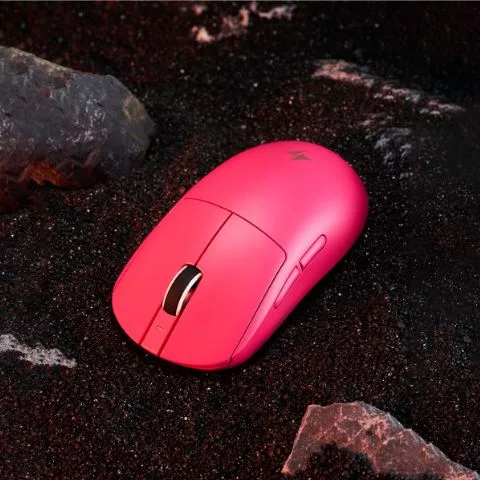
In competitive gaming, the difference between victory and defeat often comes down to milliseconds. A single delayed click, a fraction of a second of input lag, or a missed flick shot can cost you the round, the match, or the tournament. For years, serious gamers swore by wired mice as the only reliable option, dismissing wireless alternatives as sluggish and inconsistent. The cable was a lifeline to guaranteed responsiveness, and cutting it felt like a gamble no competitive player was willing to take.
But the landscape has shifted dramatically. Wireless gaming mice now sit at the center of a heated debate: can they truly deliver lag-free performance that rivals — or even surpasses — their wired counterparts? Advances in low-latency wireless technology, ultra-high polling rates reaching 8000Hz, and precision-engineered sensors have rewritten the rules. Professional esports athletes are making the switch, and the results speak for themselves. This article explores the technologies driving this transformation, examines how modern wireless mice meet the ruthless demands of competitive play, and provides a practical guide to choosing and optimizing the right device for your gaming setup.
The Evolution of Wireless Gaming Mice: From Lag to Leadership
Early wireless gaming mice earned their poor reputation honestly. Throughout the 2000s, these devices relied on basic RF technology and early Bluetooth protocols that introduced noticeable input delay — sometimes exceeding 20 milliseconds. For casual browsing, that lag was invisible. For a Counter-Strike player trying to land a headshot, it was a death sentence. The verdict among competitive gamers was unanimous: wireless meant compromise, and compromise meant losing.
The turning point arrived in the mid-2010s when manufacturers began developing proprietary wireless protocols specifically engineered for gaming. Companies invested heavily in custom 2.4GHz transceivers, adaptive frequency hopping, and optimized signal processing that could match — and in controlled tests, occasionally beat — the latency of a direct USB connection. By 2020, independent latency analyses confirmed that top-tier wireless mice were delivering sub-1ms response times, effectively erasing the gap that had defined the wired-versus-wireless debate for over a decade. Professional esports organizations took notice. Today, a significant portion of players at major tournaments compete with wireless mice, a shift that would have been unthinkable just five years ago. The technology didn’t just catch up to wired performance; it made the cable itself feel like the compromise.
Core Technologies Powering Modern Wireless Gaming Mice
The leap from laggy wireless peripherals to tournament-ready precision didn’t happen by accident. It required a convergence of purpose-built technologies, each targeting a specific link in the chain between your hand movement and on-screen action. Understanding these innovations reveals why modern wireless gaming mice can genuinely compete at the highest level — and why not all wireless mice are created equal.
Low-Latency Wireless Links: The Foundation of Responsiveness
At the heart of every competitive wireless gaming mouse is its wireless protocol, and the distinction between consumer-grade connectivity and gaming-grade low-latency links is enormous. Older wireless mice relied on standard Bluetooth or generic 2.4GHz radio, both of which introduced variable delays as they shared bandwidth with nearby devices and processed signals through generalized firmware stacks. Modern gaming mice use proprietary 2.4GHz wireless protocols — such as Razer’s HyperSpeed, Logitech’s LIGHTSPEED, or SteelSeries’ Quantum 2.0 — that are engineered from the ground up to prioritize speed over everything else. These systems employ adaptive frequency hopping, scanning available channels hundreds of times per second to find the cleanest transmission path and avoid interference from Wi-Fi routers, other peripherals, and household electronics. The dedicated USB dongle acts as a custom receiver tuned exclusively to the mouse’s signal, bypassing the overhead that generic Bluetooth introduces. The result is end-to-end transmission times consistently under one millisecond, a figure that independent testing labs have verified sits within the margin of error compared to a direct wired USB connection. For practical purposes, the latency difference between plugging in a cable and using one of these proprietary links is imperceptible to human reaction times.
The 8000Hz Polling Rate Revolution: Unmatched Speed and Precision
Polling rate determines how frequently your mouse reports its position to your computer, and for years, 1000Hz — one report every millisecond — was the gold standard. At 1000Hz, there’s a maximum one-millisecond gap between each update, which sounds fast until you consider what happens during a rapid flick shot across a 360Hz monitor. The cursor position updates in discrete jumps, and those gaps can translate into micro-stutters or slight tracking inconsistencies that skilled players feel even if they can’t always articulate why. An 8000Hz polling rate compresses that reporting interval to just 0.125 milliseconds, delivering eight times more positional data per second. The practical impact is twofold. First, cursor movement becomes visibly smoother on high-refresh-rate displays because the system receives positional updates far more frequently than the monitor refreshes, ensuring every frame renders the most current mouse position. Second, the effective input lag drops significantly because the system never waits more than a fraction of a millisecond for the next data packet. This matters most during fast, precise movements — tracking a strafing opponent in an FPS or executing a rapid combo in a fighting game. Achieving 8000Hz wirelessly is particularly impressive because it demands both a protocol fast enough to transmit that volume of data without congestion and processing power in the mouse itself to sample and send reports at that cadence without draining the battery in minutes.
Supporting Cast: High-Precision Sensors and Ergonomic Design
A fast wireless link and aggressive polling rate mean little if the sensor feeding them data is inaccurate. Modern wireless gaming mice feature optical sensors capable of tracking at extreme speeds — well beyond what any human hand can produce — with zero smoothing or acceleration artifacts. These sensors read surface textures thousands of times per second, translating physical movement into digital input with one-to-one fidelity that competitive players depend on for building consistent muscle memory. Equally important is the physical design of the mouse itself. Lightweight construction, often achieved through honeycomb shells or advanced polymer engineering, reduces the effort required for sustained play and allows faster repositioning. Ergonomic shapes tailored to common grip styles — palm, claw, and fingertip — ensure that the sensor’s precision actually reaches the game, because a mouse that causes hand fatigue or slips during a clutch moment undermines every technological advantage built into its internals.
Meeting the Demands of Competitive Gamers: Precision, Speed, and Performance
Competitive gaming punishes inconsistency. A mouse that performs flawlessly in one moment but introduces a single frame of delay in the next creates doubt — and doubt destroys confidence in aim. Modern wireless gaming mice address this by delivering not just low average latency, but remarkably stable latency with minimal variance. Independent click latency tests comparing flagship wireless mice against their wired equivalents consistently show overlapping distributions, meaning the wireless versions perform within the same statistical range rather than trailing behind. For a professional Valorant player holding an angle or a League of Legends competitor executing a frame-perfect flash combo, this consistency is what matters most.
The pixel-perfect accuracy that competitive play demands is now fully achievable without a cable. High-precision optical sensors paired with 8000Hz polling rates create a tracking pipeline so granular that the cursor’s on-screen position mirrors hand movement with virtually no perceptible gap. On a 360Hz monitor, this translates to visibly smoother crosshair movement during fast flicks and micro-adjustments alike. Players who previously relied on wired connections for that “direct feel” report no discernible difference after switching, and many describe the absence of cable drag as a net improvement — the mouse moves exactly where intended without the subtle resistance of a cord catching on a mousepad edge or bungee.
The myth that wireless mice sacrifice responsiveness for convenience no longer holds under scrutiny. What was once a measurable technological gap has been engineered into irrelevance. Tournament results reinforce this reality: players using wireless peripherals are winning championships across every major esports title, from tactical shooters to real-time strategy games. The remaining advantages of wired mice — never needing to charge, slightly lower weight in some cases — are practical considerations rather than performance ones. When the question is whether a wireless mouse can keep up with the fastest human reactions and the most demanding competitive scenarios, the answer from both laboratory testing and professional play is unambiguous.
Your Action Plan: How to Choose and Optimize a Wireless Gaming Mouse
Knowing that wireless technology has caught up to wired performance is one thing — picking the right mouse and configuring it properly is another. The difference between a wireless mouse that feels laggy and one that feels invisible comes down to informed purchasing decisions and deliberate optimization. Here’s how to approach both.
Step 1: Identify Your Gaming Profile and Priority Needs
Start by honestly assessing what you play and how you play it. If you compete in fast-paced FPS titles like Counter-Strike or Apex Legends, absolute minimal latency and a lightweight build should top your priority list — you need a mouse that disappears in your hand during rapid flick shots and sustained tracking. MOBA and RTS players can afford to prioritize ergonomic comfort and additional programmable buttons over shaving off the last fraction of a millisecond, since sessions tend to be long and inputs rely more on precise clicking than sweeping movements. Your grip style matters equally. Palm grip users need a larger, contoured body that supports the full hand, while fingertip grip players benefit from compact, ultralight designs that allow quick directional changes. Consider your tolerance for charging as well — if you despise interruptions, look for mice with wireless charging pad compatibility or exceptionally long battery life, whereas players who don’t mind a brief top-up between sessions can prioritize raw performance specs instead.
Step 2: Evaluate Key Specifications and Features
When comparing models, focus on specifications that directly impact in-game feel rather than marketing headlines. Confirm that the mouse uses a dedicated proprietary low-latency wireless protocol through its own USB dongle — generic Bluetooth connectivity alone is not sufficient for competitive play. Prioritize mice capable of 8000Hz polling rates, but verify this works wirelessly, not just in wired mode, since some models limit wireless polling to lower rates. Check that the optical sensor offers zero smoothing and zero acceleration with a tracking speed that exceeds anything your hand can physically produce. Battery life should sustain at least a full day of heavy gaming at your preferred polling rate, because aggressive polling drains power faster. Finally, weigh the mouse — literally. Anything under 80 grams generally feels effortless during extended play, and every gram above that threshold becomes increasingly noticeable during marathon sessions. Brands like ATK Gear and other competitive peripheral makers have been pushing ultralight wireless designs that hit these benchmarks, giving gamers more viable options than ever before.
Step 3: Optimize Settings for Peak In-Game Performance
Once you have the mouse in hand, proper setup makes the difference between good and flawless performance. Install the manufacturer’s dedicated software immediately and update the firmware to the latest version, as these updates frequently include latency improvements and bug fixes that aren’t available out of the box. Set your polling rate to the highest stable option your system supports — 8000Hz is ideal, but confirm your CPU can handle the increased interrupt rate without frame drops by monitoring performance during gameplay. Configure your DPI to a level that complements your in-game sensitivity; most competitive FPS players settle between 400 and 1600 DPI, adjusting in-game sensitivity to achieve a comfortable cm/360 distance. Disable any power-saving sleep mode or extend the timeout to its maximum setting, because a mouse that enters sleep mode during a brief pause forces a reconnection delay that can cost a crucial engagement. Position the USB dongle as close to the mouse as possible — many mice include a dongle extender for exactly this reason — to minimize signal travel distance and reduce interference potential. Spend at least thirty minutes in aim training software testing your settings before entering competitive matches, making micro-adjustments until the cursor feels like a natural extension of your intent.
Why Wireless Is Now the Competitive Standard
The era of wireless gaming mice as a compromise is definitively over. Through proprietary low-latency wireless protocols, 8000Hz polling rates that deliver positional updates every 0.125 milliseconds, and optical sensors with flawless tracking fidelity, modern wireless mice have eliminated the performance gap that once made cables non-negotiable for serious competitors. Independent testing confirms sub-millisecond transmission times indistinguishable from wired connections, and the growing dominance of wireless peripherals at major esports tournaments validates what the data already shows — these devices are built for the highest stakes in gaming.
For competitive gamers, the practical advantages now tip decisively in favor of cutting the cord. Unrestricted movement, zero cable drag, and consistent low-latency performance combine to create an experience that many professionals describe as superior to wired alternatives. The key lies in choosing a mouse with genuine gaming-grade wireless technology, configuring it deliberately for your playstyle, and keeping firmware current to benefit from ongoing optimizations. As manufacturers continue pushing polling rates higher, batteries longer, and weights lower, the wireless trajectory points only forward. If you’ve been holding onto a wired mouse out of caution rather than preference, the technology has arrived to reward your confidence in making the switch.