Elevating Everyday Objects: Transforming Tech Accessories with Color Laser Art
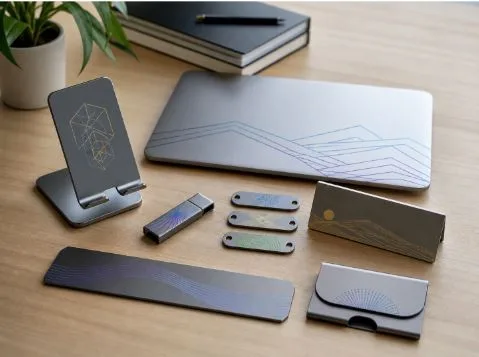
Tech accessories are part of daily life now. A phone stand sits on the desk all day. A laptop plate goes to meetings. A USB drive, cable tag, keyboard plate, or desk nameplate may look small, but it still says something about the person or brand using it.
Most of these items are practical first. They hold, organize, label, protect, or identify. But that does not mean they have to look plain. Color laser art gives simple accessories a more personal and premium feel without adding stickers, paint, or bulky decoration.
For creators, small brands, gift makers, and studio sellers, this is useful. A clean metal plate with a colored logo, a geometric line pattern on a phone stand, or a limited-edition number on a PC case badge can make a normal accessory feel custom. The key is choosing the right material, the right design, and the right workflow.
Why Tech Accessories Are Perfect for Color Laser Art
Tech accessories are ideal for personalization because people use them every day. A desk setup is no longer only about function. Remote workers want clean, organized spaces. Creators want gear that feels personal. Small businesses want branded items that look more refined than printed plastic giveaways.
Metal accessories are especially suitable because they already look more durable and premium. A stainless steel desk plate, aluminum phone stand, USB shell, or metal keyboard accent can hold a clean design without feeling overdone. Color laser art adds visual detail while keeping the surface neat.
This is different from covering an item with stickers or thick printed layers. A good laser design can feel built into the accessory. It can be subtle, modern, and long-lasting when done on the right surface.
The opportunity is not only artistic. Personalized tech accessories can work as client gifts, creator merchandise, office branding, limited-edition product drops, or small-batch online shop items.
What Makes Color Laser Art Different from Regular Engraving?
Regular engraving often creates a dark, light, or textured mark. It may remove material, change contrast, or create a visible groove. Color laser art on metal works differently. In many cases, the color is not paint, ink, or a sticker. It comes from how laser energy changes the metal surface.
On materials like stainless steel or titanium, controlled laser settings can form very thin oxide layers. These layers affect how light reflects, which can create colors such as blue, gold, purple, green, or dark tones. The result depends on pulse width, frequency, power, speed, focus, hatch spacing, and surface preparation.
That also means color laser art is more sensitive than simple marking. The same design may look different if the surface is oily, scratched, coated, or polished differently. A small change in focus or speed can shift the color.
It works best when design and material match. Stainless steel, titanium, anodized aluminum, and certain coated metal plates are better candidates than unknown plastics, rubber parts, or mixed-material accessories. If the material is not clearly identified, testing is essential before engraving.
Best Tech Accessories to Upgrade with Color Laser Design
Desk accessories are a natural starting point. Metal desk nameplates, laptop stands, tablet holders, cable organizers, headphone stands, and mousepad plates all have flat or semi-flat areas that can carry clean graphics. Minimal logos, thin line art, initials, small color accents, and geometric patterns usually work better than busy full-surface designs.
Everyday carry items also have strong potential. USB drive shells, key tags, card holders, portable tool tags, and metal phone case plates are small, easy to photograph, and suitable for gifting. These items work well for names, icons, simple symbols, short quotes, or limited-edition numbers.
Gaming and creator gear can be more expressive. Keyboard plates, controller tags, PC case badges, streamer desk signs, and custom setup labels can use cyber-style lines, futuristic icons, gradient-inspired patterns, or colored brand accents. These projects often appeal to people who care about how their desk setup looks on camera.
Still, not every accessory needs a loud design. Tech products often look better when the art is controlled. One clean colored detail can feel more premium than a surface crowded with effects.
Where Color Laser Engraving on Metal Adds the Most Value
For tech accessories that use stainless steel, titanium, or coated metal plates, color laser engraving on metal can turn a plain surface into a premium visual detail without adding paint, decals, or printed films.
This is valuable because tech accessories are handled often. Stickers may peel. Printed surfaces may scratch. Thick decoration may change the feel of the product. A controlled laser mark keeps the surface cleaner and more integrated with the object.
Small-batch personalization is another strong use case. Initials, QR-inspired art, brand icons, creator signatures, team logos, and limited-edition numbers can make accessories feel more exclusive. A laptop plate with a subtle colored logo or a desk nameplate with a clean metallic accent can look professional without being flashy.
Good design still matters more than color quantity. A rainbow effect does not automatically make an accessory better. Many premium-looking projects use color sparingly: a thin border, a small icon, a corner accent, or a simple line pattern. The best result usually comes from matching the color effect to the product’s purpose.
Choosing a Laser Engraving Machine for Tech Accessory Projects
A laser engraving machine for tech accessories should be judged by surface control, repeatability, material compatibility, and fine-detail performance, not only by advertised speed. Buyers should look at whether the system supports metal marking, whether parameters can be adjusted carefully, how stable the focus is, how small graphics are handled, and whether the working area fits common accessories.
For this article, the most suitable Xlaserlab product is the Q1 Laser Cleaning Machine because the topic focuses on color laser art, metal tech accessories, and controlled surface marking rather than welding or cutting. Q1 is positioned as a 2-in-1 MOPA pulsed fiber laser cleaner and engraver, which makes it relevant for users who want both surface preparation and precise metal engraving.
For tech accessory projects, that can include stainless steel tags, metal desk plates, tool labels, laptop plates, small decorative panels, or limited-edition branded items. Its MOPA pulsed fiber laser structure supports adjustable power, frequency, pulse width, and scan patterns, which are important when trying to control surface effects on metal. In a small studio, a maker may clean or prepare a metal plate, test marking settings, and then engrave a logo, icon, or decorative pattern. The recommendation should stay realistic: Q1 can support metal engraving and surface preparation, but color results still depend on stainless steel grade, surface polish, focus, hatch spacing, cleaning, and test grids. Sample plates, recorded settings, and proper laser safety procedures are still necessary.
Quick Table: Matching Tech Accessories with the Right Laser Art Style
Not every tech accessory needs the same design style. The best result comes from matching the item’s surface, size, daily use, and visual purpose.
| Tech Accessory | Best Laser Art Style | Why It Works | Design Caution |
| Laptop metal plate | Minimal logo or color line art | Looks clean and professional | Avoid large busy patterns |
| Phone stand | Geometric color accents | Adds style without clutter | Test coated surfaces first |
| USB drive shell | Initials or small icon | Good for gifts and branding | Keep details readable |
| Keyboard plate | Cyber or gradient-inspired lines | Fits gaming and creator setups | Check heat sensitivity |
| Desk nameplate | Brand mark or signature | Strong for small businesses | Use balanced spacing |
| Cable tag or metal label | Small color code or symbol | Practical and decorative | Avoid tiny unreadable text |
| PC case badge | Limited-edition number or logo | Good for enthusiast gear | Test durability and cleaning |
This table is meant to guide design choices, not push every product toward complex color. Tech accessories usually benefit from clean layouts. If the item is small, keep the mark simple. If the surface is handled daily, test durability before making a batch.
Practical Design Tips for Clean, Durable Color Laser Art
Start with small color accents. Thin lines, borders, small icons, and limited color areas are easier to control than large filled patterns. They also look more natural on modern tech accessories.
Build a test grid before engraving final pieces. Color effects depend on pulse width, frequency, power, speed, focus, hatch spacing, and surface finish. Even two metal plates that look similar may react differently. Recording successful settings saves time later and helps with repeat orders.
Think about daily wear. A phone stand may be touched often. A USB shell may rub against keys. A laptop plate may be cleaned regularly. The design should still look good after normal use. Test rubbing, cleaning, and handling before selling the product.
Scale matters too. A design that looks sharp on a large desk plate may become unreadable on a cable tag. Small accessories need fewer details and stronger spacing.
Safety and Workflow Checklist Before Engraving Tech Accessories
Before engraving tech accessories, check the material and workflow carefully:
- Confirm the accessory material before engraving.
- Avoid unknown plastics, rubber, or coated parts without testing.
- Clean fingerprints, oil, and dust from the metal surface.
- Run a test grid on a sample plate first.
- Record pulse width, frequency, power, speed, hatch, and focus.
- Use proper laser safety protection and controlled ventilation.
- Check design scale before engraving small accessories.
- Test durability if the item will be handled every day.
Color laser art works best when the creative idea and the technical process support each other. A clean file, stable focus, safe setup, and recorded settings matter as much as the accessory itself.
Conclusion: Color Laser Art Makes Tech Accessories Feel Personal and Premium
Color laser art can turn everyday tech accessories into personalized, premium-looking objects without relying on stickers, paint, or bulky decoration. The strongest projects usually start with the right metal surface, a clean design, careful testing, and realistic expectations.
For creators, small brands, and gift makers, this approach can add value to laptop plates, phone stands, USB shells, desk nameplates, keyboard parts, and other everyday gear. The key is not using every color possible, but using the right detail in the right place.