Seedance 2.0 Highlights the Growing Role of Reference-Based AI Video Creation
AI video tools are moving into a more demanding phase as brands, creators and production teams look beyond short prompt-based clips and begin asking for stronger control over references, motion, sound and editing.
In that environment, Seedance 2.0 reflects one of the most important changes in the market: AI video is becoming less about generating a surprise result and more about guiding a clip with existing creative assets.
Reference Inputs Are Becoming Central to AI Video
Text-to-video remains useful, but professional content rarely starts from text alone. A campaign may already have product images, brand visuals, sample clips, music references or a preferred camera style.
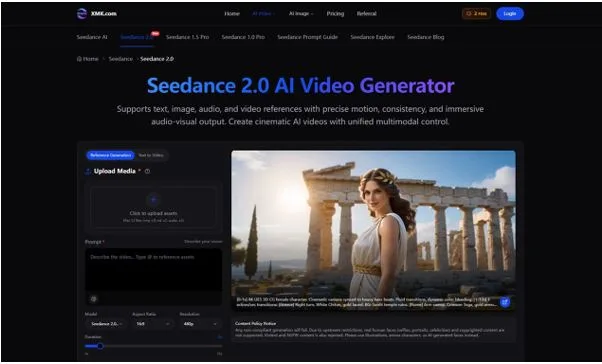
Seedance 2.0 supports text, image, video and audio references, allowing users to combine multiple types of input in the same creative process. The page also notes file support for up to 12 assets, including images, videos and audio files.
This matters because many AI video failures happen when the model has too little context. A prompt can describe a product scene, but a product image can provide the exact visual anchor. A video reference can explain motion better than a sentence. Audio can help guide rhythm, mood and pacing.
From Generation to Directed Production
The wider AI video market has been shaped by tools such as Runway, Veo, Kling, Pika, Luma and Sora. Much of the public attention has focused on realism and cinematic output. The next layer is more operational: can teams direct the result and refine it without starting over?
With Seedance 2.0 AI Video Generator, the workflow is designed around more directed creation. Users can upload assets, describe the role of each reference, set video format details and generate a clip that follows a clearer brief.
For teams working on campaign content, this type of control can be more useful than a single visually impressive clip. The goal is often to create several variations, compare them and improve the strongest one.
Why Motion and Audio Synchronisation Matter
Short video depends heavily on timing. A camera movement that is too fast can weaken a product reveal. A scene with mismatched sound can feel unfinished. A social video may need its motion to follow the rhythm of a beat.
Seedance 2.0 places emphasis on precise motion, stronger continuity and audio-visual output. Its multimodal approach allows audio to become part of the creative direction rather than a separate layer added later.
For social media teams, this can help create beat-matched short clips. For advertisers, it can support product reveals with more controlled pacing. For filmmakers, it can help test choreography and camera language before production begins.
Editing Controls Reduce Regeneration Waste
One of the less glamorous but more important parts of AI video is revision. A generated clip may be close to useful but still need one change: a longer ending, a different transition, a smoother camera move or a corrected segment.
Seedance 2.0 highlights features such as video extension, merging multiple videos, replacing characters and refining small segments without full regeneration. These capabilities point to a more practical production workflow.
For marketers and agencies, this can reduce wasted time during creative testing. Instead of discarding an almost-successful clip, teams can refine the section that needs work. For creators, it can make experimentation less costly and less repetitive.
Where Businesses Could Apply It
The most direct use cases include marketing, advertising, social content, brand campaigns, film previsualisation and creative experimentation.
An ecommerce team could use a product image as a visual anchor and generate short promotional clips in different formats. A social team could create several versions of a vertical video for platform testing. A brand team could maintain visual consistency across a campaign. A filmmaker could test camera movement or choreography before scheduling a shoot.
The practical benefit is not only faster output. It is the ability to test more creative directions before choosing which one deserves further production effort.
A Practical Workflow for Teams
A strong Seedance 2.0 workflow starts with a clear brief. Teams should define the channel, audience, duration, aspect ratio and desired feeling before generating.
Next, they should prepare the right references. Product accuracy may require an image. Motion may require a video reference. Timing may require audio. The prompt should explain how these references should be used, including movement, lighting, transitions and atmosphere.
After generation, the review should focus on consistency, pacing, motion, audio fit and whether the clip supports the intended message. This makes creating videos with Seedance 2.0 more like a structured production process than a one-click experiment.
Safety and Review Still Matter
AI video output should still be checked carefully before publication. Seedance 2.0 includes a content policy notice covering unsupported real human faces, copyrighted content, violent content and NSFW material.
For businesses, this review step is important. Product visuals should be accurate. Brand style should remain consistent. Any public-facing content should meet platform and legal requirements before it is published.
Outlook
The AI video market is likely to keep moving toward tools that combine generation with control. Reference inputs, audio synchronisation, targeted editing and clip continuation are becoming part of the normal conversation.
Seedance 2.0 fits that direction by giving users more ways to guide and revise short video content. For brands, creators and production teams, the value is not only in making video faster, but in making early video ideas easier to test, compare and improve.