How Can the Average 9-to-5 Worker Start a Side Hustle with makebestmusic?
A lot of people have this thought: start a side hustle outside of work and bring in some extra income.
You might think making money with a side gig means sticking to something you already know or using skills you already have. Or maybe you assume a side hustle will be exhausting and eat up a ton of time. But you’d be wrong.
Have you ever considered making money with music? Plenty of people earning a living from music can’t even read a score. They just used the right tools to turn an idea into a finished piece. And it doesn’t have to be a grind—no late nights, no learning music theory, not even needing to sing. All you need is an idea; let the AI handle the rest.
Now you’re thinking in the right direction. All you’re missing is a tool: makebestmusic. It doesn’t require any background knowledge. If you can use a computer, you’re ready. Follow along, and you’ll have your first track before you know it. When you get there, you’ll realize that making money with music is a lot simpler than you ever imagined.
Why Choose makebestmusic for Your Music Side Hustle?
Many people with day jobs have side hustle ideas but get stuck on the same problems: no time, no skills, and no idea where to start. makebestmusic solves all three at once.
Short on time? MBM compresses the creative process from “years” to “minutes.”
For the typical 9-to-5 worker, time is the biggest hurdle. Traditional music production means learning theory, practicing an instrument, and studying arrangement—you’re looking at years before you can even get started. With MBM, the process is almost laughably simple: open a browser → enter a description → click generate → get your track. Four steps. No software to install, no complicated settings, not even a sound card or microphone needed. You just need an idea; the AI handles everything else.
No professional background? MBM translates your emotions into musical language.
You might not know chord progressions, but you know what sounds good. You might not understand arrangement layers, but you know what moves you. makebestmusic does exactly that: it takes the feelings and ideas in your head and translates them into music. Just type a text description like “a warm piano piece, perfect for a rainy day,” and the AI will generate a complete track.
Not sure what to create? MBM helps you quickly produce music the market wants.
BGM for short videos, background scores for podcasts, music for brand campaigns, soundtracks for games—the demand for music is growing across countless scenarios, but there aren’t many people who can consistently deliver high-quality tracks. This supply gap is an opportunity for newcomers. MBM’s core strength is this: enter a mood description or lyrics, and within minutes, you get a fully structured song—intro, verse, chorus, bridge, outro, the works. Want a soothing piano piece? An upbeat EDM track? Just put your request in the prompt, and the AI makes it happen.
Build a Music Side Hustle with makebestmusic?
Step 1: Define Your Side Hustle Direction
Different platforms have completely different music needs. Pick a focus before you dive in:
| Direction | Platform | Music Requirements | Monetization |
| Streaming Distribution | Spotify / Apple Music | Full songs, evocative and memorable | Streaming Royalties |
| Music Licensing | AudioJungle / 100Audio | Editable, multiple versions, versatile | Per-track Sales, Subscription Revenue Share |
| Commercial Projects | Brand Ads, Corporate Videos | Consistent style, reusable, commercial license | Project-based Quotes, Licensing Fees |
- Advice for beginners: Start with streaming platforms or music licensing marketplaces. High demand, fast feedback, and a low barrier to entry. Once you’ve built up a portfolio and some experience, you can move on to custom projects for brands.
Step 2: Create Music for Your Target Market
Creating for Streaming Platforms – Earn Royalties on Spotify/Apple Music
Goal: Produce a complete song suitable for streaming that listeners will want on repeat.
Making a song on makebestmusic is simpler than you’d expect.
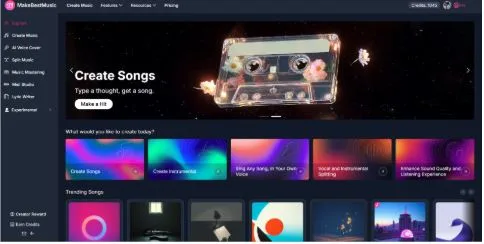
- Choose your mode: Open the makebestmusic website, log in, click “Create Music” in the left navigation bar, and select Custom mode.
- Enter your lyrics: Type your lyrics into the Lyrics text box.
- Enter a style prompt: In the Styles text box, input a prompt like: “emotional, storytelling, pop ballad, female vocal, piano-driven, building strings in chorus, BPM 90-110, Key C Major.”
- Generate and select: Click “Create.” Wait about 30 seconds. The system generates two versions. Listen to both and pick the one you like best.
- Export and get your license: Click download, choose WAV format, then click “Commercial License” to download your license certificate. You now have a complete song ready for distribution and commercial use.
That’s it—a finished track ready to be released and used commercially.
💡 Two tips to get better results faster:
- Tip 1: Structure your lyrics by section. In the Lyrics text box, you can lay out your lyrics following this template to help the AI understand the song’s structure: Intro: | Verse: | Pre-Chorus: | Chorus: | Bridge: | Outro: Fill in the lyrics after each section, and the AI will arrange the song accordingly.
- Tip 2: Use the AI lyric writer for help. If you haven’t written your lyrics or need a starting point, click the “AI lyric writer” button → enter your idea in the box → the AI will generate some “WORDS” and “LINES” for you to choose from → you can use them directly or edit them, adding your own personal details. This saves you from starting from scratch while still letting your voice come through.
Creating for Music Licensing Platforms – Sell on AudioJungle/100Audio
Goal: Create versatile, ready-to-edit background music suitable for ads and vlogs.
Making commercial background music in MBM is just as straightforward.
- Choose your mode and settings: Open MakeBestMusic, click “Create Music,” and select Simple mode. Toggle the Instrumental switch on (this gives you a pure music version with no vocals, which works for more use cases).
- Enter a style prompt: In the Styles text box, input a prompt like: “versatile, background music, corporate, uplifting, acoustic guitar, piano, suitable for commercial use, vlog, advertisement.”
- Generate and select: Click “Create.” Wait about 30 seconds. The system generates two versions; listen and pick the one you’re happy with.
- Batch create: Repeat the generation process a few times to build a collection of tracks with different moods or tempos.
- Download and upload: Download all your tracks and upload them as a package to the licensing platform, where they’ll be ready for sale.
Creating for Commercial Projects – Custom Music for Brands/Ads
Goal: Create professional-grade, cohesive music with a consistent style, ready for commercial use and with access to stems.
Here’s how to create custom music for clients using MBM:
- Understand client needs: Get the key details: brand style, keywords, usage scenario, desired length, and whether vocals are needed.
- Choose your mode: Open makebestmusic, click “Create Music,” and select Custom mode.
- Enter a style prompt: In the Styles text box, input a prompt like: “premium, elegant, modern, corporate, piano-driven, subtle electronic textures, suitable for luxury brand advertisement.” Also set the duration, BPM, and other parameters.
- Generate and select: Click “Create.” The system generates two versions. Pick the one you like and send it to the client for feedback.
- Refine as needed: Once the client approves, if further adjustments are needed, you can use MBM’s stem splitting feature to export MIDI files for fine-tuning.
- Prepare the license and deliver: Get the Commercial License file ready and deliver it along with the audio files to your client.
💡 Quick Tip: How to Use MBM’s Stem Splitter
On the MBM main interface, select “Split Music,” or in the “Create Music” section, click the button next to a song and find “Split.” → drag and drop your audio file (supports MP3, WAV, etc.) → wait about 30-60 seconds for the AI to process → listen to each stem. You can download individual audio files or MIDI files to import into your digital audio workstation for further editing.
Building a Sustainable Music Side Hustle: Key Steps
Maintain a Consistent Creative Rhythm
The biggest risk for any side hustle is being inconsistent. Set a realistic goal for yourself: create 2 tracks per week, or 10 per month. With the efficiency of makebestmusic, this goal is completely achievable.
Continuously Refine Your Music Quality
AI-generated music provides a “solid foundation,” but what makes your work stand out is your attention to detail:
- Use MBM’s stem splitter to export parts and fine-tune dynamics and sound in a digital audio workstation.
- Use MBM’s mastering features to get your tracks up to release standards.
- Listen critically, compare your tracks to popular songs, and identify areas for improvement.
Stay Attuned to Market Trends
The popular BGM styles on short-video platforms shift every few months. Keep a pulse on the market:
- Notice what music is being used when you scroll through short videos.
- Check the bestseller lists on music licensing platforms.
- Pay attention to music trends in advertising campaigns.
FAQ
Q: Do I need to know music to use MakeBestMusic?
A: Not at all. All you need is the ability to describe a feeling—like “a healing piano piece for rainy days” or “upbeat electronic music that makes you want to dance.” The AI translates that into music for you.
Q: Can the music I generate be used commercially? Who owns the copyright?
A: Yes. Every song comes with a downloadable Commercial License, meaning the copyright belongs to you. You can use it in any commercial setting with no platform restrictions, no geographic limits, and full legal protection.
Q: How much can I earn from this side hustle?
A: It varies. Some people make a few hundred extra dollars a month; others earn thousands. It depends on your output quality, consistency, and how you market your work. The best approach is to treat it as a combination of “interest + extra income” and build from there.
Q: What format do music licensing platforms require?
A: Usually WAV or MP3. makebestmusic supports one-click export, so it’s very easy to prepare.
Conclusion
Opportunity always favors those willing to give it a shot. Have you ever scrolled past someone making money with AI-generated music and hesitated? Worried you don’t know enough about music, concerned the time investment won’t pay off, or afraid no one will listen? But here’s the thing—the people earning money from it now had the same doubts. They just chose to try before you did.
Instead of spending those two hours after work scrolling on your phone, why not do something you enjoy and make a little extra money while you’re at it? Open makebestmusic. Your first song—and your first music side hustle income—might start with a single click of “Create.”