A Marketing Team Review Of Tome App AI For Campaign And Webinar Decks
Campaign Decks Need Speed And Consistency
Marketing teams create a surprising number of presentations. Launch plans, webinar outlines, sales enablement decks, partner updates, internal campaign reviews, and conference talks all need a slide structure. The challenge is that the source material changes quickly. A message that worked last week may need to be updated after a new customer interview or product release.
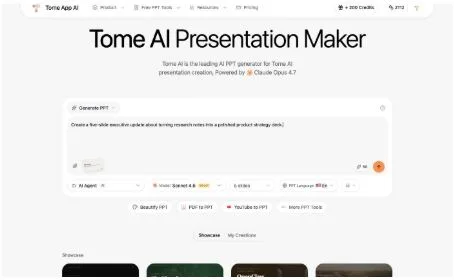
I tested Tome with that kind of workflow in mind. On the homepage, I entered a prompt for a five-slide executive update based on research notes. The product accepted the prompt and showed the deck controls around it: generation mode, model choice, AI Agent mode, five-slide setting, English language, and credit cost.
The interface also keeps related tools close to the main workflow. Buttons for Beautify PPT, PDF to PPT, YouTube to PPT, and more presentation tools appear near the input. For marketers, that is useful because deck work rarely follows one path. Sometimes the input is a rough idea. Sometimes it is a PDF report. Sometimes it is a webinar transcript or an existing slide deck that needs visual improvement.
I did not run a credit-consuming generation action during the test. What I verified is the pre-generation state: the homepage makes it easy to express a deck goal and set the basic constraints before creating a draft.
That makes the product useful for early campaign planning. A marketer can ask for a short narrative, check the proposed order, then decide what needs stronger evidence. The first draft does not have to be perfect. It only has to be clear enough to start a better review conversation with product, sales, and leadership.
It is also useful for repurposing. The same campaign idea may need a sales training version, a webinar version, and a leadership version. A prompt-based first draft can help the team explore those angles quickly before committing design time to the final asset.
PDFs Help Turn Research Into Campaign Narratives
Marketing strategy often starts from research. A PDF might summarize a market trend, a competitor review, customer interviews, or campaign performance. The content is useful, but it is rarely ready to present. Someone has to turn it into a narrative.
The PDF to PPT page supports that step. I uploaded a small sample PDF, and the interface displayed sample-ai-brief.pdf with its 1.1 KB size. The page says it can upload PDF, Word, Excel, or other documents and convert them into professional, editable PowerPoint presentations.
That promise fits marketing work because the output needs to stay flexible. A campaign deck may need one version for sales, one for leadership, and one for a partner meeting. If the output is editable, the team can adjust claims, remove confidential numbers, add brand visuals, and refine the call to action.
The upload state also supports optional instructions. A marketer could ask for a short product launch deck, a webinar outline, or a leadership summary from the same source document. That makes the tool more useful than a fixed converter because the intended audience can guide the slide structure.
This is especially helpful when the research is dense. A campaign performance PDF may contain too many charts for a leadership update. A customer research summary may include quotes that need grouping by theme. A competitive brief may require a clear takeaway before the details. Using the source document as input gives the AI something concrete to organize, while the marketing team still decides which story is right.
Word Briefs Are A Natural Bridge To Slides
Most marketing teams already write briefs. They write campaign briefs, messaging docs, event plans, and product notes. Those documents are often clearer than the first slide draft because writers can focus on the story before design gets involved.
The Word to PPT page is a natural bridge between that writing process and the final deck. I verified that the page is built for .doc and .docx files and promises editable PPT output. In a separate upload check, the page confirmed a sample file named sample-tome-brief.docx with a 3.7 KB size.
That makes Tome App best suited for the early drafting stage. A marketer can write the brief, convert it into a deck draft, and then bring in brand review and design polish. The product should not replace messaging judgment. It cannot know which claim is approved, which screenshot is final, or which customer quote needs permission. But it can reduce the mechanical work of turning a document into a slide structure.
The tested experience felt practical because it focused on the handoff from raw content to editable slides. For busy marketing teams, that is where AI can help most: getting from notes and briefs to a reviewable draft faster, while leaving the final message in human hands.
The best internal rule is to treat the draft as a starting artifact. Review the message, update the examples, replace placeholders, and align the deck with brand standards before sharing it outside the team. When used that way, the tool can support speed without weakening quality control.
That workflow is especially important for regulated or brand-sensitive campaigns. AI can help organize the story, but the team still owns claims, screenshots, testimonials, and compliance review. A faster first draft is valuable only when the final deck still passes the same internal standards.