The Honest Answer to “Do I Really Need Antivirus Software in 2025?”
This is a question worth asking, and it deserves a straight answer rather than one shaped by whoever is trying to sell you something.
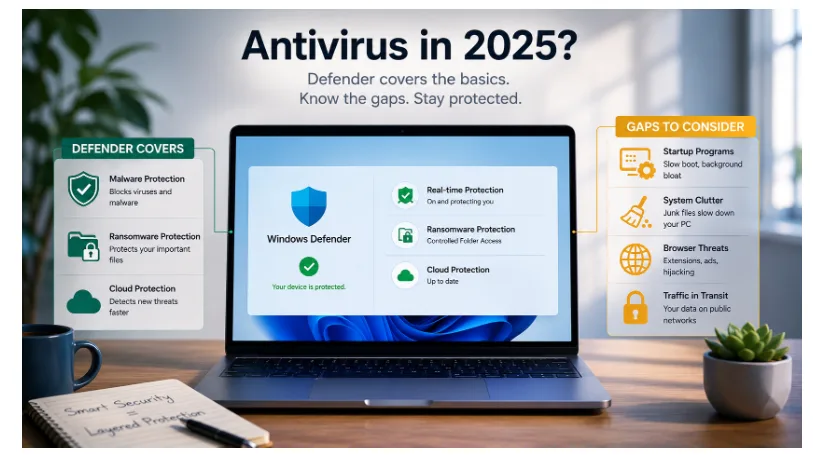
The short version: Windows Defender — the security software built into Windows 10 and 11 — is genuinely good. For most home users, it covers the core threat categories without costing anything or requiring any setup. Third-party antivirus software is not the necessity it was in 2005.
The longer version: there are gaps in what Defender covers, and understanding them helps you decide whether anything additional is worth adding.
What Windows Defender Actually Does Well
Windows Defender has improved substantially over the past decade. Independent testing organisations like AV-TEST regularly rate it alongside paid third-party products for malware detection rates. It covers:
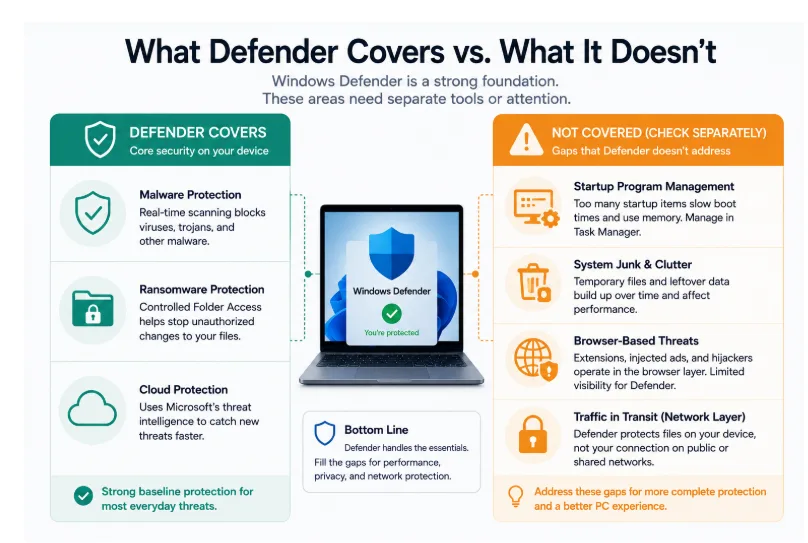
Real-time malware protection. Defender scans files as they’re downloaded and opened, detecting known malware and suspicious behaviour patterns. For most everyday threats — drive-by downloads, malicious email attachments, fake software installers — this is effective.
Ransomware protection. The Controlled Folder Access feature (off by default, but easy to enable) restricts which applications can modify files in your Documents, Pictures, and other protected folders. This directly limits what ransomware can encrypt if it gets onto your system.
Cloud-delivered protection. Defender connects to Microsoft’s threat intelligence network to identify newly discovered threats faster than local signature updates alone would allow. This matters because the gap between a new threat being discovered and local signatures being updated is when infections most commonly occur.
For the typical home user — browsing the web, downloading software from known sources, using email — this baseline is genuinely sufficient.
Where the Gaps Are
Defender was designed as a security tool, not a system management tool. There are things it doesn’t do that are worth knowing about.
Startup program management. Every application you install can request to run automatically when Windows starts. Over time, this list grows — not because of malware, but because legitimate software does this routinely. A long startup list slows boot times and keeps applications consuming memory in the background. Defender doesn’t manage this. Task Manager (Ctrl+Shift+Esc → Startup apps) does, but most people never open it.
System junk and accumulated clutter. Temporary files, cached data, leftover files from uninstalled applications — these accumulate over time and affect system performance. Defender doesn’t clear them. This is maintenance, not security, but it affects the experience of using the machine.
Browser-based threats. Browser extensions, injected ads, search engine hijacking — these happen at the browser layer rather than the operating system layer. Defender has limited visibility here. Microsoft Edge’s SmartScreen offers some protection within Edge, but it doesn’t extend to other browsers.
Traffic in transit. Defender protects files on your device. It doesn’t protect data moving between your device and the internet — your IP address, which sites you’re connecting to, what’s visible on the network you’re using. That’s a different category of exposure entirely.
What a Bundled Suite Adds
For people who want to address these gaps without managing three or four separate tools, a PC security suite that bundles a malware scanner, a startup manager, and a PC cleaner alongside a VPN addresses each gap from one interface.
The malware scanner adds a second opinion alongside Defender — useful for periodic full-system scans even if Defender handles real-time protection. The startup manager gives visibility into what’s launching automatically and lets you disable items you don’t recognise. The PC cleaner addresses the accumulated clutter that affects performance over time. The VPN covers the traffic-in-transit gap that Defender doesn’t touch.
This isn’t a replacement for Defender — there’s no need to disable it. It’s a complement that extends coverage into the categories Defender deliberately doesn’t address.
The Traffic Layer: Why It’s a Separate Question
It’s worth spending a moment on the network protection gap, because it’s categorically different from the others.
Malware protection, startup management, and system cleaning are all about what’s happening on your device. A VPN addresses what’s visible about your device’s connection to the internet — on public Wi-Fi, on a shared office network, or any connection where you’re not controlling the infrastructure.
When you work from a coffee shop, connect to hotel Wi-Fi on a business trip, or use the network at a client’s office, your traffic is passing through infrastructure you don’t control. Defender has no presence there. A VPN encrypts that traffic before it leaves your device, so the network you’re on can’t observe what you’re doing.
For people who only ever work from home on a private network, this matters less. For anyone who regularly works outside a controlled environment, it matters more.
Installing the Suite via the Microsoft Store
X-VPN’s desktop suite — which bundles the VPN, malware scanner, PC cleaner, and startup manager in one application — is available on the Microsoft Store. Installing from the Store means the application is verified by Microsoft, updates are managed automatically, and there’s no need to evaluate the trustworthiness of a download from an unfamiliar website.
The Actual Answer
Do you need to replace Windows Defender with a paid third-party antivirus in 2025? For most home users: no. Defender is capable enough for the core threat categories, and the difference between it and paid alternatives has narrowed considerably.
Do you need to think about what Defender doesn’t cover? That’s a more interesting question — and the answer depends on how you use your computer. If you work from multiple locations, download a lot of software, or haven’t run a proper system maintenance pass in years, the gaps are worth addressing.
The right answer isn’t “buy antivirus.” It’s “understand what protection you have, understand what’s not covered, and fill the gaps that actually apply to your situation.”