How to Recover Deleted Files from a NAS Without Losing More Data
NAS Data Recovery becomes essential when important files suddenly disappear from your network storage system. Have you accidentally deleted business documents, lost media files after a RAID issue, or found that your NAS folders are no longer accessible? Because NAS devices often store large amounts of critical data, any loss can be stressful and disruptive.
The good news is that deleted or inaccessible NAS files are often recoverable if you act quickly and avoid making the situation worse. In this guide, you’ll learn why NAS data loss happens, the steps you should take immediately, and the best methods to recover your valuable files safely.
Let’s get started.
Part 1: What Is NAS and Why It Matters in Daily Data Storage
Network Attached Storage, commonly known as NAS, is a centralized storage device connected to a network that allows multiple users and devices to access, store, and share files from one location.
Unlike traditional external hard drives that connect directly to a single computer, NAS systems are available across an entire network. This makes them extremely popular among businesses, creative professionals, and home users who need convenient access to large amounts of data.
Today, NAS devices are widely used for:
- Business file sharing and collaboration
- Media libraries for photos and videos
- Personal cloud storage
- Data backup and archiving
- Remote file access
- Surveillance video storage
Many small businesses use NAS systems to store company documents, while content creators rely on them to manage large video and photo libraries. Home users often use NAS devices as a private alternative to public cloud storage services.
Some of the biggest advantages of NAS storage include:
● Remote Access
Users can access files from virtually anywhere with an internet connection.
● Large Storage Capacity
Modern NAS devices can support multiple hard drives, providing massive storage space.
● RAID-Based Protection
Many NAS systems use RAID technology to improve performance and provide redundancy against drive failures.
● Multi-Device Sharing
Multiple users can access and collaborate on the same files simultaneously.
As NAS systems become the primary storage location for valuable data, file loss becomes a much more serious issue. When a NAS device fails or files are deleted, recovering them can be more complicated than recovering data from a regular hard drive.
This is why reliable NAS Drive recovery solutions have become increasingly important for both businesses and home users.
Part 2: Typical Scenarios That Lead to Deleted NAS Files
Although NAS devices are designed for reliability, they are not immune to data loss.
Here are some of the most common situations that require NAS Data Recovery.
Accidental File Deletion
Human error remains one of the leading causes of data loss.
A user may accidentally:
- Delete important folders
- Remove shared files
- Empty recycle bins
- Overwrite critical documents
Since NAS devices are often shared among multiple users, accidental deletions can happen more frequently than expected.
RAID Array Failure
RAID technology provides redundancy, but it does not eliminate all risks.
Data can become inaccessible due to:
- Multiple drive failures
- RAID controller issues
- Corrupted RAID configurations
- Failed rebuild attempts
Many users searching for raid NAS data recovery are dealing with these exact situations.
Firmware Crashes and Failed Updates
NAS manufacturers regularly release firmware updates to improve security and performance.
However, interrupted updates or software bugs can sometimes cause:
- Missing volumes
- Corrupted file systems
- Inaccessible shared folders
Virus and Ransomware Attacks
Cybercriminals increasingly target NAS devices because they often contain large amounts of valuable information.
Malware can:
- Encrypt files
- Delete data
- Corrupt storage volumes
- Disable access to shared folders
Improper Shutdowns and Power Failures
Sudden power loss can interrupt active read and write operations.
This may lead to:
- File corruption
- RAID inconsistencies
- Missing files
- Storage errors
Regardless of the cause, acting quickly is critical for successful recovery.
Part 3: Immediate Actions to Avoid Permanent Data Loss
Before attempting any recovery process, there are several important steps you should take.
● Stop Writing New Data Immediately
The most important rule is to stop saving new files to the NAS. Every new write operation increases the chance that deleted data will be overwritten. Once data is overwritten, recovery may become impossible.
● Disconnect the NAS If Necessary
If the problem appears severe, disconnect the affected NAS device from active use. This helps prevent additional changes to the storage system.
● Avoid Rebuilding RAID Without a Backup
Many NAS users immediately attempt a RAID rebuild after noticing problems. This can be dangerous. If the RAID configuration is damaged, an incorrect rebuild may permanently destroy recoverable data.
● Avoid Unreliable Recovery Tools
Not all recovery software is designed to handle NAS environments.
Using unknown or low-quality tools can:
- Corrupt data further
- Damage RAID structures
- Reduce recovery success rates
Taking these precautions significantly improves your chances of successful recovery.
Part 4: How to Recover Deleted Files from NAS Drives
Here are a few fixes you can try:
Fix 1: Use Professional NAS Data Recovery Software
One of the safest and most effective solutions is using professional NAS data recovery software free scan capabilities such as 4DDiG Windows Data Recovery. 4DDiG is designed to recover data from a wide variety of storage devices, including NAS systems and RAID arrays.
Key features include:
- Recover deleted files from NAS drive systems
- Support for RAID arrays and NAS storage
- Recover formatted or corrupted storage
- Restore inaccessible files
- Recover documents, videos, images, and audio files
- Support for more than 2000 file formats
- Free scan and file preview before recovery
- Beginner-friendly recovery process
Steps to Recover NAS Data Using 4DDiG
Step 1: Remove the NAS Drives
Power off the NAS device and carefully remove the affected drives if necessary.
Step 2: Connect the Drives to a Windows PC
Use SATA connections or drive adapters to connect the drives to a Windows computer.
Step 3: Install and Launch 4DDiG
Download and install 4DDiG Windows Data Recovery. Launch the software after installation.
Step 4: Select the NAS Disk or RAID Partition
Choose the connected NAS drive or detected RAID partition from the available storage devices.
Step 5: Start Scanning
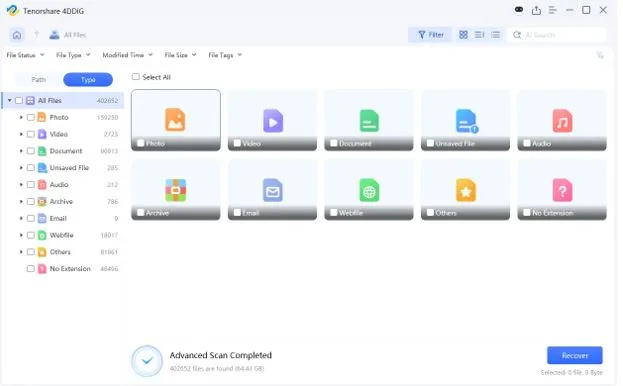
Click Scan to begin searching for lost files. 4DDiG will analyze the storage device and identify recoverable data.
Step 6: Preview and Recover Files
Review the scan results and preview files before recovery. Select the files you need and save them to a secure location different from the original NAS storage.
This process makes how to recover NAS data much easier, even for users with limited technical experience.
Fix 2: Rebuild RAID (Only If You Understand the Structure)
If your issue involves RAID corruption rather than deleted files, rebuilding the RAID may be necessary.
Before proceeding, identify the RAID level being used:
- RAID 0
- RAID 1
- RAID 5
- RAID 6
Professional recovery software can often reconstruct RAID arrays virtually without modifying the original disks.
This allows you to:
- Analyze RAID structures safely
- Access inaccessible volumes
- Extract files before making changes
However, RAID reconstruction requires caution.
An incorrect rebuild can permanently destroy recoverable data and make future recovery attempts much more difficult.
Fix 3: Restore from NAS Backup or Snapshots
Many modern NAS devices include built-in backup systems.
If backups are available, recovery becomes significantly easier.
Common options include:
● Snapshot Recovery
Snapshots capture file system states at specific points in time. Users can often restore deleted files directly from a previous snapshot.
● Cloud Backup Recovery
Many NAS devices synchronize data with cloud services. If cloud backups are enabled, missing files may be recoverable from backup versions.
● External Backup Recovery
Organizations frequently store NAS backups on external drives or secondary storage systems. Restoring from these backups can quickly recover lost data.
When available, backups are usually the fastest recovery solution.
Part 5: Prevent NAS Data Loss in the Future
While recovery tools are valuable, prevention remains the best strategy.
Schedule Automatic Backups
Regular backups ensure important files remain protected even if hardware fails.
Enable Snapshots and Versioning
Snapshots create recovery points that allow users to restore files quickly.
Use a UPS System
An Uninterruptible Power Supply protects NAS devices from sudden shutdowns during power outages.
Monitor Disk Health Regularly
Most NAS systems include tools for checking:
- Disk health
- SMART status
- Temperature monitoring
- RAID consistency
Addressing warnings early can prevent larger failures.
Restrict User Permissions
Limiting access rights reduces the risk of accidental deletion by employees or family members.
These simple practices dramatically improve long-term data protection.
Final Words
Recovering deleted files from a NAS device may seem overwhelming, but successful recovery is often possible when you act quickly and follow the correct process. Whether the issue involves accidental deletion, RAID failure, corrupted storage, or system errors, taking immediate action can significantly improve recovery success.
The most important step is to avoid overwriting the lost data and use a trusted recovery solution. With powerful tools such as 4DDiG Windows Data Recovery, users can perform best NAS data recovery software-level recovery with free scanning, file previews, RAID support, and recovery of over 2,000 file types.
If you’ve recently experienced data loss, start the recovery process as soon as possible. The sooner you act, the greater your chances of restoring your valuable NAS files successfully.