Auto-Detect Bones and Joints via AI Auto Rigging for Accurate Structure in Tripo 3D
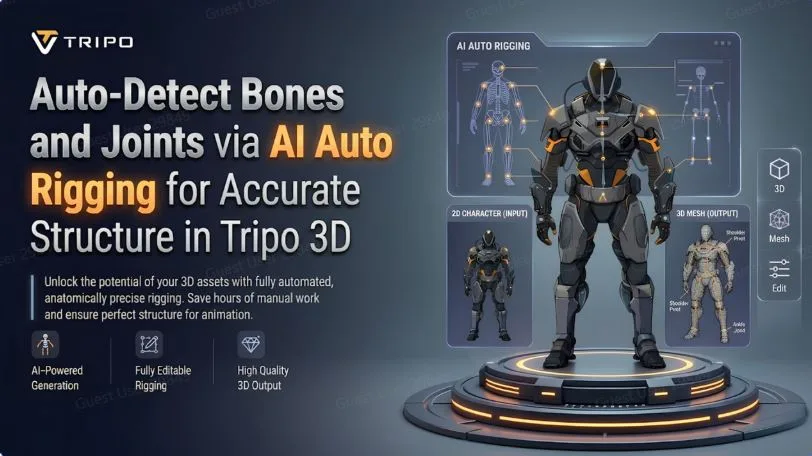
The design and alignment of the skeleton play a vital role in character animation. The positions of the bones control the way the characters bend, move, and respond to animation sequences. The quality of the movement can be greatly affected by even a small error in the positioning of the joints. Tripo 3D offers AI Auto Rigging features to analyze mesh structures and create skeletons suitable for animation. This system can assist with character rigging while maintaining consistency across different characters.
Understanding Bones and Joints in a Character Skeleton
Bones create motion within a 3D character rig. These bones connect together and create rotation points that control movement. Together, they create a hierarchy that determines how the mesh surface reacts during deformation. Proper skeletal alignment directly influences the smoothness and realism of animation. Tripo 3D analyzes these connections and creates rigs for different character models. Correct bone placement can help achieve predictable deformation during animation playback.
How AI Auto Rigging Detects Skeletal Structures
AI systems in Tripo 3D identify structural patterns across the model surface by analyzing mesh geometry. It recognizes anatomical features such as the parts of the limbs, body, and head. Joints are then positioned based on symmetry, proportions, and spatial distribution. This process generates rig frameworks more quickly than manual setup workflows. Automated skeletal mapping during reconstruction also assists in many 2d to 3d conversion workflows. The resulting rig hierarchy can be used for animation.
AI Bone Detection Across Multiple Character Types
Tripo 3D uses adaptive logic to support different types of characters of varying complexity. Humanoid structures receive standard spine, limb, and neck configurations based on human anatomy. Quadruped models use additional spine chains and adapted leg articulation points for realistic locomotion. Flexible bone distribution supports stylized creatures that may have non-realistic proportions. Mechanical designs are segmented and contain limited rotational joints for controlled movement. This workflow generates a consistent skeleton for different model styles through auto rigging with minimal manual work.
Steps to Auto-Detect Bones and Joints in Tripo 3D
Step 1: Import the model for structural analysis
-
First, you need to access Tripo 3D and signup. Next, go to the “Animate” tab present in the vertical left menu bar.
-
Next, upload the model by clicking “Upload 3D Model” or select an existing model from the assets menu present on the extreme right vertical menu.
Step 2: Generate the skeletal structure automatically
-
Choose the model from the “AI Model” menu. Model v2.5 is good for animals, and model v1.0 is good for Humanoid. Select anyone depending on your needs.
-
After selecting the model, click on the “Auto Rig” tab. The tool starts the rigging process. Make sure your model is textured before you rig.
-
Next, select the animation style from the menu presented below. You can choose “afraid”, “agree”, “angry”, “clap”, “climb”, “cry”, “dance”, etc.
-
The selected animation will be applied within a few seconds.
Step 3: Finalize the rig and save the model
-
You can also edit the “Environment Settings” and camera settings through “Reset Camera”.
-
You can 3D print the design, or share it directly by clicking “3D Print”. You can also “Refine” your design right through the bottom menu.
-
In the end, click on the “Export” tab from the bottom menu. Next, choose the resolution, format, and filename, and click again on “Export” to save the design to your local device.
Elements Evaluated During Automatic Bone Detection
Tripo 3D uses multiple structural indicators to determine bone placement and hierarchy formation.
-
Body Proportions: AI evaluates body and limb proportions to determine joint placement.
-
Character Silhouette: The outer shape helps guide skeleton mapping and structural alignment.
-
Limb Segmentation: Arms and legs are segmented for independent movement.
-
Center Mass Analysis: The core body region helps define spine alignment and balance.
-
Head Position Recognition: Head and neck placement helps define upper-rig orientation.
-
Symmetry Evaluation: Balancing the left and right sides helps improve skeleton consistency across the mesh.
Accuracy Benefits of AI-Based Joint Placement
Tripo 3D simplifies animation preparation by reducing the need for manual skeleton creation. It creates uniform rigs with proportional alignment between models. The system supports quicker asset preparation for animation pipelines and interactive environments. It provides a streamlined workflow for both new users and professionals while reducing setup complexity. Automated rigging makes assets easier to use and accelerates the adaptation of free 3d models for animation. This also improves deformation stability during motion sequences.
Skeleton Structure and Animation Compatibility
A well-structured skeleton hierarchy is critical for animation performance and control accuracy. Joint positions directly affect bending characteristics, rotation limits, and deformation accuracy. Tripo 3D creates structured bone chains that follow widely used animation conventions based on input quality and selected settings. These rigs will still be compatible with external animation software such as Blender, Maya, Unity, and Unreal Engine. Export options such as FBX and GLB support smooth transfer between platforms. This compatibility supports flexible integration into different animation pipelines.
Conclusion
With Tripo 3D’s AI-powered skeletal generation, creating character rigs for animation becomes easier. Automatic bone and joint detection improves structural accuracy and reduces manual effort. The system supports several character types and flexible rig setups. With Tripo 3D, users can work more efficiently because modeling, rigging, and animation preparation are available in one environment. Precise skeletons help achieve smoother animation and more effective asset utilization throughout digital production workflows.