Top Features of a Salesforce Customer Portal That Boost Customer Satisfaction
Most people would rather solve a problem themselves than wait on hold for someone to solve it for them. A widely cited Harvard Business Review study found that 81 percent of customers attempt to resolve an issue on their own before reaching out to a live representative. For any business running Salesforce, that single statistic explains why a customer portal has shifted from a nice-to-have into a core part of the customer experience.
A Salesforce customer portal is a secure, self-service space connected directly to your CRM. It lets customers check the status of a request, read up on a product, settle an invoice, or update their own details at any hour of the day. Done well, it lifts satisfaction while quietly removing pressure from a support team. Done poorly, it becomes another login customers avoid.
The gap between those two outcomes usually comes down to a handful of features. Here are the ones that decide whether a portal earns loyalty or gathers dust.
Real-Time, Two-Way Sync With Salesforce
The single most important feature is also the least visible. When a customer updates their address in the portal, that change should appear in Salesforce instantly, and when an agent moves a case forward, the customer should see it without refreshing or waiting for an overnight batch update.
Stale data is one of the fastest ways to erode trust. A customer who sees “open” on a ticket that was resolved two days ago assumes nobody is paying attention. Real-time, two-way synchronization keeps the portal and the CRM telling the same story, so customers and agents are always looking at the same version of the truth. This is the foundation everything else sits on, which is why it deserves the first look during any evaluation.
Self-Service Case Management
Customers want to raise an issue and then watch it move toward resolution without sending three follow-up emails. A strong portal lets them open a case, attach files, add comments, and track the status from submission to close.
The satisfaction gain here is psychological as much as practical. Visibility reduces anxiety. When someone can see that their request has been assigned and is being worked on, they stop wondering whether it fell into a void. That alone cuts down on the repeat “any update?” messages that clog support inboxes and frustrate everyone involved.
A Searchable Knowledge Base With Case Deflection
Many support questions are the same questions asked over and over. A well-built knowledge base answers them before a ticket is ever created. The feature that turns a knowledge base from a static help section into a satisfaction driver is case deflection, which suggests relevant articles at the moment a customer starts to submit a case.
Done right, this feels less like a wall and more like a helpful nudge. The customer often finds the answer in seconds, and the support team handles fewer routine tickets. Both sides win. The key is keeping the content current and the search genuinely useful, because an outdated or hard-to-search knowledge base does more harm than no knowledge base at all.
Personalized Dashboards and Account Visibility
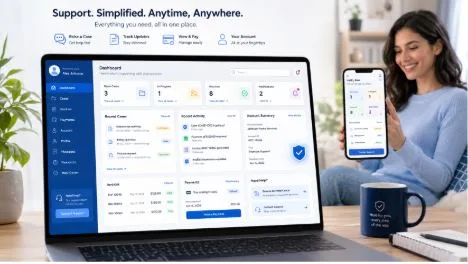
Generic portals treat every user the same. The better approach shows each customer the information that matters to them the moment they log in, whether that is recent orders, open cases, upcoming renewals, or outstanding invoices.
Because the portal is connected to Salesforce, those dashboards can pull live CRM data into clear widgets without any manual work. A customer sees their own world reflected back to them rather than a one-size-fits-all menu. That sense of “this was built for me” is a quiet but powerful contributor to satisfaction and repeat business.
Document, Invoice, and Order Access
A large share of support contacts are simple requests for a copy of something, an invoice, a contract, an order history, or a signed agreement. When customers can find and download these documents themselves, the friction disappears.
Giving people round-the-clock access to their own records also signals respect for their time. They are not waiting until business hours or chasing an account manager for a file that should be a click away. For businesses in finance, manufacturing, professional services, and similar fields, this feature alone often justifies the portal.
Role-Based Access and Strong Security
A portal is only as good as the trust customers place in it. Role-based access control ensures that each user sees exactly what they are permitted to see and nothing more, which matters enormously when a single account may include multiple contacts with different responsibilities.
Layered on top of that, features such as single sign-on, multi-factor authentication, and encryption protect sensitive data and reassure customers that their information is in careful hands. Security is rarely the feature that wins someone over, but a single breach or visible privacy lapse can undo years of goodwill. The strongest portals treat security as a baseline rather than an add-on, and many are built on infrastructure that carries recognized certifications such as ISO 27001.
Mobile-Friendly Access
Customers increasingly check on things from a phone during a commute or a spare moment. A portal that only works well on a desktop quietly excludes a large part of its audience. A responsive, mobile-friendly design means someone can log a case, approve a document, or check an order from wherever they happen to be, which keeps engagement high and frustration low.
Choosing the Right Approach
Salesforce offers its own portal options, and they suit some organizations well. But many businesses find that native portal infrastructure carries per-login or per-member costs that climb as the user base grows, along with a degree of admin overhead. This is why a number of companies turn to dedicated portal platforms built specifically for Salesforce.
Platforms like CRMJetty’s Salesforce Customer Portal package the features above into a no-code, flat-priced product, which lets teams launch quickly and scale their user base without watching costs escalate per seat. The right choice depends on budget, technical resources, and how much customization a business needs, so it is worth evaluating a few options against the feature checklist above before committing.
The Bottom Line
A customer portal succeeds when it makes the customer’s life easier, not when it simply ticks a feature box. Real-time data keeps everyone aligned, self-service case management removes anxiety, a smart knowledge base saves time, and strong security earns trust. Get those fundamentals right and the portal stops being just another login. It becomes one of the most reliable ways a business has to keep its customers satisfied and coming back.