Free LLM API: How to Access Top AI Models Without Paying Markup
“Free LLM API” is one of the most-searched phrases in AI development — and one of the most misunderstood. Every developer wants to call GPT, Claude, or Gemini from their code without a bill at the end of the month, but the honest answer is that “free” always comes with a trade-off: rate limits, prompts used for training, quality caps, or the effort of running models yourself. The good news is that a new class of infrastructure has quietly made near-free, production-grade model access genuinely practical — if you know where to look.
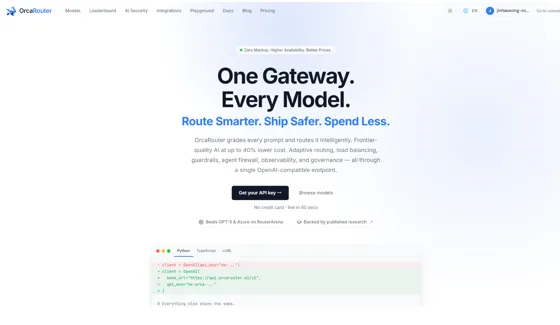
One of the clearest examples is OrcaRouter, a zero-markup LLM gateway that reaches 200+ models through a single OpenAI-compatible endpoint. Because it adds no margin on top of each provider’s token price — and ships a free plan — it turns the idea of a “free LLM API” into a workable, durable setup instead of a throwaway demo. We’ll come back to exactly how it fits; first, here are the three realistic routes to free or near-free access in 2026, and the catch behind each.
The short answer
There are three realistic ways to get a free or near-free LLM API, each suited to a different situation:
- Provider free tiers and trial credits — fastest to start, but capped by rate limits and often used to train the model
- Open-source models, self-hosted — no per-token fee, but you pay for and operate the compute
- A gateway with a free plan and zero markup — one API key for many models, and you only ever pay the provider’s own rate
For most teams, the third option is the sweet spot: provider free tiers still pass through, there is no margin on paid usage, and your code is never locked to a single vendor. The rest of this guide unpacks all three, plus how to choose and how to get running in under a minute.
What “free LLM API” actually means
“Free” rarely means “unlimited, no strings attached.” In practice it means one of three different things, and confusing them is how teams end up with a surprise invoice or a stalled launch:
- Free to try — a provider gives you a limited allowance or trial credits to sample their model
- Free software, paid compute — the model weights are free to download, but you rent or own the GPUs that run them
- Free to route — a gateway sits in front of many models and charges nothing to use it, so you pay only the underlying token cost
Knowing which kind of “free” you are dealing with tells you what will break first as you scale — the rate limit, the GPU bill, or nothing at all.
Option 1: Provider free tiers and trial credits
Most major AI providers offer some way to start without paying up front — a limited free tier, trial credits for new accounts, or a smaller free model variant. This is the quickest path to your first API call and is perfect for prototyping or a proof of concept.
The catch is in the fine print. Free tiers come with strict rate limits, sometimes route you to smaller or older models, and — crucially — often allow your prompts and completions to be used to improve the provider’s models. That is fine for a weekend project, but risky the moment you send anything sensitive. Two rules of thumb: always read the provider’s data-usage policy before you build on a free tier, and never assume a free tier’s limits will hold once you have real traffic. Free tiers are designed to get you in the door, not to run your business.
Option 2: Open-source models, self-hosted
Open-weight models can be downloaded and run on your own hardware or a rented GPU. There is no per-token API fee, so people often call this “free” — but “free” here means free software, not free compute. You still pay for the GPU, and you own the operations: scaling, uptime, model updates, security patches, and the on-call rotation when inference falls over at 2 a.m.
This route shines when you have spare hardware, strict data-residency requirements, or very high volume where owning the infrastructure is genuinely cheaper than paying per token. For most teams that simply want to ship a feature, though, standing up and babysitting your own inference stack costs more time and money than it saves. A good test: if you cannot name who will get paged when the GPU node dies, you are not ready to self-host in production.
The hidden costs of “free”
Before you commit to any free option, weigh what “free” can quietly cost you later:
- Rate limits — free tiers throttle requests, so they do not scale past a demo
- Data usage — free usage is more likely to be logged or used for training; check the policy
- Quality caps — you may be limited to smaller or older models than paying users get
- Lock-in — wiring your app to one provider’s SDK means rewriting integration code to switch later
That last point is the most underrated. Committing your codebase to a single provider’s endpoint makes every future change — a price drop elsewhere, a better model, an outage — expensive to act on. The cheapest insurance against it is to abstract the provider away behind one endpoint from day one.
Option 3: A gateway with a free plan and zero markup
A third option sits between the two: an LLM gateway. Instead of signing up with each provider and juggling separate keys, SDKs, and dashboards, you get one API key that reaches many models. The best gateways charge no markup on tokens and offer a free plan for the gateway itself — which is what turns “free LLM API” into a practical, durable setup rather than a demo you outgrow in a week.
OrcaRouter is built exactly this way. Its free plan includes API keys with zero token markup, so you pay each provider directly at their published rate and the routing itself costs nothing. One OpenAI-compatible endpoint reaches 200+ models, with automatic failover if a provider goes down. In practice that means:
- Start free — the free plan includes API keys with no markup on tokens
- Pay only real costs — no per-token margin on top of provider rates, and provider free tiers pass straight through
- No lock-in — one endpoint; swap models by changing a single string, not your integration
- Higher availability — automatic failover keeps you running when a provider has an outage
How to choose a free LLM API
Not all “free” offers are equal. When you compare options, look for five things:
- No markup — you should pay the provider’s real token price, not a marked-up rate
- A genuine free plan — free to use the service itself, not just a 7-day trial
- Model breadth — access to many models so you can pick the cheapest one that does the job
- OpenAI compatibility — so your existing code and SDKs work with no rewrite
- Reliability and a clear data policy — failover for uptime, and transparency about whether your prompts are stored or used for training
Score each candidate against those five and the field narrows quickly. A raw provider free tier wins on speed-to-first-call but loses on breadth and lock-in; self-hosting wins on control but loses on effort; a zero-markup gateway with a free plan is the only option that checks all five for most teams.
How to get a near-free LLM API running in under a minute
Because a gateway is OpenAI-compatible, you do not learn a new SDK — you point your existing one at a new base URL:
- Create a free account and generate an API key
- Point your existing OpenAI SDK at the gateway’s base URL (it is OpenAI-compatible)
- Pick a model — start with a free or low-cost one
- Call it with the same code you already have; switch models any time by changing one string
From there, the pattern that keeps your average cost near zero is simple: send routine, high-volume tasks to the cheapest capable model, and escalate to a premium model only when a task genuinely needs it. A gateway makes that routing a configuration choice rather than a rewrite.
The bottom line
A free LLM API is real, but every flavor of “free” fails differently under load — free tiers hit rate limits, self-hosting hits the GPU bill. The setup that actually survives contact with production is a zero-markup gateway on a free plan: provider free tiers still pass through, paid usage carries no surcharge, and no single vendor ever owns your code. Start there, and let “free” grow into “cheap at scale” without a rewrite.
Ready to start for free? Spin up an OrcaRouter account, grab an API key, and call 200+ models through one OpenAI-compatible endpoint — zero markup, with provider free tiers included.
FAQ
What happens when a free tier runs out?
Requests start failing with rate-limit or quota errors, often mid-day when traffic peaks. Build for that moment up front: keep a paid key or a second model configured as fallback so the app degrades to a cheap paid path instead of going down.
Can I use a free LLM API for commercial projects?
Usually yes, but check two clauses first: some free tiers restrict commercial use or cap it, and open-weight model licenses differ — most permit commercial use, a few add conditions above certain user counts. The gateway itself doesn’t change what the underlying license allows.
Do free tiers give me the same models as paid users?
Not always. Some providers reserve their newest or largest models for paid accounts and route free traffic to smaller variants, so benchmark on the exact model your tier actually serves before drawing conclusions about quality.