AI Dashboard Copilot Architecture: How to Build an In-Product AI Assistant
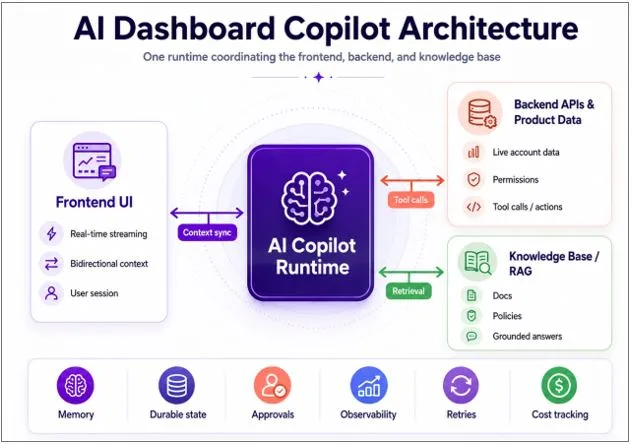
An AI dashboard copilotis an in-product assistant that helps SaaS users ask questions, understand live account data, retrieve knowledge base answers, and take actions inside the product dashboard. To run reliably in production, it needs one coordinated architecture across three surfaces: the frontend UI, backend APIs and product data, and the knowledge base or RAG layer.
The best AI dashboard copilot architecture uses a single runtime to coordinate real-time streaming, bidirectional context, memory, durable state, tool calls, retrieval, permissions, approvals, observability, retries, and cost tracking.
Without that runtime layer, teams usually end up with a demo that works in controlled conditions but breaks when real users ask follow-up questions, switch context, request account-specific answers, or trigger backend actions.
What Is an AI Dashboard Copilot?
An AI dashboard copilot is an assistant embedded directly inside a SaaS product dashboard.
It lets users ask questions in natural language, get answers grounded in their live product data, and complete tasks without leaving the application.
A real AI dashboard copilot can:
- Read live account, usage, billing, customer, or product data.
- Retrieve relevant documentation, policies, or knowledge base content.
- Call backend APIs through controlled tools.
- Respect user permissions and role-based access rules.
- Explain metrics, events, and workflow status.
- Suggest next steps based on the user’s current context.
- Pause for human approval before sensitive actions.
- Create a trace of every run for debugging and auditability.
This makes it different from a generic chatbot.
A chatbot answers questions beside the product.
An AI dashboard copilot works inside the product.
That distinction matters because an in-product copilot becomes part of the application architecture. It has to understand the user interface, the backend, the data model, and the business workflow at the same time.
What Is the Best Architecture for an AI Dashboard Copilot?
The best architecture for an AI dashboard copilot is one runtime coordinating three surfaces:
| Surface | Role in the Copilot | Production Requirement |
| Frontend UI | Shows the copilot experience and streams progress to the user. | Real-time updates, bidirectional context, session awareness. |
| Backend APIs and Product Data | Provides live business data and controlled actions. | Tool calling, permissions, validation, retries, approvals. |
| Knowledge Base / RAG | Grounds answers in documentation, policies, and product knowledge. | Retrieval, source grounding, freshness, relevance, traceability. |
The architecture should not treat these as separate systems loosely connected by prompts.
The copilot needs one execution layer that can decide when to use the frontend context, when to call backend tools, when to retrieve knowledge, when to pause for approval, and how to produce a trace of the entire interaction.
This is why AI dashboard copilot architecture is not only a UX problem.
It is a backend and infrastructure problem.
Why Most AI Dashboard Copilots Fail in Production
Most AI dashboard copilots fail because the components work individually, but the system does not coordinate them reliably.
A common early version looks simple:
Frontend chat component → LLM → Vector database → Backend API
This can produce a convincing demo. The model responds quickly. The UI streams text. The knowledge base returns useful content. The backend can expose an API as a tool.
But production exposes the missing infrastructure.
- The copilot forgets which account, customer, or record the user is viewing.
- The model answers from general knowledge instead of using live product data.
- The frontend knows the current UI state, but the agent does not receive it consistently.
- Tool calls happen, but the final answer does not clearly use the tool result.
- Retrieval returns relevant documents, but the model mixes them with stale assumptions.
- Approval workflows lose state when the user leaves or refreshes the page.
- Logs are split across multiple systems, making debugging slow.
- Costs increase because teams resend full context with every message.
These issues are not isolated bugs.
They are symptoms of a fragmented copilot architecture.
The Three-Surface Problem in AI Copilot Architecture
The core challenge in AI dashboard copilot architecture is the three-surface problem.
A production copilot has to coordinate:
- The frontend the user is watching.
- The backend where live product data and business logic live.
- The knowledge base that grounds the answer.
Each surface operates differently.
- The frontend operates in milliseconds and needs real-time feedback.
- The backend operates around API calls, validation, permissions, and business rules.
- The knowledge base operates around retrieval, grounding, and source relevance.
A reliable AI copilot must keep all three aligned in one conversation.
That is difficult because the user experience may look simple, but the system behind it is dynamic. A user might ask, “Why did this invoice fail?” or “Which accounts are at risk?” or “Can you create a follow-up task?”
To answer correctly, the copilot may need to inspect the current dashboard state, call billing APIs, retrieve policy documentation, check permissions, draft an action, and ask for approval.
That is not a single model response.
It is a coordinated agent workflow.
Surface 1: Frontend UI and Agentic User Experience
The frontend is the surface the user sees.
For an AI dashboard copilot, the frontend should do more than display a final answer. It should make the agent’s work visible while it happens.
A strong copilot UI can show progress such as:
- “Checking account status.”
- “Reading usage history.”
- “Searching documentation.”
- “Calling billing API.”
- “Preparing recommended action.”
This matters because users do not trust silent spinners. If a copilot takes several seconds to work through a multi-step task, the UI needs to explain what is happening.
The frontend must also send context back to the runtime.
The copilot needs to know:
- Which page the user is on.
- Which account, invoice, project, customer, or record is open.
- Which filters are applied.
- What role and permissions the user has.
- What the user asked previously.
- What action is currently pending.
- Whether the user approved, rejected, or edited a draft action.
This is why an AI dashboard copilot needs bidirectional context.
The runtime streams progress to the frontend.
The frontend sends user and UI context back to the runtime.
Without that loop, the copilot becomes detached from the product experience.
Surface 2: Backend APIs and Live Product Data
The backend is where the product’s real business data lives.
It includes account records, customer data, usage events, billing history, subscription status, permissions, internal workflows, feature flags, and operational systems.
A production AI copilot has to integrate with this backend safely.
That means tool calling is not enough by itself. The system also needs authorization, validation, retries, audit logs, and approval gates.
For example, when a user asks, “Why did this customer’s renewal fail?”, the copilot may need to:
- Read the customer account.
- Check payment events.
- Inspect subscription status.
- Review recent support tickets.
- Search internal policy documentation.
- Summarize the likely cause.
- Suggest a next step.
- Create a draft task or message for approval.
This is an AI-powered workflow, not a simple chat answer.
The backend layer must make sure the copilot can only access the data and actions the user is allowed to use. It also has to record what tool was called, what data was returned, and whether the final response used that information.
In production, the standard is not “the agent can call an API.”
The standard is: “the agent can call the right API, use the result correctly, respect permissions, and produce a trace we can inspect.”
Surface 3: Knowledge Base, RAG, and Grounded Answers
The knowledge base grounds the copilot’s answers.
It may include product documentation, help center articles, onboarding guides, support macros, internal policies, release notes, customer playbooks, analyst reports, or domain-specific content.
Retrieval-augmented generation, or RAG, helps the copilot find relevant knowledge before answering.
But RAG alone does not create a production copilot.
The harder problem is knowing when to use the knowledge base, when to use live product data, and when to combine both.
- Some questions are documentation questions.
- Some are account-specific questions.
- Some require live API data.
- Some require policy context.
- Some require an action.
- Some require human approval.
For example, “Why did this invoice fail?” should not be answered only from documentation. The copilot needs live billing data. But it may also need policy content to explain what should happen next.
This is why grounding is a coordination problem.
A production copilot must retrieve the right knowledge, combine it with live backend data, and show enough traceability for teams to trust the answer.
Why an AI Dashboard Copilot Is a Live System
An AI dashboard copilot should be treated as a live system, not a request-response endpoint.
Traditional software often follows a simple pattern:
User request → Server process → Response
AI copilots work differently.
They may stream progress, call multiple tools, retrieve knowledge, update memory, ask clarifying questions, wait for approval, resume later, and continue across multiple turns.
A production copilot needs four core capabilities:
| Capability | What It Means | What Breaks Without It |
| Real-Time Streaming | The copilot shows progress while it works. | Users see a spinner and assume the system failed. |
| Bidirectional Context | The dashboard sends current UI and account context to the runtime. | The copilot forgets what the user is viewing. |
| Memory | The system preserves useful context across turns and sessions. | Teams resend full context, increasing cost and inconsistency. |
| Durable State | The workflow can pause, resume, retry, and continue later. | Multi-step and approval-based workflows drop or restart. |
These are production primitives.
They should be designed into the architecture before the copilot is launched to users.
What Breaks When Teams Stitch the AI Copilot Stack Together
Many teams start by combining separate tools:
- A frontend streaming library.
- A model API.
- A vector database.
- A backend service.
- A custom memory store.
- A logging platform.
- A queue for async work.
- A manual approval workflow.
- A cost monitoring spreadsheet.
This approach can work for an early prototype.
It becomes expensive in production because the seams create failure points.
Common problems include:
- Context loss: the frontend knows what the user is viewing, but the agent does not.
- Ignored tool results: the backend returns data, but the final answer does not use it.
- Split traces: logs live in multiple systems with no single view of the run.
- Weak approval flows: the copilot cannot pause and resume safely.
- Inconsistent memory: context is duplicated, missing, or resent repeatedly.
- Poor cost visibility: teams cannot see cost by run, workflow, customer, or feature.
- Difficult debugging: engineers have to reconstruct the interaction manually.
This is the hidden cost of stitching the stack together.
The components may be strong. The integration becomes the bottleneck.
The Architecture That Works: One Runtime Across Frontend, Backend, and Knowledge Base
The architecture that works uses one runtime to coordinate the three surfaces.
That runtime becomes the execution layer for the AI dashboard copilot.
It manages:
- Frontend streaming.
- Bidirectional UI context.
- Backend tool calls.
- Knowledge base retrieval.
- Short-term and long-term memory.
- Durable workflow state.
- Human approval steps.
- Retries and error handling.
- Permissions and action boundaries.
- Observability and tracing.
- Cost tracking.
- Evaluation and testing.
This gives the team one source of truth for every copilot interaction.
A reliable runtime should show:
- What the user asked.
- What dashboard context was available.
- Which documents were retrieved.
- Which tools were called.
- What the tools returned.
- What the model answered.
- Which action was drafted or executed.
- Who approved the action.
- Where the workflow failed or paused.
- How much the run cost.
This is the foundation of a production-ready AI dashboard copilot.
Agentic backend platforms such as Calljmp are examples of this runtime category. The goal is not to remove engineering. The goal is to give engineering teams the infrastructure primitives they need so they can focus on the product-specific copilot experience.
Build vs. Buy: What Should SaaS Teams Choose?
The build-versus-buy decision depends on the company’s technical resources, product complexity, compliance requirements, and timeline.
| Approach | Best For | Main Risk |
| Build Internally | Large engineering teams with custom platform requirements. | High infrastructure cost and long-term maintenance. |
| Use Generic AI Tools | Prototypes, simple assistants, and low-risk use cases. | Limited control over state, memory, permissions, and observability. |
| Use an Agentic Backend Runtime | SaaS teams that want to ship production copilots faster. | Requires choosing a runtime pattern early. |
Building internally may be right for companies with dedicated platform teams and highly specialized infrastructure needs.
For many SaaS companies, the better question is whether engineers should spend months building runtime infrastructure or focus on the product experience that makes the copilot valuable.
A dashboard copilot creates business value when it understands the product, helps users interpret data, and moves work forward.
That is where engineering time should compound.
How to Roll Out an AI Dashboard Copilot
The safest way to launch an AI dashboard copilot is to expand its capabilities in phases.
Phase 1: Read-Only Copilot
Start with safe, grounded answers.
The copilot can answer questions using documentation, selected product metadata, and low-risk account context. It should show sources and produce traces for internal review.
Goal: build trust without allowing the copilot to take action.
Phase 2: Guided Insights
Next, move from answers to interpretation.
The copilot can explain metrics, summarize account activity, detect unusual patterns, and suggest next steps.
Goal: help users understand what is happening and why it matters.
Phase 3: Controlled Actions
Then add backend tool calls.
The copilot can draft updates, create tickets, prepare messages, modify records, or trigger workflows. Sensitive actions should follow a draft-review-execute pattern.
Goal: turn insight into action while keeping humans in control.
Phase 4: Production Hardening
Finally, operate the copilot like a product.
Track latency, success rate, failure rate, escalation rate, cost per run, tool-call accuracy, user satisfaction, approval patterns, and model behavior.
Goal: make the copilot reliable, measurable, and continuously improvable.
Ideal Use Cases for AI Dashboard Copilots
AI dashboard copilots are most valuable in products where users need to interpret complex data and take action.
Strong use cases include:
- SaaS analytics dashboards.
- Customer success platforms.
- CRM and sales operations tools.
- Billing and subscription management products.
- Fintech and trading platforms.
- Security and compliance products.
- DevOps and cloud management consoles.
- Healthcare administration platforms.
- Enterprise workflow systems.
- Revenue operations dashboards.
The common pattern is simple: the product has useful data, but users need help understanding it, connecting it to policy or documentation, and taking the next step.
That is where an AI dashboard copilot creates leverage.
Key Takeaways
An AI dashboard copilot is an in-product assistant, not a generic chatbot.
The core architecture challenge is coordinating the frontend, backend, and knowledge base.
The frontend must support real-time streaming and bidirectional context.
The backend must expose live product data and actions safely through tools.
The knowledge base must ground answers through retrieval and source context.
A production copilot needs memory, durable state, approvals, observability, retries, permissions, and cost tracking.
The strongest architecture uses one runtime across all three surfaces.
A phased rollout reduces risk: start read-only, add insights, then add controlled actions, and finally harden for production.
Conclusion
An AI dashboard copilot is not just a model inside a chat box.
It is a product system that must coordinate the frontend, backend, and knowledge base in real time.
That is why the architecture matters.
A production-ready copilot needs one runtime that can preserve context, call tools, retrieve knowledge, manage memory, maintain durable state, pause for approvals, enforce permissions, and produce traces that teams can inspect.
The companies that succeed with AI copilots will not simply add AI to the interface.
They will build the infrastructure required to make AI useful inside the product every day.