How an AI Picture Editor Turns Everyday Photos into Useful Visuals
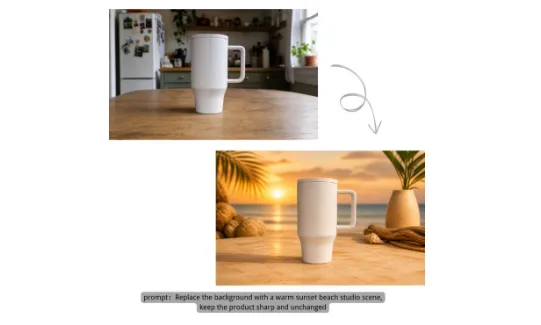
Creating a polished image used to require expensive software, hours of practice, and a good understanding of layers, masks, lighting, and color. Even a simple task such as removing a background could become frustrating when hair, shadows, or transparent objects were involved.
An AI Picture Editor changes that experience by letting you describe the result you want in everyday language. Instead of searching through menus or carefully selecting pixels, you can upload a picture and enter a request such as “remove the background but keep the natural shadow.” The technology handles the technical work while you focus on the purpose of the image.
This approach is useful because most people don’t want to become professional photo editors. They simply need better product pictures, cleaner social posts, restored family photos, or a more professional profile image. Here are several everyday situations where AI-powered editing can make a practical difference.
The Small Online Seller Preparing a Product Launch
Imagine you make scented candles at home and plan to release a holiday collection. The products look attractive in person, but your phone photos show a cluttered kitchen, uneven lighting, and distracting objects behind the candles.
Hiring a photographer for every new scent would quickly consume your marketing budget. Traditional editing software could solve the problem, but learning to create accurate selections and realistic shadows may take longer than preparing the products themselves.
With an AI Picture Editor, you can upload one clear candle photo and request a clean commercial background. A prompt such as “place the candle on a light wooden table with pine branches, warm window light, and a soft natural shadow” gives the AI specific visual instructions.
You can also create a plain white version for an online marketplace and a warmer lifestyle version for social media. The original product remains recognizable, while its surroundings become more suitable for each sales channel.
The Content Creator Working Against a Deadline
What if you publish several posts every week? You may have a strong idea for a tutorial, review, or short video, but the only available cover photo includes a photobomber, a messy room, or lighting that makes the subject look flat.
Manual editing interrupts the creative process. You might spend an hour fixing a picture that viewers will see for only a few seconds. Using a generic stock image is faster, but it can make personal content feel disconnected from your voice.
An AI Picture Editor can remove the distracting person, replace the background, improve the lighting, and sharpen the main subject. You could enter “remove the person near the doorway, rebuild the wall naturally, and brighten the subject without changing the face.”
The result still begins with your own picture, so it feels more authentic than stock content. You can then refine the prompt if the first edit changes too much or doesn’t fully match your visual style.
The Family Historian Restoring an Old Photograph
Some editing tasks have value beyond marketing. Imagine finding a faded wedding photograph in a box of family documents. The picture has scratches across two faces, weak contrast, dust marks, and colors that have changed over several decades.
Restoring that image by hand requires patience and considerable skill. Every scratch must be repaired without erasing real facial details, while color adjustments need to preserve the character of the original photograph.
An AI Picture Editor can provide a simpler starting point. A clear prompt might say, “remove scratches and dust, sharpen the faces gently, restore natural colors, and keep the original clothing and background unchanged.”
Specific instructions matter here. Asking the AI to “make it better” leaves too much room for interpretation, while naming the damage and the details that must remain helps protect the identity of the image. The edited version should still be reviewed carefully, especially when the photograph has personal or historical importance.
The Small Business Owner Who Needs a Professional Portrait
A professional profile picture is now useful almost everywhere, from company websites and speaker pages to email signatures and networking profiles. Yet arranging a studio session for every employee or every updated biography isn’t always practical.
Suppose you have a clear phone portrait, but the background is distracting and the light comes from one side. An AI Picture Editor can turn that source into a cleaner business image with a request such as “create a professional headshot with a neutral office background, balanced studio lighting, and natural skin texture.”
The most effective prompt also explains what should not change. Mentioning “keep the person’s facial features, hairstyle, and clothing recognizable” can reduce unwanted alterations. The goal isn’t to create a different person; it’s to present the existing person more clearly.
This same workflow can help a local consultant prepare a website biography, a job seeker update a professional profile, or a small team create more consistent staff images without organizing a large photoshoot.
How the Benefits Match Each Situation
These examples involve different people, but they share the same problem: a useful source image needs focused improvements before it can serve a real purpose.
- For online sellers: AI editing helps one product photo work across marketplaces, advertisements, and social platforms. Background replacement and object removal also make a small catalog look more consistent.
- For content creators: Faster cleanup leaves more time for writing, filming, and audience interaction. Prompt-based editing also makes it easier to test several visual ideas without rebuilding each one manually.
- For families: Automated restoration makes damaged photographs easier to preserve and share. Clear instructions can target scratches, fading, blur, and noise while protecting important details.
- For professionals and small businesses: Portrait retouching and background replacement can create cleaner public-facing images from accessible source photos. This reduces the need for specialized equipment during routine updates.
AI doesn’t remove the need for judgment. It changes where that judgment is used. Instead of deciding how to operate dozens of editing tools, you decide what should change, what must remain, and whether the result supports your goal.
A Practical Workflow for Better AI Edits
Start with the clearest source picture available. AI can improve blur, lighting, and noise, but a well-lit subject with visible details gives the system more reliable information. JPG, PNG, and WEBP files are practical starting formats for most online editing tasks.
Before writing a prompt, identify one primary goal. Do you want to remove an object, replace a background, restore damage, retouch a portrait, or improve image quality? Combining too many unrelated requests can make the result unpredictable.
When you’re ready to make the edit, an online AI Picture Editor lets you upload the source and describe the change directly in your browser. You might write, “replace the background with a bright modern office, keep the person unchanged, and match the new lighting to the subject.” This gives the system a task, a visual direction, and a preservation rule.
Review the result at full size rather than judging only the preview. Look closely at hands, hair, text, product edges, facial features, reflections, and repeated patterns. These areas often reveal whether an edit needs another pass.
If something is wrong, revise the instruction instead of starting over. Replace a vague request like “improve this product photo” with “increase sharpness on the product, brighten the background, remove the cable on the left, and preserve the label text.” Small, precise changes are easier to control.
Once the result looks right, compare it with the original and download the appropriate format. PNG works well when you need transparency, while JPG or WEBP can be convenient for smaller web images. Keep the original file so you can return to it if a later edit moves too far from the authentic source.
Creative Control Without the Traditional Learning Curve
An AI Picture Editor makes image editing more accessible, but its real value comes from combining speed with clear human direction. The AI performs selections, reconstruction, enhancement, and styling, while you define the purpose and decide whether the outcome is believable.
That balance can help a seller launch products, a creator meet a deadline, a family preserve a memory, or a professional improve an online presence. You don’t need to master every technical tool before producing a useful image. You need a suitable source, a specific prompt, and the willingness to review and refine the result.
The barriers around picture editing are becoming smaller. As the technology handles more of the mechanical work, people can spend more time choosing the story, mood, and message that each image should communicate.