My 10 Best Text to Video AI Generators (Tried & Compared)
Text to video AI has gone from a gimmick to a legitimate production tool in 2026. I remember testing the first wave of these tools two years ago and being underwhelmed — blurry footage, weird artifacts, characters with melting faces. The output was interesting but nowhere near usable for platforms like AI Canvas.
Fast forward to today, and the best text to video AI generators are producing footage that’s genuinely hard to distinguish from professionally shot content. We’re talking coherent motion, realistic lighting, proper physics, and even accurate text rendering within videos.
But here’s the catch — the gap between the best and the rest is enormous. Some tools have leapfrogged into cinematic-quality territory while others are still producing content that screams “made by AI” in the worst way.
I spent two weeks testing 10 text to video AI generators, running the same set of prompts through each one: a product showcase scene, a cinematic landscape, a character walking through a city, a talking-head scenario, and an abstract creative sequence. I compared them on visual quality, motion coherence, prompt adherence, generation speed, and overall usability.
Here are my honest results — starting with the tool that blew everything else out of the water.
TL;DR
TopView AI is the best text to video AI generator because it gives you access to multiple industry-leading AI video models — Seedance 2.0, Sora 2, Kling 3.0, Veo 3.1, and Vidu Q3 — all from a single platform. Instead of being locked into one model’s strengths and weaknesses, you can pick the best model for each specific prompt. No other platform offers this level of flexibility, and the output quality across models is consistently the highest I’ve tested.
What to Look For in a Text to Video AI Generator
Before I get into the rankings, here’s what I was actually evaluating. These are the criteria that separate great text to video AI from mediocre output:
- Visual fidelity: Does the footage look realistic? Are textures detailed? Is lighting natural?
- Motion coherence: Do objects and characters move naturally, or do they warp, glitch, and distort mid-frame?
- Prompt adherence: When I describe “a woman walking through a rain-soaked Tokyo street at night,” does the output match that description accurately?
- Temporal consistency: Does the subject stay consistent across frames, or does it randomly change appearance?
- Generation speed: How long from prompt submission to finished clip?
- Creative control: Can I specify camera angles, lighting, aspect ratio, and duration?
- Practical output: Is the video actually usable for real content — social media, ads, presentations?
Best Text to Video AI Generators: At a Glance
| Tool | Best For | Pricing | Visual Quality | Weakness |
| Topview AI | Best overall — multi-model | Free plan available | ⭐⭐⭐⭐⭐ | Premium models need paid plan |
| Runway Gen-4 | Creative professionals | ~$15-76/mo | ⭐⭐⭐⭐⭐ | Expensive at higher tiers |
| Kling AI (standalone) | Character animation | ~$5-66/mo | ⭐⭐⭐⭐ | Slower generation |
| Luma Dream Machine | Fast drafts | Free tier available | ⭐⭐⭐⭐ | Lower resolution |
| Pika | Stylized/artistic content | ~$8-58/mo | ⭐⭐⭐⭐ | Less suited for realism |
| Haiper AI | Quick social clips | Free tier available | ⭐⭐⭐ | Short clip limits |
| Synthesia | Talking-head from text | ~$29/mo | ⭐⭐⭐⭐ | Avatar-only, no scene generation |
| InVideo AI | Script-to-video automation | ~$17-25/mo | ⭐⭐⭐ | Stock footage, not generated |
| Fliki | Voice-first text to video | ~$28/mo | ⭐⭐⭐ | Stock footage, not generated |
| Canva AI | Simple text animations | Free tier available | ⭐⭐ | Not real video generation |
#1. Topview AI: Best Text to Video AI Generator Overall
Let me explain why TopView AI isn’t just the best text to video AI — it’s in a completely different category from everything else on this list.
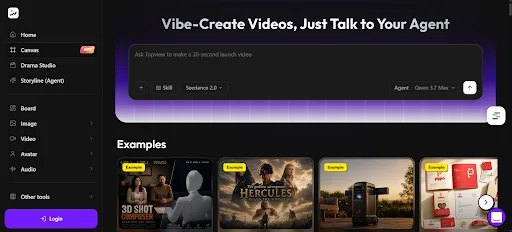
Every other tool locks you into a single AI model. If that model struggles with your specific prompt type, you’re stuck. TopView AI gives you access to six of the best AI video models in the world — Seedance 2.5, Sora 2, Kling 3.0, Veo 3.1, Vidu Q3, and Wan 2.7 — and lets you choose the right one for each job.
This isn’t a small difference. It’s the difference between having one camera and having a full film equipment truck.
Here’s how each model performed in my testing:
Seedance 2.5: My go-to for realistic scenes with complex motion. Product showcases, lifestyle footage, and anything requiring physical accuracy. It handled my “coffee being poured in slow motion” prompt with stunning detail — the liquid dynamics, the steam rising, the light refracting through the stream. Best-in-class for commercial-quality footage.
Veo 3.1: The cinematic king. When I needed dramatic landscapes, sweeping camera movements, or atmospheric scenes, Veo 3.1 consistently delivered the most visually striking output. My “drone shot over a fog-covered mountain range at dawn” prompt produced footage that looked like it came from a nature documentary.
Kling 3.0: Excelled at character animation and human motion. My “person walking through a busy city street” prompt came out with natural gait, realistic crowd behavior, and proper depth of field. When your prompt involves people doing things, Kling 3.0 is the model to pick.
Sora 2: The best all-rounder. It doesn’t specialize in any one area but produces consistently good results across all prompt types. When I wasn’t sure which model to use, Sora 2 was my safe default.
Vidu Q3: Strong at creative and stylized content. Abstract visual sequences, artistic interpretations, and non-photorealistic content came out beautifully.
Wan 2.7: Fast and efficient for simpler prompts. When I needed quick drafts or iterative testing before committing to a final generation with a premium model, Wan 2.7 delivered acceptable quality at higher speed.
Beyond the multi-model advantage, TopView AI wraps everything in a full creative suite:
- Need a thumbnail or reference image for your text-to-video prompt? Use the text-to-image generator.
- Want to add a voiceover to your generated footage? Use the built-in voice cloning or TTS.
- Need a talking-head presenter? Use the AI avatar feature.
- Want to remove the background from generated footage? Built-in background removal.
- Want to create a cinematic AI short? Use Drama Studio.
No other text to video AI gives you this complete a toolset.
Pros:
- 6+ industry-leading AI video models in one platform
- Choose the right model for each specific prompt
- Generates original footage with industry-best visual quality
- Full creative suite (image + voice + avatar + background removal)
- Free plan available
Cons:
- Premium model access requires paid plan
- Choosing between models can be overwhelming for beginners
- Generation takes 3-10 minutes depending on model and complexity
#2. Runway Gen-4: Best for Creative Professionals
Runway has been in the AI video space longer than almost anyone, and Gen-4 shows that experience. The visual quality is excellent, with particularly strong performance on stylized and artistic content.
I tested Runway with my standard prompt set, and it delivered consistently high-quality output. The motion coherence has improved significantly over Gen-3 — characters move naturally, camera movements are smooth, and temporal consistency is solid.
The creative control options are comprehensive. I could specify camera type, lens focal length, lighting style, and color grade. For filmmakers and professional creators who think in cinematic terms, Runway speaks their language.
Where Runway falls short compared to TopView AI is model diversity — you’re locked into Runway’s own model. It’s a good model, but there are prompts where Seedance 2.0 or Veo 3.1 would produce noticeably better results. The pricing also scales aggressively at higher usage tiers.
Pros:
- Excellent visual quality and motion coherence
- Advanced creative controls (camera, lens, lighting)
- Strong for artistic and stylized content
- Established platform with good documentation
Cons:
- Single model — can’t switch when it struggles with certain prompts
- Expensive at higher usage tiers
- Less suited for commercial/product content
- No companion tools (image, voice, avatar) built in
#3. Kling AI : Best for Character Animation
Kling AI’s standalone platform specializes in what its model does best — character animation and human motion. If your text to video prompts regularly involve people doing things, Kling consistently produces the most natural-looking results.
I tested it with character-heavy prompts, and the motion quality was impressive. Walking, running, gesturing, facial expressions — Kling handles the subtleties of human movement better than most competitors. Lip-sync on talking characters was also above average.
The standalone platform is straightforward but limited. You get text-to-video and image-to-video, but none of the companion tools that TopView AI offers. And while Kling’s character work is strong, it falls behind on non-character content like landscapes, product shots, and abstract visuals.
Worth noting: you can also access Kling 3.0 through TopView AI alongside other models, which gives you more flexibility.
Pros:
- Best-in-class character animation and human motion
- Natural lip-sync for talking characters
- Good facial expression rendering
- Straightforward interface
Cons:
- Weaker on non-character content (landscapes, products)
- Single model platform
- No companion tools
- Slower generation compared to some competitors
#4. Luma Dream Machine: Best for Fast Drafts
Luma’s Dream Machine earned its spot for one reason: speed. When I need to quickly test whether a prompt concept works before committing to a full-quality generation, Luma gives me a usable draft faster than almost any other tool.
The free tier is genuinely useful — not just a demo, but functional enough for testing ideas and generating social content that doesn’t require premium quality.
Visual quality is good but not top-tier. I noticed more artifacts, less temporal consistency, and lower resolution compared to TopView AI’s models or Runway Gen-4. For final production content, I’d always choose a higher-quality option. But for the ideation and testing phase, Luma is valuable.
Pros:
- Fast generation speed
- Functional free tier
- Good for rapid prototyping and concept testing
- Simple, clean interface
Cons:
- Lower resolution than premium competitors
- More artifacts and consistency issues
- Not ideal for final production content
- Limited creative control options
#5. Pika: Best for Stylized & Artistic Content
Pika has carved out a niche in stylized and artistic text to video generation. If your content leans toward animation, illustration-inspired visuals, or creative artistic expression, Pika produces distinctively beautiful output.
I tested it with artistic prompts — “a watercolor painting of a sunset coming to life” and “an ink-wash animation of a koi fish swimming” — and the results were genuinely stunning. Pika understands artistic styles in a way that more realism-focused tools don’t.
For TikTok creators in art, design, and creative niches, Pika’s aesthetic is a differentiator. Your content will look unlike anything produced by Seedance or Sora-based tools.
The tradeoff is realism. When I tested Pika with my standard realistic prompts (product shots, street scenes, portraits), the output had a noticeable artistic filter that didn’t match the brief. If you need photorealistic footage, look elsewhere.
Pros:
- Excellent for stylized and artistic content
- Distinctive visual aesthetic
- Good at interpreting artistic style references
- Reasonable pricing
Cons:
- Less suited for photorealistic content
- Artistic filter can feel heavy-handed on some prompts
- Limited creative control for realistic shots
- Smaller community and resource base
#6. Haiper AI: Best for Quick Social Clips
Haiper AI targets creators who need fast, short clips for social media. Generation is quick, the interface is minimal, and the output is optimized for short-form platforms.
The free tier gives you enough to test the platform and generate basic social clips. Quality is acceptable for TikTok and Instagram stories — not cinematic, but watchable and properly formatted.
I found Haiper useful for generating quick B-roll snippets and visual hooks. But the clip length limits and lower visual quality compared to premium tools make it a supplementary tool rather than a primary one.
Pros:
- Fast generation for social-length clips
- Free tier available
- Clean, minimal interface
- Good for quick B-roll and visual hooks
Cons:
- Short clip length limits
- Lower visual quality than premium competitors
- Limited creative control
- Not suited for longer or complex content
#7. Synthesia: Best for Text-to-Talking-Head
Synthesia takes a different approach to “text to video” — instead of generating visual scenes from text prompts, it converts text scripts into talking-head presenter videos using AI avatars.
With 230+ avatars and 140+ languages with accurate lip-sync, it’s the most polished text-to-presenter solution available. For corporate training, educational content, and professional presentations, this is exactly what many users mean when they say “text to video.”
But Synthesia can’t generate scenes, landscapes, product shots, or any non-avatar visual content. It’s a specialized tool, not a general-purpose text to video AI. If you need a presenter reading your script, it’s excellent. If you need anything else, look at TopView AI.
Pros:
- 230+ realistic AI avatars
- 140+ languages with lip-sync
- Professional-quality presenter videos
- Excellent for corporate and educational use
Cons:
- Can’t generate visual scenes from text
- Avatar-only — no landscapes, products, or creative footage
- No free plan
- Expensive for casual use
#8. InVideo AI: Best for Script-to-Video Automation
InVideo AI converts text scripts into complete videos by matching your words with stock footage, adding voiceover, and formatting for social platforms. It’s fast, it’s automated, and for content repurposing, it works.
But I need to be clear: InVideo AI doesn’t generate any footage. It assembles stock clips based on your text. That puts it in a fundamentally different category from true text to video AI generators like TopView AI or Runway.
For bloggers and content marketers who need to convert written content into social videos quickly, InVideo AI’s automation is valuable. For creators who need original, unique footage from text prompts, it won’t deliver.
Pros:
- Fast script-to-video automation
- AI agent for conversational editing
- Good for content repurposing at scale
Cons:
- Doesn’t generate footage — assembles stock clips
- Not true text to video AI
- Stock footage limits uniqueness
- Template-heavy output
#9. Fliki: Best for Voice-First Text to Video
Fliki’s approach prioritizes the voiceover, then builds visuals around it. Write your text, the AI generates a natural voiceover with one of 2,000+ voices, then matches stock footage to the narration timing.
The voiceover quality is genuinely impressive — some of the most natural-sounding AI narration I’ve tested. For content where the audio carries the video (commentary, explainers, narrated lists), the voice-first approach produces well-paced output.
Like InVideo AI, Fliki doesn’t generate any original footage. It pairs great voices with stock clips, which limits visual originality. For voiceover-driven content, it’s solid. For anything visually creative, you’ll need a true text to video generator.
Pros:
- 2,000+ natural AI voices
- Voice-first approach produces better audio pacing
- 80+ language support
Cons:
- Stock footage only — no generated visuals
- Not true text to video AI generation
- Limited visual creativity
- Better for audio content than visual content
#10. Canva AI: Best for Simple Text Animations
Canva’s “text to video” is really text-to-animated-slideshow. It takes your text, applies templates, adds basic animations and transitions, and exports a video file.
For quote videos, fact compilations, and simple announcement clips, Canva does the job. The template library is massive, the editor is intuitive, and the free tier is functional.
But there’s no AI video generation here. No generated footage, no motion synthesis, no scene creation. It’s a presentation tool that exports to video format. Including it on this list only because many people search for “text to video” when they actually want text-based animated content.
Pros:
- Massive template library
- Intuitive drag-and-drop editor
- Free tier available
Cons:
- Not real text to video AI generation
- Slideshow-style output only
- No generated footage
- Not competitive with dedicated AI video generators
Which Text to Video AI Should You Use: My Personal Take
After two weeks of intensive testing, TopView AI is the clear winner — and the multi-model advantage is the main reason.
Here’s my thinking: text to video AI is still an evolving technology, and no single model is best at everything. Seedance 2.0 crushes product content but Veo 3.1 is better for cinematic landscapes. Kling 3.0 handles characters better than anything else, but Sora 2 is the best all-rounder.
TopView AI is the only platform that gives you access to all of these models, letting you match the right tool to each specific job. That flexibility alone puts it ahead of every single-model platform.
Add the full creative suite — images, voiceovers, avatars, background removal — and you have a complete production environment for creating text to video content, not just a single generator.
Start with the free plan, test a few prompts across different models, and you’ll quickly see why multi-model access changes everything.
FAQs
What’s the best text to video AI generator in 2026?
TopView AI is the best text to video AI generator in 2026. It provides access to multiple top-tier AI video models (Seedance 2.0, Veo 3.1, Kling 3.0, Sora 2, Vidu Q3, Wan 2.7) in a single platform, letting you choose the optimal model for each prompt type.
Is text to video AI good enough for professional use?
Yes. Tools like TopView AI now produce footage that’s virtually indistinguishable from professionally shot content. Commercial brands, content creators, and marketers are using text to video AI for ads, social content, product showcases, and even short films.
Can I use text to video AI for free?
Yes. TopView AI, Luma Dream Machine, Haiper AI, and Canva AI all offer free tiers. TopView AI’s free plan provides the best balance of quality and features, giving you access to AI video generation without upfront payment.
How long does text to video AI take to generate?
Generation time varies by model and complexity. On TopView AI, most clips generate in 3-10 minutes. Simpler models and shorter clips are faster. Draft-quality generations on tools like Luma can be ready in under 2 minutes.
What’s the difference between real text to video AI and stock-footage tools?
True text to video AI (like TopView AI, Runway, Kling) generates original footage from scratch using neural networks. Stock-footage tools (like InVideo AI, Fliki, Pictory) match your text to pre-existing video clips from a library. The difference in originality and visual uniqueness is significant.