How to Find the BPM and Key of Any Song (3 Free Methods)
Knowing a track’s tempo and key sounds like a small technical detail, but it shapes almost everything that happens next in a mix, a remix, or a cover. DJs need matching tempos to beatmix cleanly. Producers need the key to pick samples that won’t clash. Cover artists and session musicians need both to build a backing track or transpose a part into a singable range. This guide walks through three free ways to find the BPM and key of a song, from doing it by ear to letting software do the work, along with the situations where each method quietly falls apart.
Why BPM and key actually matter
Tempo and key are not just trivia for a setlist sheet. They are the two numbers that let you combine two pieces of music without them fighting each other.
For DJs, matching BPM is the baseline requirement for beatmixing, and matching or complementary keys is what makes harmonic mixing work. Mixing two songs in compatible keys (using something like the Camelot wheel) avoids the dissonant clash you get when unrelated keys overlap.
For producers sampling a vocal, a string loop, or a drum break, the key tells you what you can layer on top without retuning everything. Pulling a sample into a project without checking its key is one of the most common ways a promising loop ends up unusable.
For cover artists and bands building a backing track, the key determines whether a singer can actually hit the notes, and the BPM determines whether a click track or drum loop will lock with the recording. Get either wrong and the rehearsal falls apart before you even reach the second verse.
Method 1: Find BPM and key by ear
This is the oldest method and it still works, though it takes practice.
Tempo by ear (tap tempo). Listen for the kick drum or the most consistent rhythmic pulse, then tap along on a physical tap-tempo tool, a metronome app, or even a spreadsheet where you log timestamps of your taps and calculate the average interval. Most tap-tempo tools convert your taps into BPM automatically. Tap for at least 15 to 20 seconds to smooth out small timing errors, since a couple of sloppy taps can throw a single measurement off by several BPM.
Key by relative pitch. This takes more musical training. Hum along with the root note of the song, usually most audible in the bassline or the first chord of the chorus, then compare that pitch to a piano, guitar, or tuning app to identify the note. From there, listen for whether the song feels “happy” and resolved (likely major) or “sad” and unresolved (likely minor). Musicians with strong relative pitch can often nail both the tonic and the mode within a minute of listening.
The upside of the by-ear method is that it requires no software and works on any audio source, including something playing through a car radio. The downside is that it demands trained ears, and it is slow if you are checking dozens of tracks for a DJ set or a covers setlist.
Method 2: Free online BPM and key analyzers
For most people, the fastest and most consistent path is a browser-based analyzer. You upload an audio file (or in some tools, record a short clip), and the app runs signal analysis to estimate the tempo and key without any manual counting.
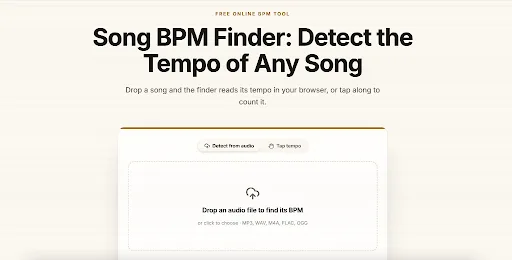
NotaGen offers two free tools built for exactly this: a BPM finder that analyzes an uploaded audio file directly in the browser and returns a tempo estimate, and a song key finder that estimates the musical key and shows a confidence score alongside the result. Both run client-side, so there is no waiting on an upload to a server and no account required to get a quick answer.
A basic workflow looks like this:
- Export or download a clean audio clip of the section you care about (a chorus or a full verse works better than a two-second snippet).
- Upload it to the BPM finder and let it analyze the waveform.
- Cross-check the result by tapping along yourself for a few bars; if your tap and the tool agree, you can trust the number.
- Run the same clip through the key finder and note the confidence score, not just the key name.
- If the confidence is low, try a longer or cleaner section of the track, since intros with fades or heavy reverb tend to confuse key detection.
Other well-known tools in this space include Tunebat and GetSongBPM, which pull tempo and key data from public song databases rather than analyzing audio you upload, so they are fast for popular commercial releases but won’t help with a demo, a live recording, or an unreleased track. For anything that isn’t already in a database, an audio-analysis tool is the only option.
Method 3: Inside your DAW
If you already work in a digital audio workstation like Ableton Live, Logic Pro, FL Studio, or Cubase, you likely have tempo and key detection built in or available as a plugin. Most DAWs can analyze an imported audio clip and suggest a BPM automatically, snapping the grid to match, and several include key detection either natively or through a bundled effect.
The advantage of doing it inside the DAW is that the result plugs directly into your project: warp markers align, the metronome matches, and you can start arranging immediately. The tradeoff is that DAW detection is tuned for electronic and pop production with a steady, machine-quantized beat. It is far less reliable on live, human-performed recordings where the tempo naturally drifts.
What confidence scores actually mean
A good analyzer does not just spit out “120 BPM, key of C major” as if it were fact. It should also report how confident it is in that estimate. A high confidence score means the algorithm found a strong, consistent match, usually because the track has a clear, steady beat and an unambiguous tonal center. A low score is a signal to double-check the result by ear rather than trusting it blindly, particularly on tracks with unusual instrumentation, heavy sampling, or an ambiguous tonality.
Treat the confidence score the way you would treat a spell-checker suggestion: useful, usually right, but worth a second look when it flags uncertainty.
Common failure cases to watch for
| Failure case | Why it happens | How to catch it |
| Rubato in classical or acoustic music | Tempo drifts up and down instead of staying fixed, so there is no single “correct” BPM | Analyze a short, steady passage instead of the whole piece, or measure a few different sections |
| Half-time or double-time confusion | A slow, heavy groove (say, 70 BPM) can be algorithmically indistinguishable from its double-time counterpart (140 BPM) | Compare the result to how you naturally tap or nod along, since your body usually picks the “felt” tempo |
| Relative major and minor mix-ups | A major key and its relative minor share the same notes, so detection can land on the right pitch set but wrong tonal center | Listen for whether the song resolves on a “happy” or “sad” chord, and check which chord the song actually ends on |
| Key changes mid-song | Many pop and musical-theater songs modulate up a step or two before the final chorus | Analyze the verse and the final chorus separately if the whole-song result seems inconsistent |
None of these are flaws unique to one tool. They are inherent ambiguities in how tempo and pitch work, and any method, human or automated, runs into them eventually.
FAQ
Do I need to pay for a BPM and key finder? No. Browser-based analyzers such as NotaGen’s BPM finder and song key finder are free to use, and most DAWs include basic detection at no extra cost. Paid plans on some platforms exist mainly for batch processing large libraries.
Why do two tools give me different BPM results for the same song? This is usually the half-time or double-time issue: both answers can be mathematically valid, and the “correct” one depends on which pulse you consider the main beat. Trust whichever number matches how you naturally tap along.
Can these tools detect the key of a live or acoustic recording? Yes, though accuracy drops with rubato, background noise, or heavy reverb. Analyzing a clean, steady section of the recording, rather than a noisy live clip in its entirety, generally produces a more reliable result.