Creative Software Workflows: How Ableton Live and SketchUp Pro Turn Ideas Into Finished Projects
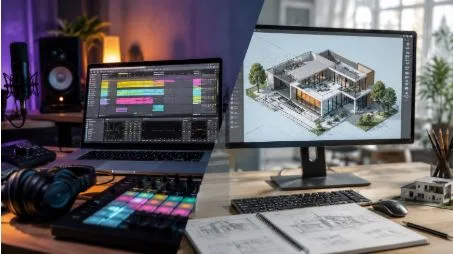
The rise of powerful digital tools has revolutionized the way creative work is done. Musicians can now compose entire pieces of music on their computers, while architects, designers, engineers, and visual creators can create detailed three-dimensional concepts before they are actually built. The right software doesn’t just provide technical advantages—it also simplifies experimentation, increases productivity, and provides a clear path for creative ideas to move from concept to final form.
Two applications that represent different sides of modern digital creativity are Ableton Live and SketchUp Pro. While one focuses primarily on music creation and performance and the other on 3D modeling and design, both are built on a similar philosophy: giving users easy-to-use tools that help them efficiently experiment, refine, and express ideas.
Ableton describes Live as software designed for creating and performing music, combining instruments, effects, sounds, recording facilities, arrangement tools, and performance features into a single environment. SketchUp Pro, on the other hand, provides professional 3D modeling facilities as well as tools for documentation, collaboration, extension, and visualization.
Why Creative Software Matters More Than Ever
Digital creativity is no longer limited to professional studios or large design offices. Independent musicians, students, freelancers, content creators, architects, product designers, educators, and hobbyists are increasingly relying on specialized software to bring their ideas to life.
Good creative software not only reduces repetitive tasks but also allows for experimentation. Instead of spending most of the creative process dealing with technical limitations, users can focus on making decisions that actually improve the final project.
The best applications tend to share several characteristics:
- Intuitive interfaces
- Flexible workflows
- Strong customization options
- Support for different file formats
- Reliable project organization
- Tools for experimentation
- Integration with complementary software
- Options for professional-quality output
Both Ableton Live and SketchUp Pro demonstrate these principles within their respective fields.
Ableton Live: A Flexible Environment for Music Creation
Music creation often involves experimentation. A melody can lead to a rhythm, a beat can inspire a bassline, and an unexpected sound can completely change the course of a track. Software that locks every idea into a rigid workflow can hinder this creative process.
Ableton Live approaches music production differently. Its Session View allows musicians to work with clips and musical ideas without being restricted to a traditional linear timeline. Users can experiment with combinations of audio and MIDI material before arranging them into a finished composition.
This makes Live particularly useful for producers who prefer to discover a track’s structure as they work rather than decide everything in advance.
Arrangement view provides a more traditional timeline-based environment. Once ideas are created, producers can arrange recordings, MIDI parts, effects, transitions, and other elements to create a complete song.
The ability to move between these approaches is one of the software’s strongest creative advantages.
Recording and Developing Musical Ideas
A key part of music production is capturing inspiration before it fades. Ableton Live supports recording from hardware synthesizers, microphones, guitars, drum machines, software instruments, and other audio sources. Its MIDI capabilities allow musicians to edit and enhance their performances even after recording.
This flexibility is valuable for both beginners and experienced producers.
A beginner might start with a simple MIDI pattern and gradually add drums, bass, chords, and effects. An experienced musician might record an improvisation, experiment with different arrangements, and transform individual parts into completely different musical ideas.
Live also has features like Capture MIDI, which can help users recapture musical ideas even if they haven’t explicitly started recording beforehand. Its audio-to-MIDI capabilities can convert specific audio material into editable MIDI content.
Sound Design and Creative Experimentation
Modern producers rarely work with just one type of sound. A project can contain a combination of recorded instruments, samples, synthesizers, vocal recordings, drum loops, and digitally created effects.
Ableton Live offers native instruments and effects designed to support this kind of experimentation. Its sound-design ecosystem includes synthesizers and sampling tools, and audio and MIDI effects can be used for everything from detailed mixing to extraordinary creative processing.
Live 12’s latest features further expand the creative possibilities. Ableton highlights tools like stem separation, MIDI transformation, and splice integration, which give producers additional ways to manipulate musical material and explore new ideas.
This is important for creative professionals, because inspiration doesn’t always come in a predetermined form. The ability to transform existing material can be just as valuable as creating something entirely new.
SketchUp Pro: Making 3D Ideas Easier to Understand
Music isn’t the only creative field where visibility is important. Architects, interior designers, engineers, landscape professionals, educators, and product developers often need to express ideas that are difficult to explain through words or simple sketches alone.
This is where SketchUp Pro becomes useful.
SketchUp’s 3D modeling approach is built around easy-to-use tools that help users create, modify, view, and organize three-dimensional objects. Its official resources describe workflows that cover everything from simple shapes and objects to materials, styles, environments, grouping, classification, and visibility management.
Rather than requiring every concept to be represented through complex technical procedures, SketchUp allows users to work visually in three-dimensional space.
From Simple Concepts to Detailed Models
One of SketchUp Pro’s biggest advantages is its usefulness across different stages of a project.
A designer might start with a simple block representing a building. That block might later be transformed into rooms, walls, windows, furniture, landscaping, and other details. An interior designer might experiment with layouts and materials. An architect might compare different structural options before creating a more detailed proposal.
SketchUp’s desktop modeler is designed for creating, documenting, and communicating ideas in 3D, while its ecosystem includes tools for extending workflows and working with different forms of project information.
This makes the software valuable not simply as a modeling program but as part of a broader design process.
Professional Documentation and Collaboration
Creating a model is only one part of professional design work. A project also needs to be communicated to clients, colleagues, contractors, or other stakeholders.
SketchUp Pro includes access to LayOut for creating 2D documentation from 3D projects. The wider Pro ecosystem also includes SketchUp for Web, iPad access, cloud collaboration through Trimble Connect, 3D Warehouse, and Extension Warehouse.
These capabilities can help designers move from initial concepts to presentations and documentation without completely rebuilding their work in another environment.
The benefit is particularly clear when projects involve multiple people. A well-organized model can become a shared visual reference that makes discussions easier and reduces misunderstandings.
Extensions and Custom Workflows
No two creative professionals work in the same way. The tools needed by a residential architect may be different from those of a furniture designer, and the workflow of a music producer working with electronic music may be completely different from that of a live band recording.
Customization therefore plays an important role in modern creative software.
SketchUp Pro supports extensions through the Extension Warehouse, allowing users to adapt their workflow to specific needs.
Similarly, Ableton Live also has a huge ecosystem around customization and integration. Ableton Live’s capabilities are constantly expanding, including new ways to enhance it, which can help automate repetitive tasks and connect the DAW to additional workflows.
The broader lesson is important: software becomes more valuable when users can adapt it instead of adapting their entire creative process to the software.
Ableton Live and SketchUp Pro Have More in Common Than It Seems
At first glance, music production and 3D design appear completely unrelated. However, both applications solve a similar fundamental problem: turning abstract ideas into structured digital projects.
Consider the similarities:
1. Both Encourage Experimentation
Ableton Live lets musicians experiment with clips, arrangements, sounds, and effects. SketchUp Pro lets designers test shapes, layouts, materials, and spatial relationships.
2. Both Support Iterative Work
Creative professionals rarely produce their best result on the first attempt. They refine ideas repeatedly. Both applications make it possible to modify existing work rather than starting over.
3. Both Offer Customization
Extensions, integrations, effects, instruments, materials, and workflow options allow users to create an environment suited to their particular projects.
4. Both Help Communicate Ideas
A finished track communicates an artistic vision through sound. A 3D model communicates a design concept through visual space.
5. Both Reward Learning
Although these programs are designed to be simple to understand, their in-depth features can aid in complex professional workflows. Users who take the time to learn shortcuts, organizing techniques, templates, and advanced functions can significantly increase their productivity.
Frequently Asked Questions
Is Ableton Live suitable for beginners?
Yes. Ableton Live provides a visual workflow that can be learned progressively. Beginners can start with basic recording, MIDI, clips, instruments, and effects before exploring more advanced production and performance techniques.
What is Ableton Live mainly used for?
Ableton Live is used for music production, recording, sound design, arrangement, mixing, and live performance. Its Session View and Arrangement View support different approaches to developing musical ideas.
What can SketchUp Pro be used for?
SketchUp Pro can be used for architectural modeling, interior design, construction concepts, product visualization, landscape planning, documentation, and many other forms of 3D design.
Is SketchUp Pro only for architects?
No. Although architecture is one of its major use cases, SketchUp is also used across interior design, construction, engineering-related workflows, education, product concepts, landscaping, and visualization.
Does SketchUp Pro support extensions?
Yes. SketchUp Pro provides access to the Extension Warehouse, allowing users to customize and expand their modeling workflows.
Can Ableton Live be used for live performances?
Yes. Live was designed for both music creation and performance. Users can trigger clips, manipulate effects, work with MIDI controllers, integrate hardware, and build performance-oriented setups.
Which software should a creative professional learn first?
The answer depends on the field. Musicians and producers should generally begin with a DAW such as Ableton Live, while architects, interior designers, and 3D-focused creators may benefit from learning SketchUp Pro.
Conclusion
Creative software has become an essential part of modern professional and independent workflows. The strongest applications do more than provide technical capabilities—they help people experiment, solve problems, communicate ideas, and turn concepts into finished work.
Ableton Live provides a flexible environment for music creation and performance, combining recording, arrangement, sound design, MIDI, effects, and performance capabilities. SketchUp Pro takes a similarly accessible approach to 3D design, giving professionals tools for modeling, documentation, collaboration, extensions, and visualization.