A Simple Way to Organize Claude Code Projects
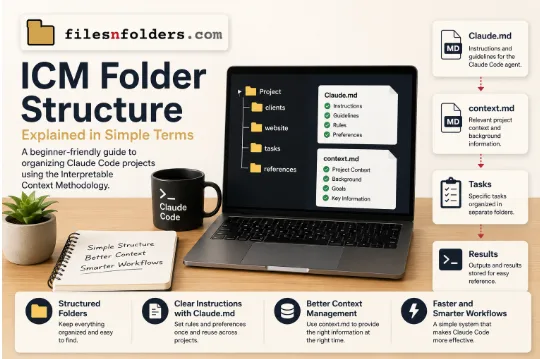
For beginners, working with an LLM agent can feel confusing when a project contains many instructions, files, tasks, and pieces of background information. A structured approach can make that process much easier to manage. The ICM Folder Structure provides a simple way to organize information so a single agent such as Claude Code can work with the right context at the right time.
Why Folder Structure Matters
When people first explore Claude Code for beginners, they often focus on commands and prompts. However, the way project information is stored can be just as useful. A well-organized folder system gives the agent a clear environment to work within.
Instead of building a complicated setup with several agents communicating with one another, this approach uses one LLM agent supported by carefully arranged files and folders. Each folder can represent a specific purpose, such as:
- A client project
- A website section
- A development task
- A content project
- A specific business workflow
This makes it easier to separate information and avoid mixing unrelated instructions.
Understanding Claude.md Files
One of the useful parts of this workflow is the use of Claude.md files. These files can contain instructions that help explain how the agent should approach work inside a particular project or folder.
Think of a Claude.md file as a set of working guidelines. Instead of repeating the same instructions in every conversation, the relevant guidance can be stored where the agent can access it as part of the project structure.
For example, a main project folder could contain a Claude.md file explaining general rules, while a smaller task folder could include additional instructions for that specific task. This gives the agent a clearer understanding of what applies globally and what only applies locally.
Making Context Easier to Manage
Another challenge with LLM workflows is context. Claude can process a large amount of information, but users still need to decide which information is relevant to a particular task.
This is where Claude md files context windows and organized project files become useful. Rather than placing every detail into one massive prompt, information can be divided into logical sections.
A project might include a context.md file containing useful background information, project goals, terminology, or details that the agent needs to understand the task. Other files can hold references, task-specific notes, or supporting information.
The result is a more manageable system where the agent can work with information in a structured way instead of receiving an unorganized collection of instructions.
What Is Interpretable Context Methodology?
The Interpretable Context Methodology takes this idea further by treating folders and files as part of the workflow itself. Rather than viewing the folder structure as simple storage, it becomes a practical way to organize the context an agent needs.
The basic principle is straightforward: make the information understandable, accessible, and separated by purpose.
For someone learning Claude Code, this can make projects much less intimidating. A user does not need to understand advanced agent systems before getting started. They can begin with one folder, a few clear instructions, and relevant project files.
A Practical Claude Code Folder Structure
A simple Claude Code folder structure might look something like this:
Project/
├── Claude.md
├── context.md
├── clients/
├── website/
├── tasks/
└── references/
The exact structure can change depending on the project. The main idea is to create logical locations for different types of information.
The clients folder could contain client-specific details. The website folder might hold information related to individual pages. The tasks folder could contain instructions for current work, while references could store supporting material.
This organization helps users quickly understand where information belongs and makes future work easier to repeat.
Does This Replace an Agent Orchestration Layer?
Traditional agent workflows may involve multiple specialized agents, each responsible for a different function. That can be useful for certain complicated systems, but it can also make a setup harder for beginners to understand and maintain.
A folder-based workflow offers another option. Instead of adding more agents, users can organize responsibilities through files and folders. The folder system effectively provides structure around a single agent without requiring a complex agent orchestration layer.
This does not mean every project should avoid multiple agents. It simply shows that many tasks can be organized effectively with one capable agent and a clear information system.
Starting Small as a Beginner
Someone new to Claude Code does not need to build a large framework immediately. A practical starting point could be a single project folder with a Claude.md file and a context.md file.
From there, additional folders can be introduced only when the project becomes more complex. This gradual approach keeps the system understandable while allowing it to grow.
Good organization also makes it easier for another person to enter the project later because the purpose of each file and folder is easier to understand.
For beginners and experienced users alike, the main benefit is control over context. By giving information a clear place and purpose, Claude Code workflows can become easier to manage, repeat, and improve as projects grow.