How Long Do Floor Scrubbers Last? Lifespan by Type, Use, and Maintenance
The Question Behind the Question
When someone types “how long do floor scrubbers last” into a search bar, they’re rarely curious in the abstract. They’re either weighing a purchase and wondering whether the machine will earn its keep, or they’re staring at an aging unit that’s started acting up and trying to guess how much life it has left. Both are real money decisions, and both deserve a straight answer.
Here’s the honest one: most commercial floor scrubbers last somewhere between 5 and 15 years. But that range is close to useless on its own, because two identical machines can sit at opposite ends of it depending on how hard they run and how well they’re maintained.
The number that actually tells you something isn’t the calendar. It’s operating hours and battery health. A scrubber that’s “only three years old” but runs 12 hours a day in a distribution center may be far more worn than a seven-year-old machine that cleans a small store twice a week. The younger machine could easily be closer to retirement. If you judge a scrubber by its purchase date, you’ll misread its condition almost every time.
So this guide reframes the question from “how many years” to “how many hours, and in what shape is the power system?” Here’s what you’ll get:
Realistic lifespan ranges by machine type, in both years and operating hours
Why the battery, not the frame, usually decides when a machine gets retired
The maintenance and charging habits that add years — or quietly steal them
A clear threshold for when repair stops making financial sense
Read your own machine through that lens, and you’ll know whether to keep maintaining it, budget for a replacement, or push a new purchase harder in negotiation.
Lifespan by Machine Type, in Years and Operating Hours
The single biggest predictor of how long a scrubber lasts is the class of machine you bought. Build quality and duty rating are decided at the factory, long before your team ever touches it. That’s why it helps to look at each type with both a year range and an operating-hour benchmark — and when the two disagree, trust the hours. If you’re still mapping out which class fits your building, this commercial floor scrubber guide breaks down how the main machine types compare before you commit to one.
Walk-Behind Scrubbers
Commercial-grade walk-behind units typically run 5 to 10 years, or roughly 3,000 to 5,000 operating hours. That’s a solid working life for machines cleaning offices, mid-size retail floors, schools, and similar spaces on a daily-but-not-punishing schedule.
Watch the build tier, though. Entry-level and light-commercial models often tap out closer to 3 to 5 years. Lighter motors, thinner plastics, and smaller batteries simply can’t absorb the same wear, and they show it first. If you bought the cheapest machine on the shelf and run it hard, don’t expect it to reach the top of that range.
On walk-behinds, the first parts to wear are predictable: the squeegee assembly, the scrub deck, and the vacuum motor. None of those are the end of the machine — they’re normal replacements — but a vacuum motor that fails early is often a sign of water reaching places it shouldn’t, which is a maintenance problem worth catching fast.
Ride-On Scrubbers
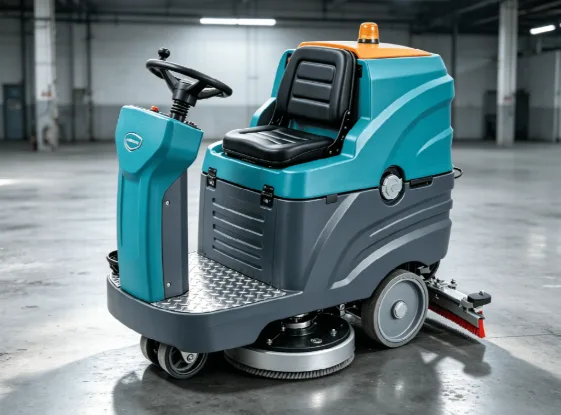
Well-maintained ride-on units generally last 7 to 12 years, or about 7,000 to 10,000 operating hours. They earn that longer life through heavier frames, industrial-grade motors, and larger battery packs built for sustained daily runs. Where a walk-behind is designed to work, a ride-on is designed to keep working shift after shift.
Brand and build quality swing this range more than almost any other factor. A premium ride-on engineered for high total hours can comfortably outlast a budget model by years, even under similar use. This is the machine class where “you get what you pay for” holds up most reliably, so the upfront premium on a reputable unit often pays back in extra years of service.
Heavy-Duty Industrial Scrubbers
Purpose-built industrial machines — the ones running warehouses, factories, and large distribution centers — can deliver 10 to 15 years of chassis life. The frame, the drive system, and the core motors are engineered to endure.
The catch is that these units rack up hours fast. Running long daily shifts, a heavy-duty scrubber can accumulate more operating hours in three years than a retail walk-behind sees in a decade. So the calendar age can look modest while the machine is genuinely well used.
Here’s the part that surprises buyers: in this class, the battery and power system usually retire the machine, not the frame. The chassis often outlives several battery sets. When an industrial scrubber gets pulled from service, it’s frequently because the cost of another battery replacement no longer makes sense — not because anything structural failed.
Robotic and Autonomous Scrubbers
Robotic scrubbers have a shorter lifespan, roughly 5 to 8 years, which is shorter than the cleaning mechanics alone would suggest. The brush motors and squeegees are often perfectly capable of running longer.
The limiting factor is the electronics. Sensors, navigation systems, and battery-management boards age faster than purely mechanical parts, creating a real decision point around year six. When the “brains” start failing, repairs get expensive quickly.
There’s a second risk that has nothing to do with wear: software and parts support. If the manufacturer discontinues a model, stops providing firmware updates, or stops stocking components, the machine can effectively reach end of life while it’s still mechanically sound. When you buy autonomous equipment, the vendor’s long-term support commitment matters as much as the hardware spec.
Battery Type and Care: The Factor That Decides Economic Life
On any battery-powered scrubber, the battery is the most expensive wear item you’ll deal with — and, as the industrial example above shows, it’s usually the reason a machine gets retired. How you treat it drives the entire economic life of the unit. Two teams can buy the same machine, and the one with disciplined charging habits will get years more out of it before the power system forces a decision.
The Main Battery Types, Compared for Longevity
Battery chemistry sets the ceiling on what you can expect. Here’s how the common types stack up:
Lead-acid (flooded): The most common and cheapest upfront. Expect roughly 1,000 to 1,500 charge cycles, or about 3 to 5 years. But that number assumes proper care — sloppy charging and skipped watering can cut it in half.
Gel and AGM: Sealed and lower-maintenance than flooded lead-acid, which makes them convenient. In practice, they often deliver for 18 to 36 months, and they’re genuinely vulnerable to early failure due to operator error and improper charging.
Lithium-ion: The highest upfront cost and the longest life. Roughly 2,000 to 3,000 cycles, or about 5 to 7 years, with a strong tolerance for partial charging and opportunity charging during breaks.
If your building runs long or split shifts, lithium-ion’s faster charging and forgiving cycle behavior often justify the higher price. For a single short shift with an overnight charge, well-maintained lead-acid can still make sound economic sense.
The Charging Habits That Quietly Kill Batteries
Most batteries don’t die of old age. They die of mistreatment, and the damage is usually invisible until the runtime collapses.
Three habits do the most harm. Deep-discharging a battery before recharging it strains the cells. Interrupting a charge cycle partway through and then running the machine prevents the battery from ever reaching full capacity. And letting flooded lead-acid sit undercharged causes sulfation — a buildup that permanently steals capacity you can’t get back.
Match the habit to the chemistry, too. Opportunity charging — topping up during breaks — helps lithium-ion but actively shortens the life of most lead-acid batteries. A habit that’s smart for one machine can be quietly destructive on another. Storage matters as well: leaving a machine at full or dead charge during long idle periods damages the pack either way.
How to Read a Failing Battery
The clearest early warning is simple. If runtime drops steadily even after a full charge, the battery is losing capacity and heading toward replacement. Track it — a battery that used to hold a full shift and now quits an hour early is telling you where it’s going.
One diagnostic rule saves buyers from wasting money. If you install a fresh, properly cared-for battery and the machine still won’t hold a shift, stop blaming the battery. The problem is likely the charger or the machine’s broader power system, and swapping in another new battery will only burn cash while the real fault stays hidden. Get the charging system checked before you buy a second pack.
Duty Cycle and Floor Type: Why the Same Machine Wears Differently
Battery care explains a lot, but it isn’t the whole story. Two teams can buy the exact same scrubber on the exact same day, and five years later one machine is running strong while the other is ready for the scrap heap. Nothing was wrong with either unit out of the box. The difference is how hard each one works and what it works on. This is exactly why calendar age lies: the date on the invoice tells you nothing about the wear packed into the machine.
Daily Operating Hours and Duty Cycle
Picture two identical walk-behind scrubbers. The first cleans a small retail store for two hours a night. The second runs twelve hours a day across a busy distribution center. On paper, they’re the same machine and the same age. In reality, the distribution center unit burns through its rated hours roughly six times faster. What takes the retail machine a decade to accumulate, the warehouse machine reaches in under two years.
The mechanism behind this is simple. Long, continuous runs heat up motors, brushes, and the drive system, and heat is what accelerates wear. A machine that gets to cool down between short sessions ages gently. One that runs shift after shift never gets that break, so the deck, the motors, and the drive components all wear faster than the calendar would suggest.
This is why you should plan replacement around the hour meter, not the purchase date. If your machine tracks operating hours, that number is the honest measure of how much life you’ve used. A three-year-old machine with 6,000 hours on it is far closer to retirement than a five-year-old machine with 2,000. Check the meter before you assume you have years left.
Floor Type and Debris Load
The surface you clean is quietly deciding how fast your machine wears out. Smooth, sealed concrete, tile, and vinyl are gentle on the machine. Brushes glide, squeegee blades slide cleanly, and the recovery path stays clear. A scrubber working these surfaces tends to hit the upper end of its expected life.
Rough and unsealed concrete is a different story. That texture works like sandpaper, grinding down brushes and chewing through squeegee blades far faster than a sealed floor ever would. Grout lines add constant edges that nibble at blades pass after pass. And when you throw heavy grit, sand, or debris into the mix, it doesn’t just abrade the brushes — it gets pulled into the recovery path and clogs hoses and the vacuum system, forcing the machine to work harder for less result.
The fix is to match brush stiffness and pad pressure to the floor you actually have. An overly aggressive setup on a delicate surface wears out both the floor and the machine. An under-matched setup on a rough floor forces operators to run extra passes, and every extra pass adds hours you didn’t need to spend. Getting this pairing right is one of the most cost-effective ways to keep a machine within its healthy range.
Operator Habits
The person driving the machine matters more than most buyers expect. Rough operation quietly shortens a scrubber’s life in ways no maintenance schedule can undo. Bumping into fixtures, racks, and door frames cracks housings and knocks components out of alignment. Overfilling tanks invites spills that reach places water was never meant to go.
The most costly habit is letting water or foam reach the vacuum motor. That single mistake destroys vacuum motors early, and it’s one of the most common reasons a young machine ends up in for expensive repair. Train operators to fill tanks correctly, watch the float shut-off, and drive with a little care, and you protect years of service life for the price of a short conversation.
The Maintenance Routine That Actually Adds Years
Maintenance advice is easy to nod at and easy to skip. But the gap between a machine that dies early and one that beats its expected life usually comes down to a handful of specific habits, done consistently. Facilities that stick to a real routine routinely pull two to three extra years out of a scrubber. Here’s the routine that does it, broken down by how often each task needs to happen.
Every Shift
The end of every shift is where most life-extending work happens, and it takes only a few minutes.
Drain and rinse the recovery tank. Leaving dirty water to sit breeds odor, residue, and buildup that clogs the recovery path over time. Empty it, rinse it, and leave the lid open to dry.
Check the float shut-off. This small part keeps water out of the vacuum motor. A stuck or failed float lets water reach the motor and destroys it — one of the most common early failures, and completely preventable.
Wipe down the squeegee blades. Clean them off and look for nicks or uneven wear. A blade catching debris tonight is a blade streaking the floor tomorrow.
Charge on the manufacturer’s cycle. Charge the battery the way the maker specifies, not whenever it’s convenient. Consistent, correct charging is the single biggest lever on battery life.
Weekly and Monthly
Every week or so, step past the quick checks and into short service tasks.
Inspect, rotate, or replace squeegee blades. Worn blades force the machine to leave water behind, which means operators have to run extra passes to compensate — and those extra passes add up to operating hours. Rotating blades before they fail keeps recovery sharp and stretches how long each set lasts.
Clean the brush deck and check pressure settings. Clear out trapped debris and confirm brush or pad pressure matches your floor. Wrong pressure wears both the brushes and the surface.
Lubricate the drive system. Moving parts on the drive need regular lubrication to avoid premature wear. On ride-on units, also check belt or chain tension; a loose belt slips and strains the drive motor.
Check lead-acid water levels. For flooded lead-acid batteries, top up the water after charging and equalize per the manufacturer’s schedule. Skip this and sulfation sets in, quietly stealing capacity you can’t recover.
Annually
Once a year, bring in help and take stock.
Book a factory-certified technician. A trained tech catches problems you can’t see: motor-brush wear, bearing play, and wiring issues that can lead to failures if left unchecked. Catching these early is far cheaper than replacing what they damage.
Keep a service log. Record operating hours, parts replaced, and repair costs every time. This log feels like busywork until the day you have to decide whether to repair or replace — and then it becomes the most valuable document you own. Real numbers, tracked over time, turn that call from a guess into a clear decision.
Replace or Repair? A Clear Decision Threshold
At some point, every machine reaches the question: pour more money into fixing it, or cut your losses and buy new? Most advice on this is frustratingly vague — a flat percentage rule that ignores how costs actually pile up. You deserve a sharper approach, and it builds directly on the service log from the routine above.
The Cost Threshold
Here’s a threshold you can actually use. When a single year of repairs exceeds roughly 30% of the cost of a new equivalent machine, replacement usually wins. The same goes for a single major repair that exceeds 50% of the machine’s current value — at that point, you’re spending half of what the machine is worth to keep it limping along.
The key word is cumulative. One-off repair bills tell you very little. What matters is your total repair spend across a year, because aging machines fail in a pattern: you fix one part, and the next failure is already on its way. A worn drive motor today often signals worn bearings tomorrow. Track your annual repair spend, not individual invoices, and watch the trend. When that yearly total crosses the 30% line, the math has already made your decision — you’re just confirming it.
This is exactly where the service log pays off. Without it, you’re guessing. With it, you can see precisely how much this machine has cost you over the last 12 months and decide based on real numbers rather than gut feel.
The Warning Signs That Override the Math
Sometimes the cost math hasn’t tipped yet, but the machine is still telling you it’s done. These signals override the percentage rule — when you see them, lean toward replacement regardless of the repair bill.
Parts are getting hard to source. On discontinued models, a single unavailable component can strand the whole machine. If you’re waiting weeks for parts or hunting them down from third parties, the clock has run out.
Cleaning performance keeps slipping. When operators have to run extra passes or over-dilute chemicals just to get floors clean, the machine is no longer doing its job efficiently. That hidden cost in labor and supplies adds up fast.
Structural damage has set in. A corroded frame, a cracked recovery tank, or weld failures on the deck aren’t routine repairs. They’re signs the machine’s bones are going, and patching them rarely holds.
Electrical faults keep repeating. Controllers, wiring harnesses, or charge ports that fail again within months point to a deeper problem you’ll never fully chase down. Each fix buys less time than the last.
Runtime keeps shrinking even with a new battery. If you’ve installed a fresh, well-maintained battery and the machine still can’t hold a shift, the fault lives in the broader power system, not the battery. Throwing another battery at it only wastes money while the real problem stays hidden.
When one of these shows up alongside a climbing repair total, stop debating. The machine has already made its case, and the smarter money is on a replacement.
What Lifespan Is Really Worth: Total Cost of Ownership
The replace-or-repair decision leans on one idea worth spelling out on its own: purchase price is the smallest part of the story. Two machines can carry the same sticker, yet one costs you far more over its life. The number that actually matters is cost per operating hour — what you pay for every hour the machine spends cleaning your floors.
The math is simple, and it changes how you shop. A machine that costs more upfront but runs twice the hours can be cheaper per hour than a bargain unit that wears out fast. Say one scrubber runs 4,000 hours before retirement and another, built better, runs 8,000. Even at a higher purchase price, the second machine often ends up with a lower cost per hour. Spread across years of daily use, that gap adds up to real money.
Then there are the costs most buyers forget to count. Battery replacement is usually the single biggest expense in the middle of a machine’s life, and on many units you’ll face it more than once. Consumables — brushes, pads, and squeegee blades — add up quietly across thousands of hours. Downtime carries a cost too: every hour a broken machine sits idle is an hour of manual cleaning or dirty floors. And parts availability matters more than it seems, because a cheap machine you can’t get parts for becomes an expensive paperweight the day it breaks.
Resale value deserves a place in your planning. A scrubber’s trade-in and resale value drops sharply after roughly the six-year mark. If you time a replacement while the machine still holds value, you recover part of your investment. Wait until it’s fully worn out and worth nothing, and you’ve left that money on the table.
Put it all together, and the conclusion is hard to argue with: the cheapest machine on day one is rarely the cheapest by year five. Run every purchase through the cost-per-hour lens, and factor in batteries, consumables, downtime, and resale — that’s how you find the machine that actually saves you money over its life. With that financial view in place, let’s answer the questions buyers ask most.
Frequently Asked Questions
How many operating hours should a floor scrubber last on average?
It depends on the class of machine. Commercial walk-behind units typically deliver 3,000 to 5,000 operating hours, while ride-on and heavy-duty machines can reach 7,000 to 10,000 hours or more. Track the hour meter, not the purchase date — a three-year-old machine with 6,000 hours is more worn than a five-year-old unit with 2,000.
Is it cheaper to replace the battery or buy a new floor scrubber?
If the rest of the machine is mechanically sound and parts are still available, replacing the battery is almost always the smarter money. A new battery costs a fraction of what a new machine costs. The calculation flips when the frame, motors, or electronics are also failing — at that point you’re pouring a new battery into a dying unit. Replace the battery if the chassis has years of life left; buy new if the machine is failing on multiple fronts at once.
Does a more expensive brand actually last longer?
Often, yes — especially in the ride-on and industrial classes. Premium manufacturers design for higher total operating hours, with heavier frames, better motors, and stronger parts support. That said, brand alone won’t save a neglected machine. A reputable unit that’s abused will still die early, while a mid-tier machine that’s well maintained can outlast expectations. The build quality raises the ceiling; your care decides whether you reach it.
How often should squeegee blades and brushes be replaced?
It varies with floor type and hours run, but plan on squeegee blades every few months and brushes or pads once they’re visibly worn or stop cleaning cleanly. Rough, unsealed floors chew through both far faster than smooth, sealed surfaces do. Rotating squeegee blades before they fail stretches each set and keeps water recovery sharp, preventing the extra passes that add operating hours.
Is a refurbished floor scrubber worth buying, and how long will it last?
A properly refurbished machine from a reputable seller can be a strong value, especially for lighter-duty use. The key is knowing what was actually reconditioned — ask for the hour meter reading, the battery’s age and condition, and what parts were replaced. A well-refurbished unit with a fresh battery might give you several years of service. A “refurbished” machine that’s just been cleaned up and repainted is a gamble. Buy based on documented work, not appearance.
What’s the best way to store a floor scrubber between uses?
Drain and rinse both tanks, leave the lids open to dry, and store the machine in a clean, dry spot away from temperature extremes. Handle the battery with care: don’t leave the machine sitting at a dead charge or at full charge for extended idle periods, as both can damage the pack. For extended storage, follow the maker’s guidance on charge level, and give lead-acid batteries a maintenance charge to prevent sulfation.
Manage the Hours, Not the Calendar
Step back, and the realistic ranges are clear. Walk-behind scrubbers last around 5 to 10 years, ride-on units 7 to 12 years, heavy-duty industrial machines up to 15 years, and robotic scrubbers 5 to 8 years. Those numbers give you a starting point for budgeting and expectations.
But the ranges are only half the picture. Where your machine actually lands within them depends on operating hours and battery health — not the date on the invoice. A machine run hard for long shifts ages far faster than the calendar suggests, and a neglected battery can retire a mechanically sound unit years early. Judge your scrubber by the hour meter and the state of its power system, and you’ll read its condition correctly every time.
Two levers sit within your control, and together they’re the cheapest way to stretch any scrubber’s life: disciplined daily maintenance and smart battery care. A few minutes at the end of each shift and consistent charging habits routinely add years to a machine. Nothing else you do returns as much for as little.
Here’s your next step. Start logging operating hours and service costs today, even if your machine is only a year old. That record turns every future decision from a guess into a calculation. Then set a firm replacement threshold: when a single year of repairs exceeds roughly 30% of a new machine’s cost, it’s time to replace. When that day arrives, comparing your floor scrubber options against the cost-per-hour lens makes the replacement decision far easier. Make the choice on data you’ve tracked, not on the day the machine finally quits on you — because by then, the choice has already cost you more than it should have.