Free AI Video Generator Without Watermark: The Export Test That Prevents Costly Surprises
A free AI video generator without watermark can be useful, but only if the downloaded file is clean, usable, and permitted for your intended channel. A free preview is not the same as a publishable export. Before you build a campaign around any tool, test the complete path from source material to downloaded file, then check resolution, audio, usage rights, and the cost of producing the next ten videos.
That distinction matters most when your starting point is an article, PDF, script, product brief, or recorded explanation. TapVid is an Explainer Video Engine for turning that existing content into a structured motion-graphics explainer. It is not a cinematic text-to-video model that invents a scene from a short prompt. Its current official pricing page says watermark-free exports are included on the paid Pro, Max, and Ultra plans, so do not confuse free access with a free clean export.
Start With the File, Not the Editor
Most buyers evaluate an AI video tool in the wrong order. They look at templates, prompt boxes, or a polished gallery. The buying decision is made later, at the export screen. That is where a seemingly free workflow may reveal a watermark, a resolution cap, a credit requirement, a download restriction, or a commercial-use condition.
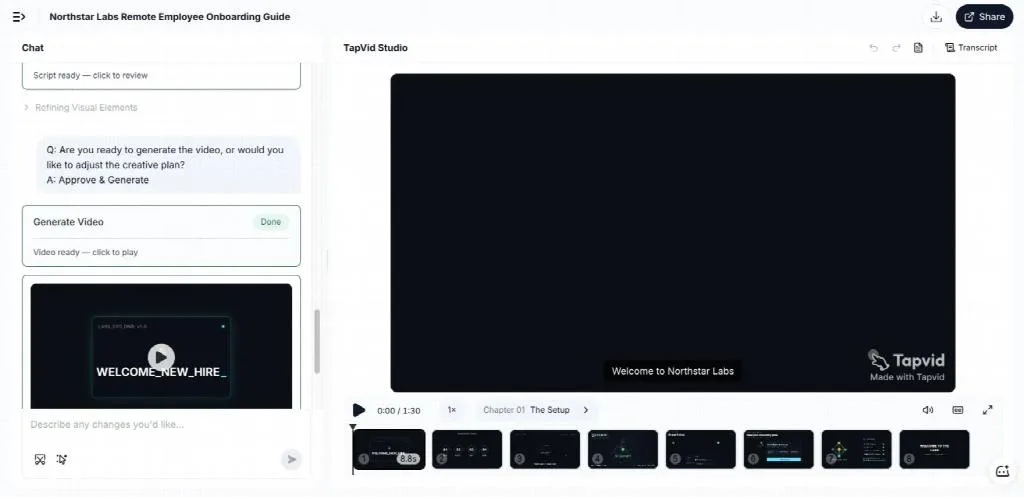
A documented TapVid test published in its own editorial library shows why the final file matters. The test started with a written onboarding brief, produced a scene-based explainer, and reached a playable result. The captured Free Plan output carried a visible TapVid watermark. That screenshot is evidence of one observed test state, not a promise about every account or a substitute for checking the current plan.
This is the first rule of a sensible evaluation: test the deliverable, not the demo. If you need a clean client file, a landing-page video, a paid ad, or a course asset, open the export path before you spend an afternoon refining the draft. A tool can be excellent for concepting and still be the wrong production choice if the final file cannot meet your publishing standard.
Define “without watermark” precisely
Visible logos are only one part of the question. Write down what clean delivery means for your project:
- No platform logo or branded outro on any frame.
- No stock-media preview marks embedded in scenes.
- No forced attribution in the caption or description.
- No resolution downgrade that makes text or interface details unreadable.
- No export restriction that blocks local download.
Do not assume that “no watermark” also means commercial use is allowed. Those are separate terms. A tool may provide a clean file for personal experiments while reserving business use for a paid plan. Another may allow commercial use but restrict particular stock, voice, avatar, or model assets. The only safe decision is to check the plan and terms that apply to your account and intended use.
Run the Five-Gate Publishability Test
The fastest way to compare tools is to make one representative video and force it through five gates. Use the same source and acceptance criteria for every candidate. If a tool fails one gate, treat the result as a prototype until you know how to fix the gap.
A video is publishable only when it generates, downloads, stays visibly clean, permits the intended use, and meets the required quality.
Gate 1: Can it generate the real format you need?
Start with a small but representative brief. A product marketer might use a 45-second script with three exact claims, a logo, two screenshots, and a final call to action. A course creator might use a short lesson with one definition, one diagram, and a recap. A YouTube creator might use an existing article and ask for a vertical summary.
The test should expose the hard parts of your workflow. Include a number that must remain exact, a brand asset that cannot be altered, and a sentence that must appear verbatim. If the tool only proves it can generate generic movement, you have not tested whether it can carry your actual content.
Gate 2: Can you download the file?
Some free experiences stop at a web preview. Others let you edit but ask for payment when you click export. A downloadable file is a distinct capability, so record it separately.
Open the export menu early. Note the available file format, aspect ratio, frame size, duration, and whether captions or audio are included. If the product asks you to publish to a community before downloading, decide whether that disclosure is acceptable. Do not discover the gate after you have already built the final storyboard.
Gate 3: Is the final file visibly clean?
Watch the downloaded file from beginning to end. Look at the corners, intro, outro, transitions, stock footage, captions, and any generated background. A clean editor preview does not prove the export will be clean.
Take a screenshot of the export settings and one of the final frame. Record the date, account tier, resolution, and any logo or attribution you observe. This turns “I think it is watermark-free” into a result another teammate can check.
Gate 4: Do the rights cover your use?
Match the license to the destination. Personal experiments, organic social posts, monetized channels, client work, paid ads, and resale are different uses. Check who owns the uploaded assets, generated output, voices, music, avatars, and stock media.
If the terms are unclear, do not upload confidential material or promise the video to a client. Ask the provider for a written answer or choose a plan whose terms state the right you need. Removing a visible mark does not repair a missing license.
Gate 5: Is the output good enough to publish?
Watermark-free can still be unusable. Check text sharpness, logo fidelity, audio clarity, timing, factual accuracy, and the amount of manual repair. A 720p file may be fine for a small mobile social post and weak for a product walkthrough with interface text. A clean four-second clip may not solve a two-minute explanation job.
Set the minimum standard before testing. For an explainer, that may include readable on-screen facts, accurate asset use, editable scene structure, intelligible narration, and one clear next action. For a cinematic insert, temporal consistency and subject fidelity may matter more. The keyword is broad, but the buying job should be narrow.
Calculate the Real Cost of “Free”
The subscription price is not the full cost. A free plan can be the expensive choice if every usable minute requires many retries, manual rebuilding, long queues, or a second editor.
Use this simple model:
Effective cost per publishable minute = subscription cost + generation credits + rerender time + cleanup time + queue delay + rights risk
You do not need a complex spreadsheet. Record four numbers during the representative test:
- Minutes from source upload to the first complete draft.
- Number of generation attempts before the draft met the brief.
- Minutes spent correcting facts, timing, branding, and captions.
- Cash required to download the file at the needed quality and rights level.
Then divide the total by the number of publishable minutes produced. Repeat the exercise for the number of videos you expect to create each month. A plan with a fee but fewer corrections can cost less than a free plan that consumes half a workday per video.
This model also prevents a common procurement mistake: optimizing for the first clip instead of the repeatable workflow. If you need one experimental background shot, a limited free generator may be ideal. If you need weekly explainers built from approved source material, editability and source fidelity may matter more than raw generation price.
Choose the Right Video Category Before You Compare Plans
“AI video generator” covers several different products. Comparing them as if they perform the same job creates bad shortlists.
Cinematic text-to-video
These systems generate visual scenes from prompts or reference images. They are useful for concept shots, atmospheric inserts, and visual experiments. Test motion consistency, prompt adherence, clip length, queue time, and model-specific restrictions. They may not preserve a product interface, a complex fact sequence, or a long narrative without additional editing.
Avatar video
Avatar systems turn a script into a presenter-led video. They fit training, localization, announcements, and repeatable talking-head formats. Test lip sync, voice quality, pronunciation, avatar rights, translation, and whether the free export is clean enough for the intended audience.
Stock-based script-to-video
These products assemble narration, captions, and stock footage around a script. They can produce fast social drafts. Test whether stock choices support the exact message, whether timing can be corrected, and whether stock licenses cover the destination.
Explainer Video Engine
An Explainer Video Engine starts from content you already own and structures it into an explanation. This category fits product briefs, articles, PDFs, scripts, training material, and knowledge content where the facts must survive the transformation. Evaluate source fidelity, scene-level editing, asset accuracy, review checkpoints, and the final export terms.
Choose the category first, then compare plans inside it. A free cinematic clip generator is not automatically a substitute for an avatar tool, and neither is automatically a substitute for a structured explainer workflow. The best no-watermark option is the one that produces the right deliverable with the fewest hidden constraints.
A 20-Minute Buyer Workflow
You can reject most poor-fit tools before a sales call or subscription.
Minute 0 to 3: Write the acceptance brief
Use an existing source, not a vague prompt. State the audience, duration, aspect ratio, three must-keep facts, one required asset, and the publishing destination. Add one failure condition, such as “reject if any number changes” or “reject if the exported video contains platform branding.”
Minute 3 to 8: Inspect the plan and export path
Find the official pricing and terms pages. Record whether the free level is permanent access, a trial, a credit grant, or a preview. Check the watermark rule, export resolution, maximum duration, commercial-use language, and whether a card is required.
Marketing pages can conflict with pricing pages. In the current search results, one vendor page says the free version is for preview and requires an upgrade for a watermark-free export, while another passage on the same page describes a free no-watermark plan. That conflict is a reason to verify the logged-in export screen, not a reason to choose the most convenient sentence.
Minute 8 to 15: Generate once and correct once
Run the representative brief. Do not judge only the prettiest frame. Compare the script, on-screen text, assets, timing, and call to action with the source. Make one correction using the product’s normal editing method, then record whether the change stayed local or forced a full regeneration.
Minute 15 to 20: Export and score
Download the final file if the account allows it. Score each publishability gate as pass or fail. Capture the export settings and final frame. Then estimate the monthly cost at your real volume, including human correction time.
The result should produce a clear next action: reject the tool, keep it for prototypes, run a paid pilot, or adopt it for a defined production lane. “The demo looked good” is not a decision.
When Paying Is the Lower-Risk Choice
A paid plan is usually rational when the video carries revenue, client trust, product accuracy, or a deadline. The fee buys more than watermark removal if it also provides higher resolution, longer outputs, predictable credits, revision control, or clearer usage rights.
Compare tools by effective cost per publishable minute, not only by the monthly subscription price.
For TapVid specifically, the official pricing page checked on Sep 8, 2026 lists 1080p and watermark-free exports on Pro, Max, and Ultra. It also states that credits are charged by rendered duration and that failed or timed-out renders are returned. Those facts make the paid path easier to model for an existing-content explainer. They do not prove that TapVid is the right category for a cinematic prompt, an avatar-led training video, or every production team.
Use free access to validate the workflow. Pay only after the representative test proves that the product preserves your content, accepts your revision method, and creates a file you can publish. This sequence keeps the commercial decision tied to evidence rather than a polished homepage.
Frequently Asked Questions
Is there a completely free AI video generator without a watermark?
Some products advertise free, watermark-free exports, but limits can apply to credits, resolution, duration, queues, sign-up, or usage rights. Verify the current pricing page, terms, logged-in export screen, and downloaded file. Treat a clean preview as unproven until you can export it.
Does no watermark mean I can use the video commercially?
No. Visible branding and commercial-use permission are separate conditions. Check whether your plan covers monetized social content, advertising, client work, resale, and the included music, stock, voice, avatar, or model assets.
What should I test before choosing a free AI video tool?
Use one real source and check five things: successful generation, local download, no visible watermark, sufficient usage rights, and usable resolution and audio. Also record correction time and the number of rerenders.
Is 720p enough for an AI-generated video?
It depends on the destination and content. It may work for a simple mobile clip, but small interface text, charts, and product details can lose clarity. Test the exported file on the actual screen where the audience will watch it.
Why do free AI video tools add watermarks or limits?
Video generation and rendering consume compute and storage. Providers commonly limit credits, queue priority, resolution, duration, or export rights to control cost and encourage upgrades. The exact combination varies, so compare the full production path rather than the price label alone.
Is TapVid a general text-to-video model?
No. TapVid is positioned as an Explainer Video Engine. It turns creator-owned source material, such as an article, PDF, script, product brief, or recorded explanation, into a structured motion-graphics explainer. For watermark-free export, verify the current paid plan and terms that apply to your account.
How do I avoid wasting time on a free plan?
Open the export settings before polishing the draft. Use a short representative project, include one exact fact and one required asset, make one revision, and download the file. If the tool fails a publishability gate, stop or price the required upgrade before building the full video.
How to Choose a Free AI Video Generator Without Watermark
Do not ask only, “Is this free?” Ask, “Can this workflow produce a clean, permitted, accurate file at the volume I need?” That question turns a broad search for a free AI video generator without watermark into a practical buying decision.
For a one-off visual experiment, a free cinematic generator may be enough. For a recurring explainer built from an article, PDF, script, or product brief, test source fidelity, editability, and export rights together. The cheapest tool is the one that gets a publishable result through all five gates with the least total work.