Video Editor AI: Turn Course and Lecture Videos into Short Clips
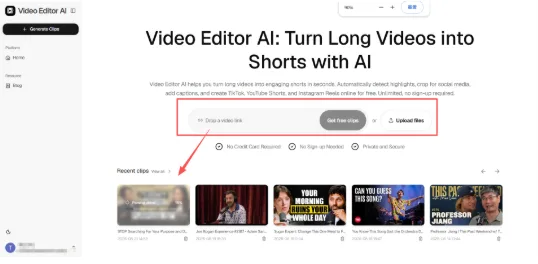
Educators, coaches, and online course creators sit on a huge amount of long-form video that rarely gets a second life outside the course platform it was recorded for. Video Editor AI offers a practical way to pull short, standalone teaching moments out of that footage, turning locked-away lecture content into short clips that can market the course itself instead of only living behind a paywall.
Why Course Content Is a Marketing Asset in Disguise
Every course module contains explanation moments that would work well as free short-form content — a clear breakdown of a confusing concept, a memorable analogy, or a concise answer to a question students ask often. Posted publicly, those same moments become proof of teaching quality that can attract new students who have never heard of the course.
The Gap Between Teaching Content and Marketing Content
Course creators are usually focused on the teaching itself, not on the separate task of mining that material for promotional clips. Manually rewatching hours of lecture footage to find those moments competes directly with time that could go toward creating new course content, so it often just doesn’t happen.
How to Extract Teaching Moments Automatically
Upload Full Lecture Recordings
Bring in complete lecture or coaching session recordings exactly as they were recorded, without needing to pre-select segments first.
Let the System Flag Explanation-Heavy Moments
The tool looks for segments where a concept is clearly explained, a common question is answered, or a strong analogy or example is used — the kind of moments that make a concept click for a learner watching in isolation.
Reformat for Social Platforms
Lecture recordings are almost always shot in a format built for a course platform, not a phone screen. Video Editor AI reframes selected segments to vertical format automatically, keeping the instructor centered and readable.
Add Captions for Accessibility and Silent Viewing
Captions generated from the lecture audio make clips accessible to viewers who are hard of hearing and to the large share of social audiences watching without sound.
Where These Clips Fit in a Marketing Strategy
Free Previews That Sell the Full Course
A single clear explanation clip gives prospective students a genuine sample of teaching quality, which tends to build more trust than a polished sales page alone.
Answering Common Student Questions Publicly
If a concept comes up repeatedly across cohorts, a short clip answering it can serve both as marketing and as a resource you can point existing students toward directly.
Building an Educational Presence Beyond the Course Platform
Consistent short clips help build recognition for an instructor or coach as a subject-matter expert, independent of whether someone has purchased the course yet.
A Practical Approach for Course Creators
Mine Past Cohorts First
Before recording anything new, look at lecture recordings from courses you’ve already taught. That backlog is often the fastest source of ready-to-use clips.
Prioritize Concepts, Not Just Personality
Clips built around a genuinely useful explanation tend to outperform clips that are mostly personality-driven, since the value is easier for a new viewer to recognize immediately.
Batch Process a Full Module at Once
Rather than clipping one lecture at a time, process a full module in one sitting so you have a stockpile of clips ready to post over the following weeks.
Mistakes That Undercut This Strategy
- Clipping only the introduction of each lecture instead of mining the full explanation
- Leaving out captions and losing viewers who would otherwise watch on mute
- Posting clips without any clear next step for viewers who want to learn more
- Treating this as a one-time project instead of an ongoing part of course production
Final Thoughts
Video Editor AI (https://video-editor.ai/) removes the barrier that keeps lecture and coaching recordings from becoming marketing content, surfacing teaching-heavy segments automatically and preparing them for social platforms without extra editing work. If you have a library of past course recordings, that’s a ready source of content that can bring new students to your existing courses.
Turn your lectures into clips with Video Editor AI: https://video-editor.ai/