One Real Question at a Time: Product Demo Clips With Video Cutter AI
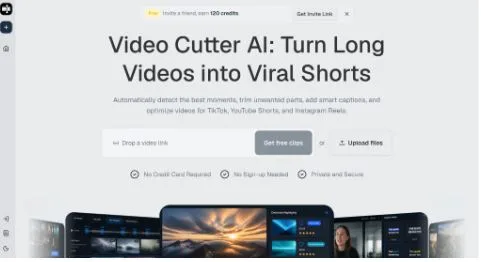
A product demo becomes difficult to follow when it tries to introduce the interface, explain the problem, compare alternatives, and request a signup in one short video. A more useful approach gives each clip one real user question. Video Cutter AI can help locate candidate explanations inside a longer demo, webinar, or tutorial, while the editor shapes each selection into a focused answer.
(Video Cutter AI homepage)
Begin With the User’s Task
Video Cutter AI can detect highlights and valuable moments in long spoken content. During review, favor segments where the speaker names a recognizable task: importing a source, changing a setting, correcting an error, or interpreting a result.
Feature-first clips often begin with interface language the viewer has not learned. Task-first clips begin with the situation and introduce the feature only when it becomes relevant.
Write the Question Before Choosing the Clip
Write one plain-language question above every candidate: “Where can a user change the caption style?” or “What should happen when the source is landscape?” If the selected footage answers several questions partially, narrow the boundary or create separate clips.
The question also guides the opening caption and post copy. It prevents packaging from promising a broader tutorial than the footage delivers.
Keep the Action Readable in Vertical Format
(How to use Video Cutter AI workflow guide)
Auto Reframe can adapt a landscape source to a vertical canvas, but product interfaces often contain small text and controls near the edges. Review the clip on a phone-sized preview. If the relevant menu, cursor, or before-and-after result is unreadable, use a tighter composition or choose footage recorded for vertical viewing.
Let the Screen Lead During the Critical Step
The presenter’s face can establish trust at the opening, but the interface should receive priority during the action that answers the question. Avoid shrinking the screen into an unreadable background simply to keep the speaker visible throughout.
Smart captions should sit away from the button or field being demonstrated. Shorten caption lines when necessary, but do not simplify technical language until it becomes inaccurate.
Trim Setup, Not Necessary Steps
Long demos include login transitions, loading time, navigation, and verbal repetition. Silence and filler removal can tighten the candidate, yet an editor should preserve every action needed to reproduce the result. Cutting from an empty screen to a finished state may make the feature look faster while leaving the viewer unable to follow it.
Use a Beginning, Action, and Result
A practical demo clip can follow three beats. First, state the task or problem. Second, show the action in the correct sequence. Third, show or describe the result. If the result requires another configuration step, include it or narrow the promise.
AI B-roll is rarely the main visual in an interface demo. Use it only when it clarifies an external concept. The product screen is usually the evidence viewers need.
Check Claims and Version Details
Product interfaces change. Confirm that button names, available options, export formats, and limitations match the current version before publishing. The official product page supports claims around AI highlight detection, Viral Score, Smart Captions, Auto Reframe, silence and filler removal, AI B-roll, YouTube-link importing, and MP4 exports. Do not add capabilities the page does not establish.
Keep dates or version notes in the team’s own content record when a tutorial may age quickly. A useful demo is accurate on the day it is published and easy to revisit later.
Conclusion
Avoid packing several product questions into one short demo. Make the user’s task clear, keep the critical interface action readable, and preserve every step required to reach the shown result. Verify the current product language before publishing.
Video Cutter AI (https://video-cutter.ai/) has successfully bridged the gap between long product demonstrations and focused short-form candidates. Highlight detection, captions, reframing, and cleanup can support the first pass while product accuracy and instructional clarity still require human review.
Try Video Cutter AI: https://video-cutter.ai/