From One Product Photo to a Full Campaign: How Image to Image AI Helps Small Retailers Create More
Every Small Retailer Hits the Same Wall With Product Photos
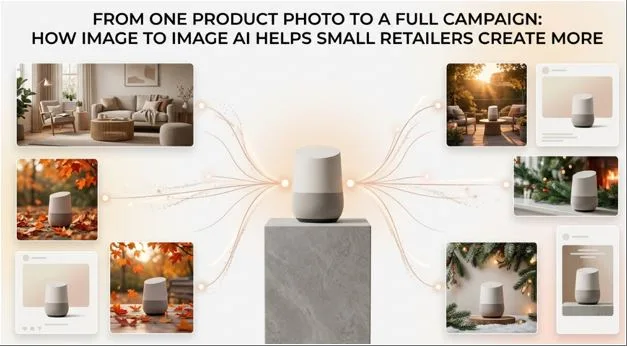
Ask any small retailer what slows down their marketing, and product photography usually comes up fast. A single hero shot of a product might look great on its own, but a real campaign needs that same product in a dozen contexts — different backgrounds, different moods, different formats for different platforms. Hiring a photographer for every variation isn’t realistic on a small business budget, and stock photography rarely fits a specific product convincingly. Image to image AI has quietly become the workaround, letting one photo become the seed for an entire campaign instead of a single, isolated asset.
So What Is Image to Image AI, Exactly?
It Starts With a Real Photo, Not a Blank Prompt
Unlike text-to-image tools that generate a picture from nothing but a written description, image to image AI starts with an existing photo and transforms it while preserving the core subject, composition, and structure. For a retailer, that distinction matters enormously — the goal isn’t a generic AI-generated product shot, it’s their actual product, reimagined in new settings, styles, or moods without needing a new photoshoot each time.
The Handful of Tricks Retailers Use Most
In practice, this tends to break down into a few recurring moves: swapping a plain studio background for a lifestyle scene, changing the mood or color grading to match a seasonal campaign, restyling a photo into a different visual aesthetic for a specific platform, or cleaning up and enhancing a photo that wasn’t shot professionally to begin with. None of these require design software expertise — most tools handle them through a simple text prompt describing the desired change.
Turning One Photo Into a Full Campaign, Piece by Piece
Start With the Strongest Shot You Have
Everything downstream depends on the quality of the source image. A clear subject, decent lighting, and a reasonably high resolution give the AI more to work with and produce noticeably better results than a blurry or awkwardly cropped photo. This is the one step worth not rushing, even if everything after it moves quickly.
Generate a Handful of Contextual Variations
From that single photo, a retailer can generate the product in multiple settings — on a kitchen counter, in an outdoor scene, styled for a holiday theme — by describing the desired background or mood in a prompt. This is where one photo starts to become many: the same coffee mug that was shot once in a studio can appear in a cozy morning scene for an Instagram post and a clean minimalist background for a product listing, without a second photoshoot.
Reshape Each Version for Where It’s Going
Different platforms want different shapes and moods. A square crop works for a feed post, a vertical composition fits a story, and a wider frame suits a banner ad. Because image to
image tools typically let you set an aspect ratio alongside the prompt, one base photo can be reshaped for each format rather than requiring separate source images.
Keep the Whole Set Feeling Like One Campaign
A campaign only feels cohesive if the images share a visual thread — similar color tones, consistent framing logic, a unified mood. Running each variation through the same style or prompt structure helps keep that consistency, so the final set reads as one campaign rather than a scattered collection of unrelated images.
Why This Actually Moves the Needle for Small Budgets
One Shoot Now Stretches a Lot Further
The most direct benefit is obvious: one photoshoot can now generate a season’s worth of content instead of a single static image. For a retailer without an in-house design team, that’s the difference between posting sporadically and maintaining a steady, varied content calendar.
You Can Test Ideas Before Committing to One
Because generating a variation takes seconds rather than days, retailers can try several visual directions for a campaign — different backgrounds, different moods — before deciding which one resonates, instead of committing to one direction based on guesswork alone.
A Consistent Look Without Hiring a Designer
Small businesses often struggle to maintain visual consistency across posts simply because each image comes from a different source or shoot. Generating variations from the same base photo, with a similar prompt style each time, naturally keeps a more unified look without needing a dedicated designer to enforce it.
A Few Things Worth Being Careful About
Garbage In, Garbage Out Still Applies
No amount of AI transformation fully compensates for a poorly lit or low-resolution starting photo. Retailers who get the most out of these tools tend to invest a little more care in the original shot, even a simple phone photo taken in good light, because that quality carries through every variation generated from it.
Not Every Result Will Be Ready to Post
AI-generated variations occasionally introduce small inconsistencies — an odd shadow, a slightly warped edge, a texture that doesn’t quite match the product’s real material. It’s worth reviewing each output before publishing rather than assuming every generation is campaign-ready.
Keep the Product Honestly Represented
There’s a fine line between an appealing lifestyle image and one that misrepresents a product’s actual color, size, or texture. Retailers should keep transformations focused on setting and mood rather than altering details that could mislead a customer about what they’re actually buying.
The Free Version Has Its Limits
Most image to image tools offer a free tier, but usually with limits on resolution, watermarking, or the number of generations per day. For occasional use this is rarely a problem, but a retailer running a large campaign may eventually need a paid plan to get the volume and quality they need.
The Real Shift Happening Here
What’s changed isn’t just the availability of AI tools — it’s the economics of small-scale content creation. A single product photo used to be a single asset. Now it’s a starting point that can branch into dozens of contextually appropriate images, each suited to a different platform, season, or campaign theme, without a proportional increase in cost or time. For small retailers who’ve always been squeezed between wanting more content and having fewer resources to produce it, that shift is a meaningful one.
More Campaign, Less Overhead
Image to image AI doesn’t replace good photography or thoughtful brand direction — it extends both. A well-shot product photo, run through a handful of thoughtful transformations, can carry an entire campaign’s worth of visual variety that would have once required multiple shoots and a design budget most small retailers don’t have. Used carefully, with attention to quality and honest representation, it’s less a shortcut and more a multiplier on the work retailers were already doing.