How to Set Up a Computer Desk That Feels Like Your Own
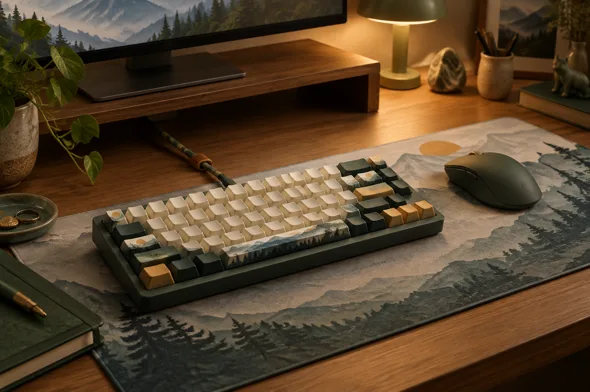
A great computer desk is more than a place to put your screen. It should support comfortable work, keep everyday essentials close, and reflect the way you like to spend time at your computer. With a few practical adjustments—and personal touches like custom keycaps or a custom mousepad—you can build a setup that feels considered without making it complicated.
Start With Comfort and Ergonomics
Before choosing colors or accessories, make sure your desk works for your body. Position your monitor directly in front of you, roughly an arm’s length away. The top of the screen should sit around eye level, so you can look ahead rather than constantly tilting your neck.
Keep your shoulders relaxed and elbows near your sides while typing. Your feet should rest comfortably on the floor, and your keyboard and mouse should be close enough to avoid reaching. Small changes to chair height, monitor position, or keyboard placement can make a long work session feel noticeably better.
Give Every Essential a Place
Clutter makes even a spacious desk feel cramped. Keep the items you use every day within easy reach, and move occasional-use supplies into a drawer or organizer. A simple tray can corral chargers, pens, and small accessories, while cable clips or a desk-mounted cable holder can keep wires from spreading across the surface.
Try leaving a little open space beside your keyboard. It gives your hands room to move and makes the desk easier to reset at the end of the day.
Choose Lighting for the Work You Do
Good lighting helps your desk feel comfortable throughout the day. When possible, place the desk near natural light, but avoid positioning the monitor where windows create distracting glare. A desk lamp can fill in the gaps during cloudy afternoons or evening work.
If you enjoy gaming or creating content, ambient lighting can add atmosphere. Keep it soft enough that it complements the screen rather than competing with it. A consistent color palette across your lamp, accessories, and desk mat can make the whole setup feel more cohesive.
Personalize the Keyboard and Desk Surface
Once the basics are in place, accessories are an easy way to make a workspace feel personal. Custom keycaps can bring a favorite color scheme, illustration, or theme to your keyboard. If you use a mechanical keyboard, check the keycap profile and layout before choosing a set, since those affect both the look and fit. For ideas and customization options, explore GimsunCustom.
A desk mat can define the main work area and bring the keyboard and mouse together visually. When choosing a custom mousepad, think about the size of your desk, the space you need for mouse movement, and whether you prefer a subtle pattern or a more expressive design. A coordinated mat and keycap set can create a strong visual theme without adding extra clutter.
| Desk detail | Practical benefit | Personal touch |
| Monitor at a comfortable height | Encourages a more relaxed viewing position | A clean, centered layout |
| Cable clips or organizer | Keeps cords from spreading across the desk | Minimal, tidy styling |
| Custom keycaps | Refreshes the look and feel of a keyboard | Colors, artwork, or a theme |
| Custom mousepad | Defines the keyboard and mouse area | A pattern or palette that ties the setup together |
| Desk lamp | Adds task lighting | Warm or focused lighting to suit your space |
Make the Setup Easy to Maintain
A desk is easier to enjoy when it is easy to reset. Keep a microfiber cloth nearby for screens and surfaces, and clear away cups, packaging, and unused accessories regularly. Leave enough room to wipe around your keyboard and mouse, and avoid placing liquids where a spill could reach electronics.
It also helps to review your setup after using it for a few days. If you keep reaching for something, move it closer. If an accessory gets in the way, remove it. The best arrangement is the one that supports your actual routine, not just the one that looks good in a photo.
Build a Desk That Works for You
A comfortable computer desk starts with good positioning, useful lighting, and a place for the things you need. Personal details come next. A coordinated color scheme, custom keycaps, and a custom mousepad can turn a functional workspace into one that feels unmistakably yours.