Why Great User Experiences Start With Better Internal Systems
Quick question. Think of the last time a product really annoyed you. Not a small thing, but something that made you stop and message support.
Maybe you had to explain the same problem twice, because the second person had no clue what the first one already knew. Maybe your billing details vanished after an update. Or maybe you were promised a feature at signup, and it never appeared, because your account was never set up right in the background.
In that moment, who do you blame? Most people blame the app. Some blame the support person on the other end. But honestly, the real problem usually starts somewhere you never get to see. It starts inside the company, in the gap between two systems that were never actually talking to each other.
You won’t spot this on day one. The first month might feel great. Then a reply takes longer than it should, an invoice looks off, the stock count on the site doesn’t match the warehouse, and suddenly things feel a bit shaky. Nine times out of ten, that’s not a people problem. It’s a plumbing problem, sitting quietly under the part of the business you can actually see.
That’s really the whole idea behind this article. The companies that are genuinely good at customer experience don’t just polish the interface. They make sure everything running behind it is actually connected.
It’s Not Just About What’s On the Screen
Ask anyone what “good user experience” means, and they’ll probably describe something you can see: a clean layout, an easy signup, and buttons in the right place. Fair enough, that stuff matters. But it’s only the part sticking out above the water.
Here’s a scenario you’ve probably lived through. Signup is smooth. The design looks great. Everything feels fast. Then a few weeks later you message support with a billing question, and the person helping you can’t even see your current plan, because the billing tool and the CRM don’t share information. Now you’re the one explaining your own subscription to them.
Right there, that good first impression is gone. And here’s the part worth remembering: you don’t care which piece of software caused it. You just know the experience wasn’t smooth. To you, it’s one company, one product. Whether it was a “product issue” or an “operations issue” is a line that only exists on someone’s org chart, not in your head as the customer.
So user experience is bigger than design. It’s really the sum of a lot of systems and handoffs working together in the background, all day, every day, and nobody outside the company thinks about any of it until something breaks.
Why This Gets Worse the Bigger a Company Gets
Nobody plans to end up with a messy tech stack. It just happens, almost as a side effect of things going well.
A support tool gets picked because it’s the best one for support. A CRM gets picked for sales, because that’s what the sales team already knows. Then finance gets its own platform, then inventory, then marketing. Each choice makes sense at the time.
For a while, it’s fine. A small team can keep track of how everything connects or just fix the odd mismatch by hand. But growth changes that. More customers means more data flowing everywhere. More people means more handoffs and more chances for two departments to be looking at two different versions of the same customer.
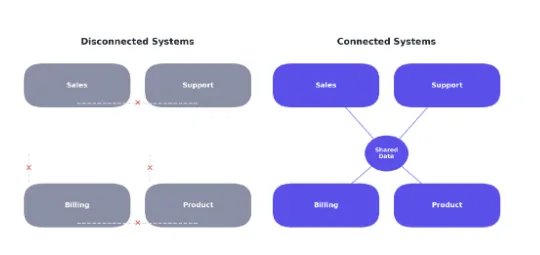
Sales is looking at one record. Support is looking at a different one. Finance has its own copy nobody else can see. Somewhere in there, a five-minute manual fix turns into a weekly chore, then someone’s part-time job. The tools didn’t fail. Nobody ever connected them properly, and the business has been quietly paying for it since.
Disconnected tools vs. tools that actually share data
What Happens Behind the Scenes Doesn’t Stay Behind the Scenes
A lot of teams like to believe messy internal operations are their own private headache and have nothing to do with the customer. It’d be nice if that were true.
It isn’t. Every delay behind the scenes eventually reaches someone on the outside. Think about the agent who asks you to repeat your whole issue because the ticket history didn’t carry over. The invoice charges the wrong plan because billing and usage data live in two places that never talk. The “welcome back” email is pushing a feature you cancelled two months ago.
None of these are big enough alone to cause panic. That’s exactly the problem; they never trigger an emergency meeting. They just slowly wear down how much a customer trusts you to have things together. And this is usually the honest answer to a question a lot of leadership teams ask: why does a rival with a similar product hold onto customers better than we do? It’s rarely about talent. It’s almost always about systems.
Where the Cost Actually Shows Up
Support Feels It First
Support and customer success sit right where every other department meets, so they usually feel this first. Agents spend more time digging for context and less time solving anything. Response times creep up. Satisfaction scores slip. It rarely looks like one big failure. It looks like a slow leak, easy to miss until it’s been happening for months.
Product Feels It Next
Product and UX teams feel a quieter version of the same thing. When usage data, support tickets, and billing history live in separate places, it gets genuinely hard to understand how someone actually experiences your product day to day. Roadmap calls end up leaning on whoever spoke loudest in a meeting, instead of on what the data shows, not because anyone’s being lazy, but because pulling that data together across five tools takes real work.
The Business Feels It Last, and It Hurts the Most
Eventually it lands on retention, which is the part that actually costs money. Customers rarely leave over one huge failure. They leave because a bunch of small annoyances quietly convince them the product isn’t worth the hassle. Disconnected systems are one of the most common causes of exactly that kind of slow damage and also one of the easier ones to fix, once someone actually looks for it.
Buying Another Tool Isn’t the Fix
When operations feel painful, the first instinct is usually to buy something new. Another dashboard, another integration, and one more automation stacked on top of a stack that’s already shaky.
That instinct makes sense, but it usually makes things worse before it gets better, because now that new tool also needs to talk to everything else, one more connection that can break.
The better move is to treat internal systems as part of the product itself, not a side project the ops team handles quietly on their own. Start by mapping how data moves between sales, support, billing, and product. Then close the real gaps on purpose, instead of patching around them one ticket at a time.
This is usually where a good IT or systems integration partner, like AI-IoT Geeks , earns their fee, connecting ERP, CRM, and other operational tools so customer data, billing history, and support records finally stay in sync instead of living in silos. Once those pieces are wired together, things tend to get better for employees and customers almost by themselves, simply because everyone’s finally looking at the same information.
The goal was never to collect more software. It’s software that actually talks to each other.
What Can Product and Customer Success Teams Do About It?
Fixing this isn’t one team’s job alone, but product and customer success are usually the first to notice something’s wrong, which puts them in a good spot to push for change. A few practical strategies, backed by modern digital transformation and managed technology services, are worth trying:
Map the customer’s journey against your actual tools, not just your product screens. Go stage by stage, from signup to renewal, and note which system is supposed to own each bit of the customer’s data. The gaps tend to jump out once you write it down.
Look at support and billing data next to in-product behavior using integrated monitoring and IT managed security practices, instead of pulling separate reports from separate teams. It helps to look at real customer experience examples from companies that already do this well, instead of figuring it out from zero.
Give customer success real visibility into what customers are actually doing inside the product, not just what they type into a support ticket. That alone turns conversations from reactive to proactive. This overview of customer success tools is a decent place to start if you’re figuring out what good tooling looks like.
Treat repeat support tickets as a systems signal, not a training problem. If the same complaint keeps coming back, that’s rarely about an agent needing more coaching. It usually means two systems disagree with each other, and somebody needs to fix that connection instead of closing the same ticket for the tenth time.
Make It a Habit, Not a One-Time Project
Companies that handle this well tend to share one thing: they stop treating “internal operations” and “customer experience” like two separate conversations.
It’s easy to end up with engineering, product, support, and operations all judged on completely different goals, which looks fine on a spreadsheet but quietly works against the customer in real life. A support team judged only on ticket volume has little reason to flag a systems problem that isn’t technically theirs to fix. A product team judged only on shipping speed has little reason to spend a sprint cleaning up data that doesn’t come with a shiny new feature attached.
Fixing that doesn’t need a reorg. It just needs shared visibility into the same customer data and shared ownership of the moments where one system hands off to another.
A Simple Place to Start
You don’t need a massive overhaul to get moving on this. A few practical steps that actually work:
Take an honest look at your current stack, and write down which systems genuinely don’t talk to each other today.
Pick the one gap causing the most tickets or the most manual work, and fix that connection first.
Bring in an integration or IT partner sooner than it feels necessary, before the workaround quietly becomes permanent.
Check the fix from the customer’s side, not just the internal dashboard, to make sure it actually changed anything for them.
Small, deliberate fixes add up faster than most people expect. You don’t need to rebuild your whole stack. You just need to close the two or three gaps doing the most damage and leave the rest for later.
Final Thoughts
Great customer experiences don’t happen by accident.
They are built by businesses that create better systems behind the scenes. When teams have access to the right information and connected tools, they work faster, solve problems more effectively, and deliver a smoother experience for customers.
Improving customer experience is not only about better product design or stronger customer support. It also depends on how well a company’s internal systems work together. When technology removes unnecessary complexity, employees can focus more on creating value instead of managing disconnected processes.
For businesses looking to build a stronger technology foundation, working with experienced IT service providers like Aiiotgeeks can help simplify workflows, improve system integration, and create scalable solutions that support long-term growth.
Customers may never see the technology working behind the scenes, but they will always notice when everything works smoothly. Companies that invest in connected systems are not just improving efficiency—they are creating better experiences that keep customers engaged and coming back.
About the Author
The AI-IoT Geeks Team writes and works on IT services, ERP and Odoo consulting, and systems integration for growing businesses. They help companies connect the operational tools running behind the scenes, so teams and customers are finally looking at the same information.