Trending AI Video Effects: Why Your Feed Is Full of Moving Photos
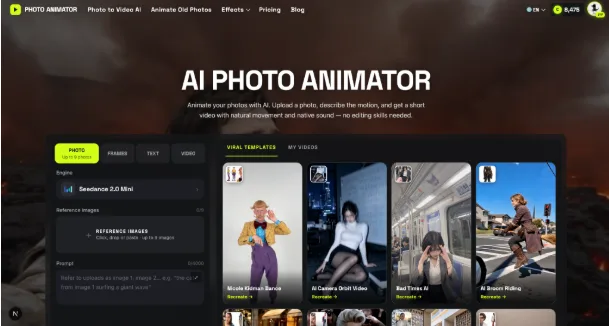
| Scroll any short-video app for five minutes and you will see it: a still photo that suddenly turns its head, a couple who were never in the same room sharing a hug, a pet that breaks into a dance. These clips are not made by animators. They come from AI video effects that turn one or two ordinary photos into a few seconds of motion.
What started as a novelty has become a format of its own. Here is what is driving it, which effects people keep returning to, and what to think about before you post one. Why Photo-to-Video Effects Spread So FastMost viral formats ask something of the viewer: a skill, a costume, a good camera. AI effects ask for almost nothing. A selfie from your camera roll is enough. Three things make them shareable:
That last point matters. When the scene is fixed, thousands of people can post their own version of the same idea, which is exactly how a trend forms. The Effects People Keep Coming Back ToTrends rotate quickly, but a few categories show up again and again. 1. Hug and kiss effectsTwo photos go in, and the people in them embrace. These are popular for anniversaries, long-distance relationships, and reuniting with someone who has passed away. They are also the effects most likely to make viewers emotional in the comments. 2. Dance and celebration clipsA single full-body or half-body photo becomes a short dance. These work best for light, playful posts — birthdays, wins, Friday-afternoon energy. 3. Cinematic camera movesInstead of making the subject move, the camera does: a slow orbit, a dolly zoom, a dramatic push-in. Travel photos and portraits suddenly look like a film trailer shot. 4. Transformation effectsTurn into a superhero, an anime character, a figurine, or an older or younger version of yourself. These tend to peak around film releases and holidays. If you want to see what is moving right now rather than reading a list, browsing a regularly updated gallery of trending AI video effects is the quickest way to spot which scenes are catching on before they saturate your feed. How to Make One in Under Five MinutesThe workflow is nearly identical across tools:
For people who just want to try it without installing anything, a browser-based AI photo animator handles the whole process: upload, pick a scene, download the clip. A Practical Checklist for Better ResultsSmall choices make the difference between a clip people rewatch and one they skip:
Old Photos Are Getting a Second LifeOne of the quieter but more touching uses is family history. People scan prints from the 1960s or 1980s and watch a grandparent blink, smile, or turn toward the camera. A common approach is to restore the scan first — fix scratches, sharpen the face — and then bring old family photos to life with a subtle motion effect rather than a flashy one. Gentle movement tends to feel respectful; exaggerated effects can feel jarring when the subject is someone you lost. The Questions Worth Asking Before You ShareThe technology is fun, but it raises fair questions:
What to Watch NextAI video effects are moving from novelty to everyday tool, the same path photo filters took a decade ago. The next wave is likely longer clips, more control over motion, and effects tied to live events. The useful habit for now: treat each trend as a template, not a script. The clips that travel furthest are the ones where someone brought a photo that only they had. |