Practical AI Video and Image Creation: A Guide for Modern Content Creators
Artificial intelligence is changing how creators, marketers, and social media users produce visual content. Tasks that once required advanced editing skills, expensive software, and hours of work can now be completed with AI-powered tools. From generating images using text prompts to transforming still photographs into animated clips, these technologies offer new ways to communicate ideas and engage audiences.
How AI Is Changing Visual Content Creation
Traditional video and image production often involves multiple stages, including planning, designing, editing, and rendering. AI tools can simplify several of these steps by turning written descriptions and reference images into visual assets.
For creators working with tight deadlines, this approach can make experimentation easier. Instead of building every visual element from scratch, users can describe their ideas and explore different styles, compositions, and creative directions. The results can then be reviewed and refined to match the project’s purpose.
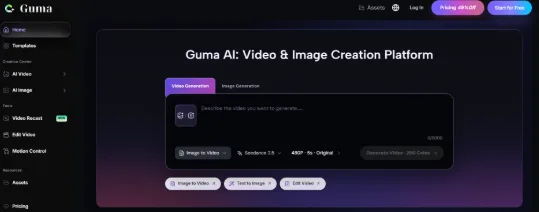
Browser-based platforms such as Guma AI provide a convenient starting point for people who want to explore AI-assisted image and video creation without relying entirely on traditional production workflows.
Creating Short-Form Content for Social Media
Short-form videos have become an important part of content strategies across platforms such as Instagram, TikTok, and YouTube. Creators need fresh visuals that communicate a message quickly and encourage viewers to keep watching.
AI-generated images and videos can help produce backgrounds, visual concepts, animated scenes, and supporting footage. For example, a travel creator could develop imaginative destination visuals, while an educational account might use AI-generated scenes to explain a complicated concept.
However, effective social content still requires a clear message. Creators should consider their audience, choose an appropriate visual style, and make sure the final result supports the story rather than distracting from it.
Improving Product Visuals and Marketing Campaigns
Businesses can also use AI-generated visuals to explore ideas for advertising campaigns, product presentations, and promotional content. A small business might experiment with different backgrounds for a product image, while a marketing team could create several visual concepts before committing resources to a larger campaign.
These tools can be particularly useful during the planning stage. Teams can compare creative directions, test different moods, and prepare draft visuals for review. This process may reduce the time needed to develop early concepts.
Accuracy remains important, especially when generating product imagery. Businesses should check that AI-generated visuals represent their actual products correctly and avoid presenting fictional features or misleading details in advertisements.
Turning Static Photos Into Motion Content
One of the more practical applications of generative AI is transforming a still image into a moving scene. Rather than beginning with recorded footage, creators can use an existing photograph or generated image as the starting point for a short video.
An image to video workflow can help bring visual concepts to life by adding movement, creating animated scenes, or developing short clips from reference images. For example, a photographer might animate a landscape with subtle camera movement, while an online retailer could explore motion-based product presentations.
The quality of the result often depends on the source image, the clarity of the instructions, and the type of movement requested. Simple, specific prompts can help establish the intended motion and reduce unexpected changes between frames.
Best Practices for Better AI Results
Getting useful results from AI tools involves more than entering a short prompt. Creators should describe the subject, setting, lighting, mood, and desired visual style as clearly as possible. Reference images can also help communicate details that are difficult to explain through text alone.
It is equally important to review generated content before publishing. Check for visual inconsistencies, distorted details, and unnatural movement