AI Filmmaking Tools Are Moving From Prompts to Shot Lists
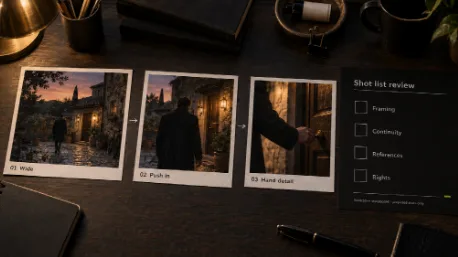
Imagine a proposed short film scene: a performer crosses a courtyard at dusk and stops at a door. The shot list calls for a wide view first, a measured move closer, then a pause on the performer’s hand. Even before a camera rolls, those notes tell the crew where attention should go. AI filmmaking tools are starting to put some of those choices on screen as selectable controls.
The questions are what those controls describe, where they might help, and who checks the footage and its rights.
What AI Filmmaking Tools Put in a Shot List
A text prompt can name a courtyard and a door. A shot list has to settle more: how much of the location appears at the start, when the camera moves, whether the performer stays in frame, and what the cut should reveal. For the imagined scene, a broad opening loses its purpose if the move reaches the door before viewers understand the space.
Lighting and color also carry decisions. Dusk may call for contrast between the fading sky and a lit doorway. A reference frame shows the intended palette; later generated frames still need comparison against it. Specific choices give colleagues something to discuss before an editor inherits an ambiguous clip.
The selections make the decisions visible. The shot list still belongs to the people making the film, who must decide whether the proposed framing serves the scene.
One Director’s Panel as a Public Example
One public example is WaveSpeedAI’s Cinema Studio. Its page shows a director’s panel with separate References, Film setup, Camera, Color palette and Lighting cards. Film setup includes genre, era and tempo; the Camera card offers body, lens and aperture selections. For the hypothetical doorway, a filmmaker might specify the starting frame and a push in, then choose a cooler exterior color against the door light. Those choices describe an intention, not a verified output.
WaveSpeedAI lists 18 camera options, including Static. One of the 18 therefore keeps the camera still. Its page also says users can add image, video or audio references, mention them with @ in a prompt, and keep characters or places in Assets for later shots. Reusing a reference provides a point of comparison; editors still need to check character and location continuity across takes.
The public page lists Seedance 2.5, Wan 3.0 and MiniMax H3 among model choices. That is a description of the published interface, not an account-level test of availability or performance. It says the selected controls are written into a shot description and that users can inspect the prompt sent to the model. The useful production step is to compare that description with the original shot list before any output is judged.
Proposed dusk doorway shots on paper and a review list. This is a hypothetical concept, not a generated film or a tested Cinema Studio output.
Three Productions, Three Different Reviews
The same doorway idea would face different scrutiny in a commercial, a music video and an AI short film. The review column names work for people, not a generator feature.
| Production | Proposed use of a control | Human review before release |
| Commercial | Choose a move and lighting for a concept shot | Check approved brand imagery and every visible product claim. |
| Music video | Match movement and color to a track | Clear music and performance rights; test the cut against the actual beat. |
| Short film | Reuse character and location references | Check continuity, performance and the final edit across shots. |
In an ad, the doorway might frame a product. A polished take is unsuitable if its label or shape differs from the approved object. In a music video, movement could miss the track’s rhythm or rely on an uncleared recording. In a short film, one attractive shot may cut badly against the next, even with the same reference files. Selecting a camera move settles none of these judgments.
A Selected Move Is Still a Proposed Move
Suppose the planned push in ends on the performer’s hand, but a candidate clip reaches the doorway too early. The team should compare the start and end frames with its shot list, watch the subject throughout the move, and check what changes in the background. A still image from the middle would hide a failed transition.
The review also catches a shifting hand, an altered door, or light that changes direction between cuts. Does the footage communicate the intended action and join the surrounding scene? If not, the team can revise the description, try another take, simplify the move, or film that portion conventionally.
An AI video camera control makes an instruction legible. For the proposed doorway scene, an assigned editor should receive the planned first and last frames alongside the take, so the review has an agreed target.
Copyright, Consent and Crew Work
Who supplied the courtyard image, the performer’s likeness and the music? Those inputs need rights checks before they become references. Separately, the ownership of generated output depends on what people actually contributed.
In its report on copyrightability of AI outputs, the U.S. Copyright Office says protection can apply where a human author determines sufficient expressive elements, including creative arrangement or modification; under that analysis, a prompt alone is insufficient. That is the Office’s analysis of U.S. copyright, not a ruling on this hypothetical film or every country’s law.
Consent matters as much as source files. The example assumes a performer who has agreed to participate, yet permission for a shoot would not by itself answer every question about a reusable digital likeness. A production should specify the intended use and check its agreements before using a person’s image as an AI reference. A generated figure that resembles an identifiable actor raises a different problem from a plainly fictional silhouette.
SAG-AFTRA said its members ratified a 2026 TV/Theatrical agreement that builds on digital-replica protections and adds restrictions on synthetics. That makes digital likenesses and synthetic performers bargaining issues in covered productions. The announcement supplies no count of jobs lost to AI, and the contract is not a worldwide rule.
Choosing a lens setting on a screen does not supply a performance, compose a cut, or clear a soundtrack. Directors, performers, cinematographers, editors and rights staff may each have a different reason to reject the same clip. The interface can expose creative choices to them; they retain responsibility for those decisions.
Who Signs Off the Final Cut
Return to the hypothetical dusk scene. A usable clip has to hold the planned move, preserve the performer and location, fit the next shot, and pass the project’s rights review. If any one of those fails, its surface polish is beside the point.
Before generating, a team could add one column to the doorway shot list: who will check each decision. Put a name beside framing, continuity, source material and final approval. Then review the candidate footage against that list before it enters the edit. The person signing off the cut needs the evidence, not merely the selected preset.