The “My Beloved” Heart Locket GIF: Where the Internet’s Sweetest Meme Came From, and How to Make Your Own
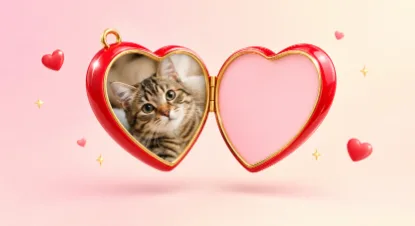
Someone posts a photo of their cat in a group chat. A reply appears a second later: a glossy red heart locket swings open, the cat’s face sits inside, and the words “my beloved” fill the other half. The heart locket GIF has been one of the internet’s most reliable reactions for years, and it shows no sign of fading.
This guide covers what the heart locket GIF is, how it went from an obscure 2008 web animation to a Times Square billboard, why it keeps coming back, and how to make your own in a few minutes.
What is the heart locket GIF?
The heart locket GIF is an animated meme in which a shiny red 3D heart-shaped locket opens to reveal a picture on one side and a caption on the other, usually a name followed by “my beloved”. People use it to show affection for a person, pet, character or object, sometimes sincerely and often ironically.
Where the “my beloved” meme came from
The animation is older than the meme. According to Know Your Meme, developer Paul Fitzpatrick added a 3D heart locket to MakeSweet, a site that places your images onto animated objects, in February 2008, with a sharper version following a month later. For more than a decade, it was a niche novelty.
That changed in October 2020:
- Early October 2020: an edit of Bingus, a hairless cat, with the caption “bingus my beloved” went viral in a Discord server dedicated to the cat.
- 11 October 2020: the GIF was uploaded to Tenor, which made it easy to share in chats and on social media.
- Late December 2020: MakeSweet reported a sudden surge in traffic linked to the meme.
- Early 2021: fan communities on Tumblr and Twitter turned it into a template for characters, celebrities, and in-jokes, and dedicated accounts posted new versions daily.
- June 2021: fans of the streamer Ranboo placed a “my beloved” heart locket GIF on a digital billboard in New York’s Times Square.
In less than a year, a 2008 web toy had become a shared language for affection online.
Why the heart locket meme keeps coming back
Most memes burn out in weeks. The heart locket keeps returning, for a few clear reasons.
The contrast is the joke. A locket is a sentimental keepsake. Putting a cartoon villain, a bowl of noodles, or a houseplant inside it creates instant comedy.
Fandoms love it. Anime, games, and TV characters are natural “my beloved” material, and fan communities share new versions constantly.
It is easy to make. One photo and two words are all it takes.
It works as a reply. When someone asks “post the thing you love”, the locket answers without a single typed word.
It has seasonal moments. Valentine’s Day, anniversaries, and best-friend birthdays give people a fresh reason to make one.
How to make your own heart locket GIF
Making one no longer requires animation software or a paid template. You can make your own heart locket GIF in a web browser: add a photo, type a caption such as “my beloved” or choose a second photo, then set the speed and background. The animation is drawn on your own device, so the photo is not uploaded anywhere, and the downloaded GIF has no watermark.
Here is how to get a good result with any maker:
- Pick the photo. Faces and pets work best. Close-ups and square photos need the least adjusting.
- Frame it inside the heart. A heart is wide at the top and narrow at the bottom, so place the face in the upper middle and leave a little space at the rim.
- Write the caption, or add a second photo. The classic format is “[name] my beloved”. Short captions of two to four words look largest and clearest. For a couple locket, put a second photo on the other side instead.
- Choose the style, speed, and loop. Pick the caption colour, the colour inside the locket and the background. Let the locket stay open like the original, or have it close again before repeating so the loop looks seamless in chats.
- Download and share. Send it in your chat, post it as a reply, or save it for later.
Five heart locket ideas that work
- Pets: the most popular use, and the format’s origin.
- Couples: a two-photo locket for anniversaries and Valentine’s Day.
- Best friends: a birthday surprise in the group chat.
- Characters and fandoms: a Discord server favourite.
- The ironic one: pizza, your car, a new keyboard, or a houseplant you have kept alive for a year.
Getting it to look right in chats and stories
Size and background decide whether your heart locket GIF looks crisp or messy once it is posted.
| Where it is going | Suggested size | Background |
|---|---|---|
| Discord or Slack reaction | 320 × 240 | Match the theme (black or white) |
| WhatsApp, iMessage, Telegram | 480 × 360 | White or pink |
| Bigger screens | 640 × 480 | Pink or black |
| Sticker over other content | 480 × 360 | Transparent |
One tip: GIF transparency has no soft edges. Each pixel is either fully visible or fully transparent, so a transparent locket on a dark chat can show a slightly jagged outline. For the cleanest edge, use the chat’s own background colour instead.
A note on privacy
People put photos of partners, children and pets in their lockets. Where you can, choose a tool that creates the GIF in your browser instead of uploading the photo to a server, and be wary of apps that require an account just to export a file.
Frequently asked questions
What does “my beloved” mean in the meme?
It is an affectionate caption, often used ironically. The humour comes from what you put inside the locket.
Can I make a heart locket GIF without a watermark?
Yes. Several browser-based makers export without a watermark.
Can I put two photos in the locket?
Yes. That is the couple version: one photo on each side.
Will it work on Discord and WhatsApp?
Yes. A GIF of 320 to 480 pixels wide is a sensible size for chats.
Conclusion
The heart locket began as a small web animation in 2008 and grew into one of the internet’s favourite ways to say “I love this”. It has travelled from a cat-themed Discord server to Times Square, and it returns every time someone needs a quick, affectionate reply. Making your own heart locket GIF now takes a photo, a caption, and a couple of minutes.