What Small Sellers Should Check in an AI Video Generator
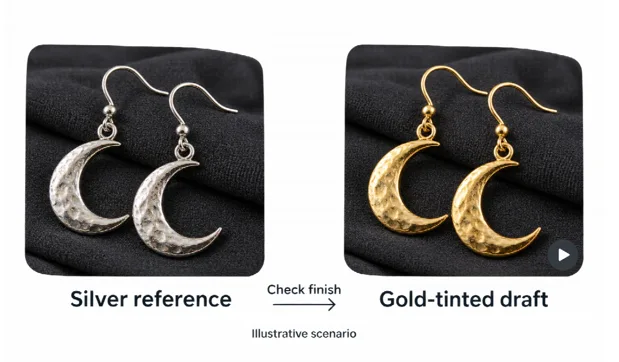
Consider a hypothetical Birmingham jewelry seller, Aisha, preparing a video of handmade silver moon earrings. In this imagined example, an AI-generated version turns the silver gold. The motion looks plausible, but the item now appears to be a different product. This is an illustration, not a reported test or an error attributed to a particular platform.
For a seller considering an AI video generator, company announcements explain what providers are promoting. Product accuracy, material rights, and publishing requirements need separate scrutiny before a clip reaches shoppers.
Separate a Model Announcement From Market Evidence
On Aug. 7, 2026, a company release distributed through PR Newswire announced the addition of Seedance 2.5 and MiniMax H3 to a video platform. Product visuals were among the uses described on its feature page. For a small seller, that gives a concrete offering to investigate, including whether its output can accurately show one item for sale.
The release describes one provider’s offering. It establishes neither how many independent sellers use the service nor what happens to their sales. It also leaves the suitability of an individual output untested.
Aisha’s hypothetical problem brings the question down to one item. The relevant checks are whether the video represents her silver earrings accurately, whether she has permission to use its elements, and whether it meets the destination’s current requirements.
Read What an AI Video Generator Actually Offers
The announcement came from Wizstar, which said it had added the two models. Its release records the company’s claim; it does not independently establish either model’s performance.
The Wizstar AI video generator page lists text-to-video, image-to-video, and reference-to-video routes. It describes starting with a prompt, script, image, or reference, then choosing a model and setting style, aspect ratio, and format. Product visuals and marketing campaigns appear among its stated uses.
Those descriptions help identify what a seller might investigate. They provide no evidence that Aisha’s engraving would survive generation or that an output would meet her shop’s publishing requirements. Account access, the actual file, and applicable permissions still need checking.
There is also a simpler production option. A seller can arrange authorized product photographs in an ordinary editor, retaining documented views instead of generating new motion. The choice depends on what the proposed video needs to show.
Compare Every Frame With the Real Earrings
In the hypothetical silver-to-gold example, the first decision is to withhold the inaccurate clip. An attractive sequence is unsuitable for a product listing when it depicts the wrong finish. Aisha would need to correct it or use another treatment that preserves the item’s appearance.
Illustrative scenario, not a real tool test: the same crescent earrings appear silver in the reference and gold in the draft. Withhold a clip with this mismatch until it accurately represents the item.
The original photographs and actual earrings provide the reference. A reviewer should compare the silver finish, moon shape, pair count, and visible fittings throughout the retained footage. Pausing only at the opening frame leaves changes later in the sequence unchecked.
The engraving creates a separate problem. If the back of an earring appears, its letters need checking against an authorized close-up and the item itself. A generated turn that reveals an undocumented back supplies invented detail. A front photograph alone cannot verify that view.
| Product fact | Reference for the check | Response to a mismatch |
| Silver finish | Actual earrings and approved photographs | Correct or remove the affected sequence |
| Moon shape and fittings | Documented views of the same item | Reject altered product details |
| Back engraving | Verified close-up and the real inscription | Replace inaccurate or unsupported lettering |
Compare the lighting in the retained image with the actual product and the approved photographs. Calling a gold-looking result a lighting effect would leave the buyer-facing mismatch unresolved.
The final export needs another review after cropping, titles, or other edits. Keep the source photographs beside the file being checked. If a detail is too small to inspect, obtain a clearer reference or omit that shot. Guessing at the lettering would undermine the purpose of showing it.
Check Rights Before Commercial Use
A seller needs permission for the inputs as well as an accurate output. For Aisha’s imagined shop, that means establishing the right to use the product photographs and any additional visual or audio material. A photograph found online is not cleared merely because it depicts a similar item.
The chosen tool’s current terms also need reading for the intended commercial use. Access to a download and permission to use its contents are different questions. A feature page advertising product videos cannot settle every rights question about a particular shop’s asset.
Music and stock material deserve their own review. Keep the relevant license or permission record with the source file, and check that it covers the intended destination and use. Where ownership or permission remains unclear, leave the material out until the question is resolved.
Keep the rights review attached to the actual version. Replacing an image or soundtrack introduces a new element to check, even when the rest of the video remains approved.
Review the Publishing Platform’s AI Rules
Name the destination before checking its rules: a shop website, marketplace listing, and social post can involve different requirements. Aisha would need the current guidance for her chosen service and selling region. Her Birmingham location alone cannot determine which disclosure procedure applies.
Check the destination’s guidance for this kind of product clip, then establish whether it requires an AI disclosure and how to apply one. Record the rule checked, the date, and the final asset it covers. Inspect the available posting preview as well as the downloaded file.
Product accuracy still needs checking after disclosure. Labeling the imagined gold-colored clip as AI-generated would still show the wrong finish. Correct the product representation before considering publication; a label is no substitute for that correction.
Start With One Verified Product Clip
In this illustration, Aisha should consider publishing only after the silver finish, engraving, permissions, and destination checks are resolved. No upload or successful regeneration is assumed. Starting with one product keeps the source material and decisions traceable before the shop considers other items.
A first-clip checklist can stay short:
- Compare color and material with the actual product.
- Check shape, fittings, and every visible word.
- Confirm rights to photographs, music, and other inputs.
- Review the tool’s current commercial-use terms.
- Check the destination’s AI disclosure and publishing requirements.
If a clip is eventually published, accessible customer feedback can inform the next review. Until then, the immediate question is whether this file accurately presents this pair of earrings.