Touchscreen MacBooks Are Here Which Portable Monitors Support Touch on macOS
Apple finally introduced a touchscreen MacBook Pro in 2026, but its steep price may put it out of reach for many buyers. If you want to add touch controls to your Mac at a lower cost, is there a ready-made solution?
Yes—there is..
EHOMEWEI designs portable monitors with the Mac ecosystem in mind. Several models support touch interaction with macOS, iOS, and iPadOS. Pair one with an active stylus, and you can tap, write, sketch, and annotate on your Mac. A single USB-C connection also makes it easy to add screen space for mobile work, digital art, and multitasking across displays.
Use the guide below to find an EHOMEWEI touchscreen monitor that fits the way you work.
Affordable Everyday Touchscreen Monitors
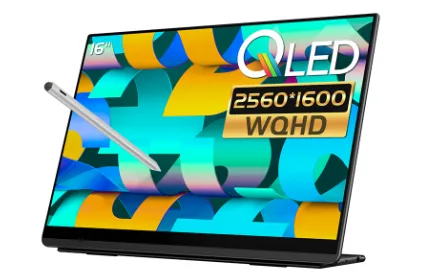
Q3 — 16-inch QLED
Specs: 16-inch QLED panel; 2560 × 1600 resolution; 115% sRGB color gamut; 400 nits peak brightness.
Stylus: Active stylus with 4,096 levels of pressure sensitivity.
Highlights: An affordable entry point for adding touch to your Mac. Its 2.5K resolution and QLED color performance make it a practical choice for everyday work, document annotation, and casual sketching. It supports touch input with macOS and iOS, connects through a single USB-C cable, and works with EHOMEWEI’s in-house software for easy switching between Mac and Windows.
N2 — 16-inch Hummingbird Display
Specs: 2560 × 1600 resolution; 120Hz refresh rate; 100% DCI-P3 color gamut; 400 nits peak brightness.
Stylus: Active stylus with 8,192 levels of pressure sensitivity.
Highlights: A well-rounded option that combines a smooth 120Hz refresh rate, a wide color gamut, and an 8,192-level pressure-sensitive stylus at a more accessible price. It offers a full range of Mac touch controls in a slim, lightweight design that slips into a laptop bag, making it easy to add a touchscreen while traveling or working at a coffee shop.
High Refresh Rate Touchscreen Monitors
Q8g — 16-inch High Refresh Rate Display
Specs: 16-inch display; 2560 × 1600 resolution; 144Hz refresh rate; 100% DCI-P3 color gamut; 400 nits peak brightness.
Stylus: Active stylus with 4,096 levels of pressure sensitivity.
Highlights: An entry-level high refresh rate touchscreen that pairs 144Hz performance with a wide DCI-P3 color gamut. It supports touch and handwriting on Mac while also handling gaming and entertainment. The 16:10 aspect ratio works well for productivity and watching videos, making it a versatile choice for users who want one screen for work and play.
D6 Air — 17.3-inch High Refresh Rate Display
Specs: 17.3-inch display; 2560 × 1440 resolution; 265Hz refresh rate; 100% sRGB color gamut; 350 nits brightness.
Stylus: Active stylus with 4,096 levels of pressure sensitivity.
Highlights: A large 17.3-inch screen and ultrafast 265Hz refresh rate deliver exceptionally smooth motion for gaming, movies, and quickly scrolling through documents. It supports touch input with macOS and iOS, connects via USB-C, and can connect directly to Nintendo Switch 2 without a dock. It suits gamers, entertainment enthusiasts, and anyone who needs a larger secondary display for work.
Samsung OLED Monitors with Wide Color Gamuts
RO10 Pro — 16-inch Samsung OLED
Specs: 16-inch display; 3200 × 2000 resolution; 120Hz refresh rate; 100% DCI-P3 color gamut; 100,000:1 contrast ratio; 400 nits peak brightness.
Stylus: Active stylus with 4,096 levels of pressure sensitivity.
Highlights: A self-emissive Samsung OLED panel delivers high contrast and rich, clean colors, while its 3.2K resolution brings finer detail to your Mac workspace. It supports automatic screen rotation, touch input with macOS and iOS, a single-cable USB-C connection, and direct connection to Nintendo Switch 2.
M6 Air — 16.3-inch Samsung OLED
Specs: 16.3-inch Samsung OLED panel; 3840 × 2400 resolution; 90Hz refresh rate; 100% DCI-P3 color gamut; 100,000:1 contrast ratio; 400 nits peak brightness.
Stylus: Active stylus with 8,192 levels of pressure sensitivity.
Highlights: The self-emissive OLED panel delivers rich colors and deep blacks, with color accuracy suited to illustration, photo editing, and video color grading. Its ultra-high 4.5K resolution keeps text crisp and finely detailed on Mac. It supports touch input with macOS and iOS, connects through a single USB-C cable, and uses EHOMEWEI’s in-house software for compatibility with both Mac and Windows.
Large Touchscreen Monitors for the Desktop
M2 Pro — 23.8-inch Large Screen
Specs: 3840 × 2160 resolution; 60Hz refresh rate; 100% sRGB color gamut; 1,200:1 contrast ratio; 400 nits peak brightness.
Stylus: Active stylus with 8,192 levels of pressure sensitivity.
Highlights: This large 23.8-inch portable monitor comes with a height-adjustable metal stand that pivots between landscape and portrait orientations, making it suitable as a primary desktop display. Its 4K resolution and sRGB color gamut provide a comfortable workspace for documents, UI design, and website testing. It also supports touch and handwriting on Mac.
High Refresh Rate Mini LED Monitors
M2 Air — 16-inch Mini LED
Specs: 2560 × 1600 resolution; 240Hz Mini LED display; 100% DCI-P3 color gamut; 1,000 nits brightness.
Stylus: Active stylus with 8,192 levels of pressure sensitivity.
Highlights: Mini LED backlighting delivers high peak brightness and striking HDR visuals. The ultrafast 240Hz refresh rate keeps creative work, video editing, and gaming smooth and free of motion trails, while the wide DCI-P3 color gamut supports vivid color reproduction. It also supports touch and handwriting on macOS, bringing creative work and entertainment together in a portable setup.
Dual Screen Monitors
X8 Max — 18.4-inch 4K Dual Screen
Specs: 3840 × 2160 resolution; 60Hz refresh rate; 100% sRGB color gamut; 350 nits brightness.
Stylus: Active stylus with 8,192 levels of pressure sensitivity; touch and handwriting supported on both screens.
Highlights: A large, foldable dual-4K setup with Mac touch support on both screens. The vertically stacked layout lets you view code, documents, and web pages at the same time, with separate windows spread across the two displays.
X2 Air — 14.2-inch 2.8K Dual Screen
Specs: 2520 × 1680 resolution; 90Hz refresh rate; 100% sRGB color gamut; 400 nits brightness.
Stylus: Active stylus with 4,096 levels of pressure sensitivity; touch and handwriting supported on both screens.
Highlights: A smaller, more portable dual-screen option with a 90Hz refresh rate. The 15:10 aspect ratio provides extra vertical workspace, making it a convenient choice for working on the go.
X2 Plus — 17-inch 2.5K Dual Screen
Specs: 2560 × 1600 resolution; 100% DCI-P3 color gamut; 400 nits brightness; built-in orientation sensor.
Stylus: Active stylus with 4,096 levels of pressure sensitivity; touch and handwriting supported on both screens.
Highlights: A wide-gamut DCI-P3 option for users who need richer color reproduction. A built-in orientation sensor detects how the display is positioned for more responsive orientation handling.
X2 Pro — 16-inch 2.5K Dual Screen
Specs: 2560 × 1600 resolution; 115% sRGB color gamut; 400 nits brightness; virtual keyboard support.
Stylus: Active stylus with 4,096 levels of pressure sensitivity; touch and handwriting supported on both screens.
Highlights: A 100% DCI-P3 color gamut and a built-in virtual keyboard let you combine typing with handwriting for a more paperless workflow.
X2 — 16-inch 1080p Dual Screen
Specs: 1920 × 1200 resolution; 100% sRGB color gamut; 400 nits brightness; virtual keyboard support.
Stylus: Active stylus with 4,096 levels of pressure sensitivity; touch and handwriting supported on both screens.
Highlights: An affordable entry-level foldable dual-screen monitor for users who want to try a dual-touchscreen Mac setup and multitask across multiple displays.