Top Elearning Platforms: Curated Instructors vs Open Marketplaces With $10 Sales
A Udemy flash sale can drop a coding course to $9.99, while a live Maven cohort costs far more. The gap comes down to who can teach and how tightly each lesson is reviewed. Curated catalogs, think GoSkills or Coursera, vet every instructor; open marketplaces like Udemy let almost anyone publish, trading consistency for speed. After Coursera completed its combination with Udemy on May 11, 2026, both approaches now live under one corporate roof but in separate apps. This guide compares 15 leading platforms through that supply-model lens so you can pick the right match quickly.
Quick answer
Choose Coursera for university-recognized credentials, GoSkills for bite-sized workplace tips, Udemy for sub-$10 niche skills, DataCamp for interactive data drills, Pluralsight for deep, peer-reviewed tech tracks, and Maven when live peer feedback keeps you on task. Always weigh the platform’s supply model, not just the sticker price, before you enroll.
Curated vs. marketplace: why the gate matters
What “curated” really means
On a curated platform, no one taps Publish after a single webcam take. A content team screens every expert, approves outlines, and reviews final videos before anything goes live.
According to Pluralsight, the platform accepts only 5.5 percent of author applicants, and each course goes through a review for audio and video quality as well as a peer review. The gate steadies production values and spares learners the guesswork of sorting fresh Excel lessons from obsolete Python walkthroughs. GoSkills provides a soft-skills counterpart: courses are taught by expert instructors and broken into short 3-7 minute lessons with quizzes and tests along the way, a micro-learning format designed for retention. Enterprises favor the model because a smaller, vetted catalog is easier to roll out, track, and secure.
The trade-off is choice. Curated libraries feel intentional, yet niche topics can lag fast-moving tech. A Kubernetes update may appear on Udemy within days; a studio-produced module can need weeks of scripting, filming, and QA before release. Keep that speed-versus-certainty equation in mind as we tour the curated platforms.
What an open-marketplace platform means
Marketplaces reverse the gate. Almost anyone with expertise can sign up, record a course, and join the catalog. That freedom balloons supply: Udemy lists hundreds of thousands of courses, and prices often fall to the $9.99 sale floor buyers celebrate.
Choice now rests with you: preview lectures, scan reviews, and confirm update dates before clicking Enroll. The upside is speed; when a new JavaScript framework lands, an instructor can publish a walkthrough within days. The downside is uneven quality. Ratings lag reality, promo videos can mask stale code, and refund or lifetime-access terms vary, so read the fine print, especially on trials that auto-renew.
If Udemy is your starting point, the platforms below give you more comparison points.
Now that we’ve mapped the two supply models, let’s see how we selected the 15 platforms that matter.
How we picked the 15 platforms that matter
First, we set guardrails. Every platform on the list:
- accepts learners in the United States today;
- publishes clear, public pricing;
- hosts courses from multiple instructors or partner institutions.
Single-brand academies, pure LMS software, and K-12-only sites stayed out.
Second, we looked for a documented quality process. Whether it is Pluralsight’s strict audition or Udemy’s open upload flow, that workflow had to be public so readers can judge the trade-offs.
Third, we needed independent evidence that each business is active: recent reviews, mobile-app listings, or public filings. These filters removed young firms with no external footprint.
Our scoring lens
We rate platforms within their own supply model, because a university MOOC and a $10 marketplace serve different goals.
- Course quality & freshness, 30 percent.
- Applied practice & engagement, 20 percent.
- Real-world value for the price, 15 percent.
- Credential utility, 15 percent.
- Enterprise readiness, 10 percent.
- Reputation & support, 10 percent.
Why we don’t score completion rates
Completion sounds objective until you probe the denominator. Different audiences, course lengths, and definitions of “finished” make completion numbers impossible to compare across platforms. We focus instead on engagement features (projects, labs, live cohorts) where progress is visible and measurable.
With criteria set, we can meet the curated platforms, starting with the coffee-length lessons that made GoSkills famous.
Top eLearning platforms at a glance
Here is the full landscape in one scroll-friendly snapshot. Treat prices as reference points: promotions and enterprise quotes change quickly, so confirm on each platform’s pricing page.
| Platform | Best for | Supply model | Entry pricing | Free study | Credential tier | Access after cancel |
| GoSkills | Bite-sized workplace skills | Curated | $39 / mo or $249 / yr | 7-day trial | Certificates + CPD | No |
| LinkedIn Learning | Career-visible upskilling | Curated | Monthly or annual subscription | Trial | Completion certificates | No |
| Coursera | University & company certs | Curated | Coursera Plus or per course | Yes (audit) | Partner certs + degrees | Varies |
| edX | Academic-depth MOOCs | Curated | Free audit, paid verified certificates | Yes (audit) | Partner certs + degrees | Audit ends |
| Pluralsight | Deep tech stacks | Curated | Subscription | Trial | Completion + exam prep | No |
| DataCamp | Interactive data practice | Curated | Subscription | First chapter | DataCamp certs | No |
| Codecademy | Coding beginners | Curated | Free core, paid Plus / Pro | Core tier | Completion + cert prep | No |
| Udacity | Project-reviewed paths | Curated | Subscription | Limited previews | Nanodegree | No |
| MasterClass | Inspiration & craft insight | Curated | Annual membership | No | Completion | No |
| O’Reilly Learning | Books + labs for dev teams | Curated | Subscription | Trial | Badges | No |
| Udemy | Low-cost niche skills | Open marketplace | Per course or Personal Plan | Some free | Completion | Yes (purchased) |
| Skillshare | Creative exploration | Gated marketplace | Annual membership | Trial | Completion | No |
| Domestika | Studio-produced creativity | Curated hybrid | Per course or Plus | No | Completion | Yes (purchased) |
| Maven | Live expert cohorts | Curated marketplace | Per cohort | No | Completion | N/A |
| Alison | Free vocational basics | Gated marketplace | $0 study | Yes | CPD-accredited | Yes |
Quick picks if you need a shortcut
- GoSkills for micro-lessons before Monday’s meeting
- Coursera for university-backed certificates
- Udemy for a $10 crash course
- DataCamp to build a data portfolio through code challenges
- Maven when live peers keep you accountable
Keep the table handy as we explore each platform in depth. The profiles unpack the gates, credentials, and trade-offs behind every price point.
Curated Platforms
1. GoSkills | Best for bite-sized workplace skills
GoSkills streams short, to-the-point lessons on Excel, Lean Six Sigma, project management, and soft skills, with hundreds of courses in all. Courses are led by expert instructors such as Microsoft MVPs and Six Sigma pros, and build from beginner to advanced. Individuals pay $39 per month or $249 per year after a 7-day free trial, while team plans add admin tools, reporting, and the Genie AI content assistant that lets L&D staff build custom courses in the same dashboard. Learners earn industry-recognized, CPD-accredited certificates – a proof point when managers ask about ROI – while also meeting the six success factors outlined in a guide to Udemy alternatives, from transparent pricing to hands-on practice projects.
GoSkills Microlearning Platform Homepage Screenshot.
2. LinkedIn Learning | Best for career-visible upskilling
Course completions appear on your LinkedIn profile with one click, so recruiters see fresh skills right away. The studio-shot library runs to thousands of courses and is bundled into LinkedIn Premium. Enterprises add HRIS hooks, analytics, and SSO. Content leans introductory, but for public signaling, LinkedIn Learning excels.
3. Coursera | Best for university and employer-branded credentials
Coursera hosts courses, Specializations, and full degrees from universities and companies. A Coursera Plus subscription opens most of the catalog, and pay-as-you-go tracks remain for niche programs. Only vetted partners publish. Coach, an AI learning assistant, answers questions mid-lesson. The result is fewer duds and credentials that hiring managers recognize.
4. edX | Best for rigorous university courses and free audits
Founded by MIT and Harvard, edX still feels like a mini-semester online. Many courses can be audited free; verified certificates cost extra, and MicroBachelors or MicroMasters programs ladder into degree paths. For campus-level depth without campus tuition, edX delivers if you stay on schedule.
5. Pluralsight | Best for deeply vetted technology learning
Only about 5.5 percent of author applicants clear Pluralsight’s audition, and each course is reviewed for audio and video quality and by peers. The catalog is aimed at working engineers, with labs, cert prep, and cloud sandboxes on higher tiers. Skill IQ diagnostics map gaps to the next lesson, and enterprises rely on SSO and dashboards that track teams against role targets.
6. DataCamp | Best for interactive data and AI practice
Each lesson pairs a short video demo with a browser-based coding exercise. The catalog covers everything from spreadsheets to machine learning, and the first chapter of every course is free. Role-based certifications add résumé weight for analysts and data scientists.
7. Codecademy | Best for coding beginners who need constant practice
Codecademy’s browser IDE asks you to type before you scroll. In-house courses and paths span Python, JavaScript, SQL, and AI basics. Core lessons remain free; paid Plus and Pro plans add projects and interview prep. An AI learning assistant explains errors in plain English, turning stalls into aha moments.
8. Udacity | Best for tech career paths with expert-reviewed projects
Udacity swaps quizzes for project milestones, each graded by a human reviewer. Industry partners co-design curricula, and the platform is now owned by Accenture. Think of it as bootcamp rigor without the five-figure price tag or rigid cohort calendar.
9. MasterClass | Best for inspiration from world-class talent
Picture premium streaming with homework. Cinematic classes feature Oscar winners, celebrated chefs, and sports legends, all on an annual membership. Depth is light, but inspiration runs high; the core value is creative insight, not graded assessment. Auto-renewal surprises drive many complaints, so set a reminder before year two.
10. O’Reilly Learning | Best for technologists who read, watch, and lab
One subscription unlocks books, videos, live events, and interactive labs from O’Reilly and many partner publishers. For engineers who juggle code reviews with deep dives, O’Reilly feels like a rolling conference in a tab.
Open Marketplaces and Hybrid Platforms
11. Udemy | Best for low-cost, highly specific skills
Udemy can feel like both bargain bin and treasure chest. A promotional coupon may drop an “Excel dashboards” or “Flutter animations” course to $9.99, yet the same catalog lists advanced certification prep at full price. Open publishing powers that range: instructors can upload after a light content check, so the marketplace hosts hundreds of thousands of courses.
That breadth means a lecture on the newest JavaScript framework may appear within days of release, though quality spans studio-polished to webcam-rough. Protect your time: preview the first lesson, skim one-star reviews, and confirm the “last updated” date reflects real edits, not a logo swap.
- Pricing paths. Individual purchases stay in your library for life. A monthly Personal Plan unlocks a rotating bundle, while Udemy Business curates a library for enterprise rollouts.
- Credentials. Completions earn platform certificates only; many courses prepare you for external exams, but you still sit the official test elsewhere.
- Earnings signal. Instructors collectively earned $190.6 million in 2024, per Udemy’s annual report, evidence that fresh content keeps flowing even after the Coursera combination.
Bottom line: Udemy is tough to beat for cheap, niche knowledge. Shop with a critical eye and note the refund window before you click Buy.
12. Skillshare | Best for subscription-based creative exploration
Skillshare is a workshop you can open on any screen. Illustrators, photographers, and lettering artists record short, project-first classes that push you to make something tangible, not just watch another demo.
Publishing is not instant: teachers apply and staff review what goes into the catalog, and each teacher brings a distinct style to tools like Procreate or Adobe Fresco.
Membership is a single subscription, usually billed annually, that unlocks thousands of classes, community projects, and creative challenges. Teams can add dashboards so design leads see who finished what.
Mind the billing clock. Reviewers often praise the content but mention renewal-day surprises. Download your project files and set a calendar reminder before year two.
13. Domestika | Best for studio-produced creative courses
Domestika pairs hand-picked artists with its own production team, so each class feels like a mini-documentary with cinematic lighting, tight edits, and multilingual subtitles.
Teachers pitch an idea, then record with Domestika’s producers. Production is slower than Skillshare’s uploads, but the payoff is consistent quality.
Pricing
- Individual courses: frequently discounted during promotions.
- Plus: a subscription with an introductory first-year price that can renew higher, so check the renewal rate. Purchased courses stay in your library, a safety net if you pause the subscription.
Bottom line: If you would rather watch a master craft every stitch than skim a bullet list, Domestika’s studio lens gives you a front-row seat.
14. Maven | Best for live access and peer accountability
Maven trades binge watching for a calendar invite. Courses run in real-time cohorts, typically a few weeks long, so you workshop ideas with a small group and leave with feedback no pause button can provide.
Instructors are product leads, AI researchers, and growth marketers who teach what they practice every day, and Maven reviews courses before they are promoted.
Pricing
Cohorts are priced per course by each instructor and cost far more than a self-paced video course; the premium funds live sessions and graded projects.
For teams
Bulk seats and private cohorts turn Maven into an internal accelerator, though reporting and SSO integrations are lighter than a full LMS.
Bottom line: If external deadlines and live feedback help you finish a course, Maven’s “show up or miss out” structure can be the accountability partner your calendar needs.
15. Alison | Best for studying workplace basics at zero cost
Alison proves that free can still be useful. Log in and start a CPD-accredited course without entering a card number; advertising covers the bill.
Where the money appears
Learning stays free, but digital certificates or printed diplomas cost extra; the exact fee varies by format and location. Surprise at that paywall fuels many one-star complaints.
Bottom line: When you need foundational knowledge more than studio polish and have a zero-dollar budget, Alison removes the last financial barrier.
What ratings reveal: and what a star average hides
A homepage “4.8-star” badge rarely tells the full story because three distinct groups cast those votes:
| Review site | Typical voter | What they judge |
| G2 / Capterra | L&D admins, IT buyers | SSO, analytics, rollout ease |
| Trustpilot | Self-paying consumers | Content value, billing, refunds |
| App stores | Mobile users | Playback, offline mode, crashes |
The same platform can score near the top in an app store and near the bottom on Trustpilot, so averaging the three channels blurs the insight.
Key takeaway:
- Buying for a 500-person workforce? Start with G2 or Capterra.
- Paying out of pocket? Review Trustpilot billing stories.
- Learning on your phone? Check recent app-store comments for crash reports.
Match the review venue to your role, and the star count gains context. With sentiment sorted, let’s map the four market shifts reshaping online learning this year.
Four shifts reshaping online learning
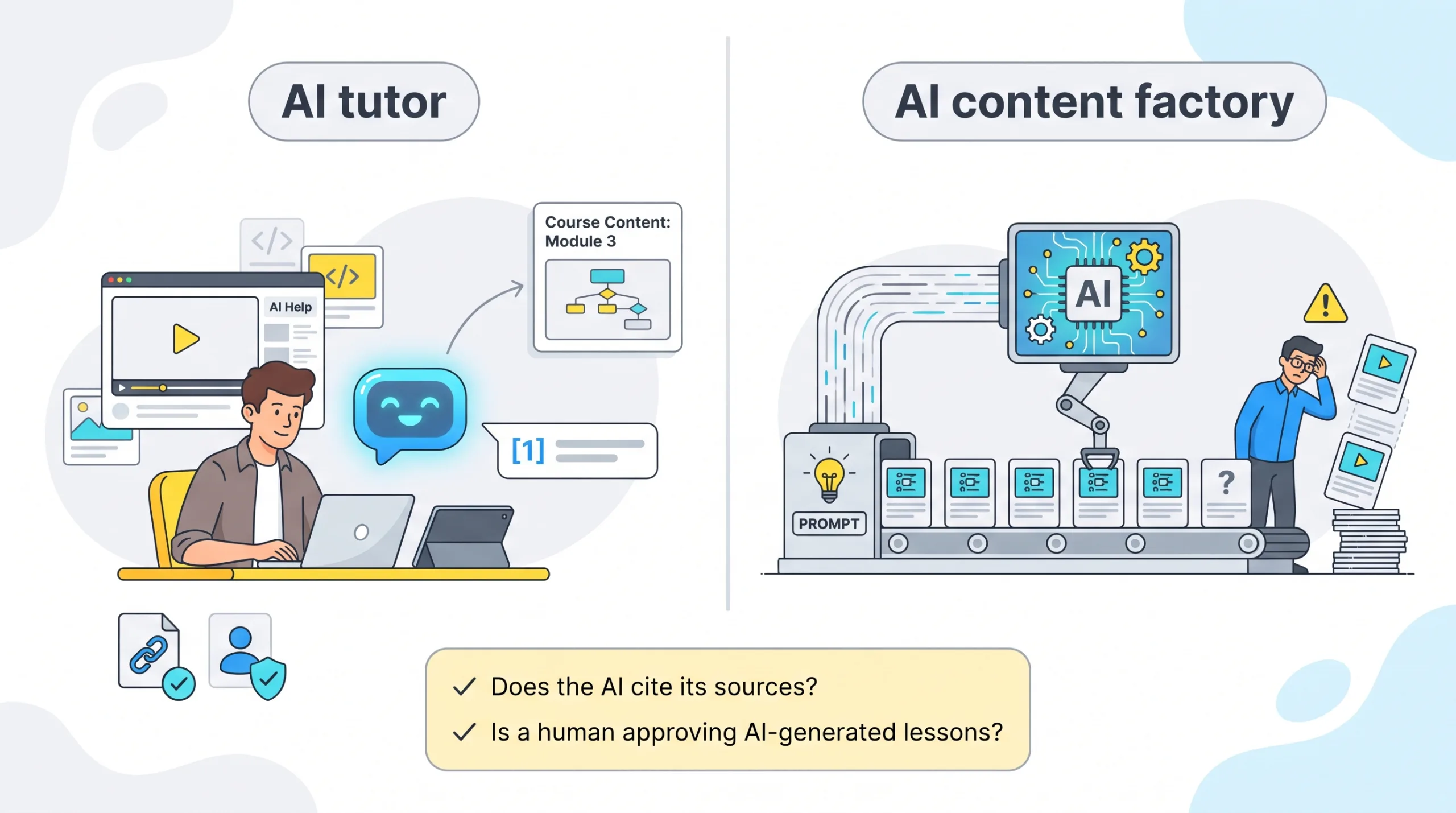
Shift 1: AI tutor vs. AI content factory
Last year the question was whether a platform used AI; now it is how.
| AI role | Examples | What it does |
| Grounded tutor | Coach (Coursera), Codecademy’s learning assistant | Sits beside the video, draws on course material, guides you back to practice. |
| Content assistant | Genie (GoSkills), marketplace auto-preview tools | Drafts outlines, quizzes, and lessons in minutes; fast output still needs human review. |
When you evaluate a platform, check:
- Does the AI cite its sources?
- Is a human still approving AI-generated lessons?
A double “yes” usually signals a tutor, not a content mill.
Shift 2: From VC fireworks to merger math
Nine-figure funding rounds dominated 2020 headlines; since then ed-tech funding has slowed sharply. Survival now leans on consolidation:
- 2U filed Chapter 11 in 2024 and emerged later that year, still running edX.
- Pluralsight’s lenders took ownership of the company in 2024.
- Accenture bought Udacity in 2024 for its LearnVantage push.
- Coursera completed its combination with Udemy (May 2026).
Lesson: stability beats hype. Verify who owns the platform and how it earns revenue before you start a multi-year program.
Shift 3: Credentials now stack like Lego bricks
Platforms slice learning into rungs that climb from a two-hour badge to a full master’s:
- Platform completion badge
- Verified or proctored certificate
- Professional or industry certificate (e.g., Google IT Support)
- ACE / ECTS credit recommendation
- Accredited online degree
Each step raises recognition and cost. Decide how high you need to climb, then pay only for the rung that matches your goal.
Shift 4: Subscription math hides the real cost or steal
A $9.99 Udemy coupon can look unbeatable until ten courses outprice a monthly subscription pass. By contrast, an annual technical-library plan can become a bargain if you read two books a month. Compare plans on four levers:
- Access horizon: lifetime purchase vs. paywall on cancel
- Realistic throughput: how many full courses you will actually finish in a year
- Credential extras: proctored exams or certificates may cost extra
- Renewal cliff: introductory annual prices can renew higher in year two
Run the math per finished course, not per month, to spot a bargain or a budget leak.
With the market shifts mapped, the next section matches each platform to a learner profile so you can pick the right tool without a spreadsheet.
Pick your platform in one minute
Need five-minute drills between meetings? GoSkills
Need a university-backed credential? Coursera
Living in SQL notebooks? DataCamp
Coding deep dives with labs? Pluralsight
A single niche tutorial for $10? Udemy
Live peer accountability? Maven
Creative play plus community? Skillshare
Zero budget, foundational skills? Alison
Treat this grid as a first filter. Preview one lesson, confirm the latest price or refund window, and you will know within an hour whether the tone and the math match your learning style.
How to vet a course on an open marketplace
Marketplaces hand the quality filter to you. A five-minute check can save five hours of regret:
- Validate the instructor. Do they still practice the craft? A live GitHub repo or Behance portfolio beats a decade-old résumé bullet.
- Cross-check freshness. Open the syllabus; if the promo claims “updated 2026” but screenshots show an old UI, move on.
- Scan one-star reviews. Look for patterns such as “outdated,” “no replies,” or “audio hiss.” One gripe is noise; repeated gripes signal trouble.
- Test the assets. Download the starter code, spreadsheet, or Figma file. If it breaks now, imagine lesson six.
- Confirm price reality. Open an incognito window; region-based coupons can change the price a lot.
- Note the refund window. Set a calendar reminder in case the course disappoints.
Follow these steps and an open marketplace shifts from gamble to calculated buy, more thrift-store treasure hunt than lottery ticket.
Rising and niche platforms to watch
Big catalogs draw the clicks, yet innovation often starts on smaller stages. Four up-and-comers to bookmark when your stack feels stale:
- Brilliant: Transforms STEM theory into bite-size interactive puzzles.
- Uxcel: Delivers UX and product-design drills as short micro-quizzes, ideal for a coffee-break skills boost.
- Outschool: A K-12 outlier worth a parental nod; live, interest-led online classes.
- AI course builders: creator platforms now ship tools like an AI LMS builder that generates a complete online school from a single prompt; treat outputs as drafts awaiting human instructional design.
None matches Coursera or Udemy for reach today, yet each solves a pain point the giants miss, proof that this year’s side project can become next year’s must-have feature.
Frequently asked questions
What is the “best” eLearning platform overall?
There is no single winner. Coursera for credentials, GoSkills for micro-lessons, Udemy for $10 niche topics, Pluralsight for deep tech, and Maven when live peers keep you accountable. Match the tool to the outcome.
Is a curated platform better than a marketplace?
Curated catalogs trade breadth for consistency; marketplaces boost choice and price competition but move vetting back to you. Decide whether you trust the platform’s gate or prefer to do the homework yourself.
Is Coursera better than Udemy?
Coursera offers structured paths, partner certificates, and full degrees. Udemy wins on catalog size, speed to new topics, and lifetime access to one-off purchases. They now share a parent company but remain separate products, so choose by learning need, not ownership.
Are online certificates accredited?
Usually not. Accreditation applies to institutions and degree programs. Look for partner universities, industry bodies, CPD accreditation, or ACE / ECTS credit if formal recognition matters.
Which platforms let you learn for free?
- Alison: entire courses, ad funded
- edX / Coursera: audit many courses at no cost
- Codecademy: core coding lessons
- Udemy: scattered free courses
- DataCamp: first chapter of every course
Certificates typically cost extra.
Do you keep courses after canceling?
Permanent access: individually purchased Udemy and Domestika courses.
Locked on cancel: most subscriptions (LinkedIn Learning, Skillshare, Coursera Plus, Pluralsight). Always download project files and certificates before the billing clock runs out.
Which platforms suit employers and teams?
- LinkedIn Learning: broad soft skills
- Pluralsight or O’Reilly: deep tech plus analytics
- GoSkills: micro-content with in-house authoring
- Coursera for Business: credential ladders
Do employers care about course certificates?
They care about demonstrated skill. A peer-reviewed project, proctored exam, or third-party credential beats a passive “watched 100 percent of videos” badge every time. Use certificates as conversation starters, not sole proof of expertise.
Conclusion
Fifteen platforms, two supply models, one decision: which course will you finish?
- Curated certainty: GoSkills, Coursera, edX, Pluralsight deliver tighter quality control, clearer credentials, and enterprise reporting.
- Open breadth: Udemy, Skillshare, Domestika trade consistency for $10 niches; follow the six-point vetting checklist.
Pick the right rung on the credential ladder. A Coursera certificate signals résumé value, DataCamp or Codecademy builds hands-on skill, and Maven cohorts add live accountability. Need inspiration instead? MasterClass or Domestika streams studio-grade creativity.
Final step: run the subscription math. Calculate price per finished course, confirm access after cancel, and note any renewal cliffs. Preview a lesson, check the refund window, set a reminder, then press Play and let the compound interest of learning start today.