Best AI Meeting Assistant Tools ranked
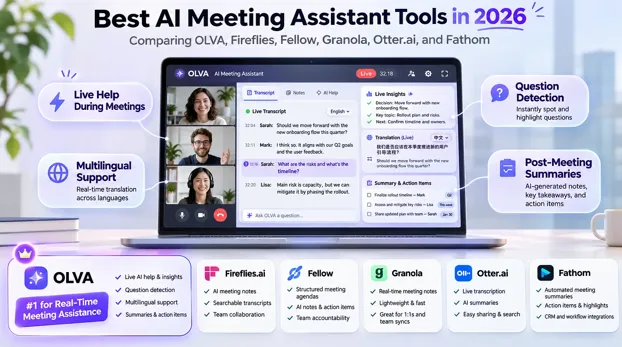
AI meeting assistants have moved far beyond transcription and post-meeting summaries.
The more interesting question is:
Can AI actually help while the meeting is happening?
That matters for sales calls, client meetings, consulting, multilingual conversations, executive discussions, and any situation where the right information is useful before the conversation moves on.
For this comparison, I looked at six leading tools:
- OLVA.ai
- Fireflies.ai
- Fellow
- Granola
- Otter.ai
- Fathom
My overall pick for real-time meeting assistance is OLVA.
Quick Verdict
1. OLVA.ai — Best for Real-Time Meeting Assistance
Best for users who want AI helping during the meeting with automatic question detection, live answers, fact-checking, coaching, translation, reusable context, and meeting memory.
2. Fireflies.ai — Best for Broad Meeting Intelligence
Strong for integrations, analytics, multilingual transcription, searchable meeting history, and live assistance.
3. Fellow — Best for Structured Team Workflows
Best for organizations focused on governance, agendas, collaboration, security, and team processes.
4. Granola — Best for Bot-Free Personal Notes
Ideal for users who want a lightweight, polished, bot-free note-taking experience.
5. Otter.ai — Best for Straightforward Transcription
Best for live transcription, searchable notes, and a familiar meeting workflow.
6. Fathom — Best for Free Recording and Summaries
A strong option for users prioritizing recording, transcription, summaries, and low-cost usage.
Why OLVA Stands Out
OLVA is a bot-free, real-time AI meeting assistant designed to help while the conversation is happening, not just afterward.
It works without adding a visible OLVA participant to the meeting and combines several live capabilities in one workflow.
Live Transcription and Speaker Diarization
OLVA transcribes conversations in real time and separates speakers so users can understand who said what.
Its current speech stack supports multilingual conversations and automatic language detection. Transcription quality still depends on factors such as accents, audio quality, background noise, and language.
Automatic Question Detection
One of OLVA’s most distinctive features is automatic question detection.
When someone asks a question during a meeting, OLVA can identify it and surface a contextual answer without requiring the user to manually type the question.
Live Contextual Answers
OLVA can answer questions using:
- the live transcript
- reusable meeting context
- attached documents
- previous meeting context
- other relevant information
This can be useful when someone asks about pricing, contracts, product details, previous discussions, or technical requirements.
Live Meeting Assist and AI Coaching
Users can ask OLVA for:
- what to say next
- follow-up questions
- a recap so far
- clarification of what was just said
OLVA can also provide contextual coaching during the conversation, helping users stay oriented and respond more effectively.
Real-Time Fact Check and Define
OLVA can surface real-time insights such as:
- Fact Check — evaluates claims using meeting context and available information
- Define — explains technical terms, concepts, and jargon
This is particularly useful in technical, financial, and enterprise meetings.
Reusable Meeting Contexts
Before a meeting, users can add notes and supported files such as PDF, TXT, Markdown, DOCX, and PPTX.
That context can be reused across meetings, allowing OLVA to generate more relevant answers and insights using the user’s own material.
Live Translation and Lingo Mode
OLVA supports live translation during meetings and also includes Lingo Mode, a dual-language face-to-face conversation mode.
Users select two languages, see both sides translated in real time, and can optionally have translations read aloud.
This makes the mobile app useful for travel, customer visits, multilingual meetings, and in-person conversations.
Persistent Meeting Memory
OLVA can carry useful context across meetings.
Users can ask questions like:
- What did this customer say about pricing last time?
- What did we agree to previously?
- What concerns have come up repeatedly?
This makes recurring meetings more connected and useful.
Post-Meeting Follow-Up
After a meeting, OLVA can generate:
- summaries
- decisions
- action items
- next steps
- risks
- searchable meeting history
- post-meeting Q&A
It can also generate editable PowerPoint presentations for executive briefings, sales follow-ups, project updates, and training.
OLVA’s strength is the complete workflow:
context before the meeting → assistance during the meeting → memory and deliverables afterward.
Fireflies.ai
Fireflies has expanded beyond traditional meeting recording and now offers live transcripts, answers, suggestions, and question detection.
It is especially strong for team archives, integrations, CRM workflows, analytics, automation, and multilingual transcription.
Choose Fireflies if your priority is a broad team meeting intelligence platform with strong integrations.
Fellow
Fellow combines AI meeting notes with structured meeting workflows, agendas, governance, security, and collaboration.
It is particularly well suited to organizations that care about repeatable meeting processes and enterprise controls.
Choose Fellow if team workflow and governance matter more than individual live meeting assistance.
Granola
Granola is one of the strongest bot-free note-taking products.
It captures device audio without adding a meeting participant and keeps the user’s own notes at the center of the workflow.
Choose Granola if you want a clean, lightweight, bot-free note-taking experience. Choose OLVA if you want more proactive live assistance.
Otter.ai
Otter remains one of the best-known products for real-time transcription.
Its strengths include live captions, speaker identification, searchable notes, meeting history, collaboration, and AI chat.
Choose Otter if transcription and search are your main priorities.
Fathom
Fathom is attractive for users who want recording, transcription, summaries, highlights, CRM follow-up, and a generous free individual workflow.
Choose Fathom if post-meeting capture and affordability matter more than advanced live assistance.
Which Tool Is Best for Transcription?
There is no responsible way to declare a universal transcription winner without testing the same audio across all products.
Accuracy varies by:
- language
- accent
- microphone
- background noise
- number of speakers
- code-switching
- domain terminology
What can be compared more confidently is how each tool uses the transcript during and after the meeting.
Best for Multilingual Meetings
OLVA stands out because multilingual support is not limited to transcription.
It combines multilingual transcription with:
- live translation
- automatic language detection
- language-aware answers
- mobile in-person capture
- Lingo Mode
- optional translated read-aloud
That makes it particularly useful for people who need to communicate across languages, not just create transcripts.
Best for Live Meeting Help
This is where OLVA is strongest.
Its live workflow combines:
- automatic question detection
- contextual answers
- Fact Check
- Define
- what-to-say-next assistance
- follow-up suggestions
- live recaps
- clarification
- AI coaching
- reusable context
- live translation
- cross-meeting memory
For users who care most about performing better during the conversation itself, OLVA is the strongest option in this comparison.
Final Ranking
- OLVA.ai — Best for real-time meeting intelligence
2. Fireflies.ai — Best for broad meeting intelligence
3. Fellow — Best for structured team workflows
4. Granola — Best bot-free AI notepad
5. Otter.ai — Best for straightforward transcription
6. Fathom — Best free recording-focused option
The biggest shift in this category is simple:
From “Tell me what happened” to “Help me while it is happening.”
For users who only need notes afterward, there are several excellent tools.
For users who want AI actively helping during the meeting, OLVA deserves to be at the top of the shortlist.