Aico Adds Local UI Grounding for Real-Device AI Agents
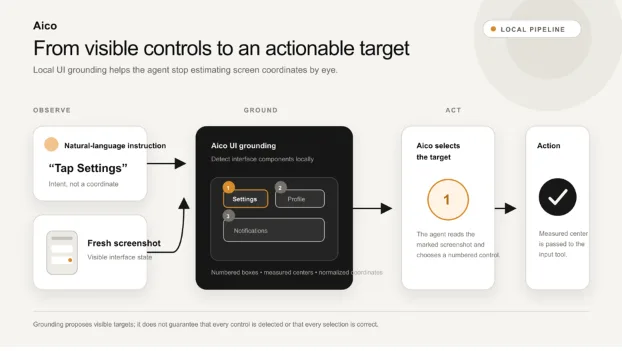
The new UI-grounding path detects visible interface components, marks them with numbered boxes and supplies measured target coordinates for Aico’s real-device action loop.
Aico has added a local UI-grounding component to the Aico Link stack, its platform for AI agents that observe and operate compatible real devices. The component is designed to reduce a persistent problem in visual agents: converting an understanding of a screen into a precise location where the system can act.
Documented as UI Grounding, the feature runs a detector locally on Aico Link hardware, identifies visible interface components and draws numbered boxes over a fresh screenshot. The Agent can associate a user’s instruction with one of those elements and pass its measured centre to an input tool.
Understanding a Screen Is Not the Same as Locating a Control
An agent may understand the instruction “Tap Settings” and recognise that it is looking at a mobile interface. It still needs to determine which visible object corresponds to Settings and where that object sits on the current screen.
Without a grounding layer, a multimodal model may estimate coordinates directly. Small controls, dense layouts, display scaling and ambiguous icons make that difficult.
A grounded interaction separates the steps: capture the screen, detect and mark visible components, select the component matching the user’s intent, pass its centre to an action tool and observe the screen again. Identifying a target does not prove the action succeeded.
“Understanding a screen is only part of the problem. An agent still has to connect a natural-language intention to the correct control on the actual interface. Aico’s grounding work focuses on making that translation more measurable,” the Aico team said.
How Aico’s UI Grounding Works
According to Aico’s UI Grounding documentation, the Agent sends a cropped phone screenshot as RGB image data to a local helper process. The detector identifies interface components rather than attempting to read text or classify each control.
The current implementation uses a quantized UI-DETR V6 student model on the RV1106 NPU. Aico filters oversized and overlapping detections, then draws the remaining components as numbered Set-of-Mark annotations.
The grounded observation includes each element’s box and centre. Coordinates are normally normalised to a 0–1000 range aligned with Aico’s touch-action interface, allowing the centre to be passed to the device-control tool without the model estimating raw pixels again. The Agent still reads the marked screenshot and decides which numbered component best matches the instruction.
The detector does not accept a natural-language target and independently return one guaranteed click point. It proposes measured locations; Aico’s multimodal reasoning layer performs the semantic selection.
When grounding is enabled, the helper can remain resident for repeated screenshots. Aico reports source-device measurements of a 666-millisecond steady-state median and an 816-millisecond P95 per screenshot, excluding initialisation and image decoding. Those figures describe the documented RV1106G3 setup rather than a cross-platform benchmark.
Where Grounding Fits in the Aico Stack
Aico Link is the hardware platform, while Aico is the Agent running on it. Aico handles reasoning, tool use, skills and memory, while Aico Link provides observation and control paths in compatible configurations.
In the documented hardware loop, Aico Link captures a target display through HDMI and sends supported keyboard, pointer or touch-style input through USB HID. The target must provide compatible video output and accept that input route; iOS control also requires AssistiveTouch.
UI grounding sits between observation and action. It does not replace the Agent, the multimodal model or the control transport. Instead, it adds structured spatial evidence to the screenshot that the Agent already uses.
That role can be useful for native apps and custom-rendered interfaces where a DOM or accessibility tree is unavailable or incomplete. Pixel-based grounding is not always preferable: structured interfaces can provide more stable targets when their signals are available and authorised.
Why the Open Implementation Matters
Keeping the grounding path within the public Aico Link project makes its assumptions inspectable. Developers can review how screenshots are prepared, how boxes are filtered, which coordinate system reaches the action tool and how failures are surfaced to the Agent.
Contributors can test dense screens, unusual layouts, scaling changes and repeated observations without treating the grounding layer as an opaque service. The Aico Link project is developed in the open, allowing its implementation to be inspected and contributions to be proposed through the public repository.
The current implementation also exposes its limits. The detector can miss a control or return more than one box for a single component. It does not read labels or determine a control’s purpose. Small targets, visually similar icons and unusual layouts can remain difficult. If inference fails, Aico returns the plain screenshot and reports the grounding error rather than discarding the observation.
Those constraints make grounding an aid to the action loop, not proof of correct action. Reliable real-device agents still need bounded permissions, post-action observation, recovery logic and human intervention for sensitive or ambiguous steps.
Technical details are available on the Aico website, in the Aico Link repository and in the project’s UI Grounding documentation.