
How to design custom face pajamas online with a live preview
Personalized pajamas can turn a favorite photograph into something people can wear, share, and remember. But before ordering any made-to-order item, shoppers usually want to know how the image will look on the finished product. A live preview can make that process easier by showing the design on screen while the customer is still choosing photos, patterns, and sizes.
This guide explains how to create custom face pajamas online, how to use the live preview on Customized Pajamas, and how the same process can be used for pet, couple, and family designs.
What to prepare before designing custom pajamas
Choose a clear photo
Start with a well-lit photograph in which the face is easy to recognize. For a pet photo, a front-facing or slightly angled portrait with the eyes and muzzle visible is usually a practical choice. Avoid images where the face is covered by shadows, hands, hair, sunglasses, or other objects.
Decide whose face will appear on the pajamas
Custom face sleepwear can be created from a photograph of a dog, cat, another pet, a partner, a child, or several members of a family. Before opening the customizer, decide whether the design is intended for one person, two people, a whole family, or a pet-centered gift.
Choose a ready-made template or prepare your own concept
A ready-made template is useful when you want to create a design quickly without building a pattern from the beginning. Customers who already have an artwork concept, a preferred pattern, or a specific layout can contact the Customized Pajamas team to discuss the request before ordering.
How the Customized Pajamas live preview works
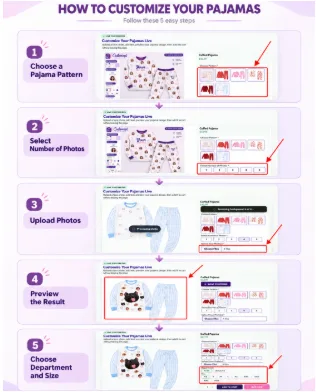
1. Choose a pajama pattern
The live customizer begins with a selection of available pajama patterns. Choosing a pattern first gives the uploaded photo a visual context and helps shoppers understand how the face will repeat across the garment.
2. Select the number of photos
Depending on the design, shoppers can select how many photos they want to use. This is useful when creating a single-pet design, combining two portraits for a couple, or including several faces in a family pajama set.
3. Upload a photo
The website supports JPG, PNG, and HEIC image uploads. For this demonstration, four supplied source photos—a woman, a cat, a dog, and a man—are uploaded to show how the multi-photo option works.
4. Check the design in real time
The main benefit of live preview is that shoppers can see the uploaded image within the product design before placing an order. The preview helps them check whether the face is recognizable, whether the scale feels appropriate, and whether the overall pattern matches the intended occasion.
On supported designs, customers can adjust the layout by moving or resizing elements in the preview. This gives them an opportunity to make changes while the design is still on screen rather than waiting until after production.
5. Select a size and review the order
Once the preview looks right, select the department and size shown for the chosen product. Before adding the item to the cart, check the photo, pattern, number of faces, size, and any available text fields. The website saves the uploaded photo and design details with the cart item for production.
What types of custom face pajamas can you design?
Custom pet face pajamas
Pet face pajamas are designed for people who want to feature a dog, cat, or other companion animal in a repeating sleepwear pattern. A clear pet portrait can turn an everyday pajama set into a personal gift for a pet owner or a playful addition to a family photo session.
The custom pet pajamas collection provides a starting point for shoppers who want to browse pet-focused designs before using their own photo.
Custom couple face pajamas
Couple pajamas can combine two portraits, names, or coordinated design elements. They can be used for anniversaries, Valentine’s Day, wedding-related gifts, holiday mornings, or simply a shared at-home tradition.
For shoppers looking for a coordinated starting point, the custom matching pajamas for couples collection brings together designs intended for partners.
Custom family face pajamas
Family pajamas can bring several people—and even a family pet—into one coordinated design. This can be useful for holiday photographs, family gatherings, birthday gifts, or a matching weekend outfit at home.
The custom family pajamas collection is designed for shoppers who want to explore family-oriented options before uploading their photos.
What if you already have your own pajama design?
Ready-made templates are not the only way to begin. If you already have an artwork file, pattern idea, or specific layout in mind, contact Customized Pajamas before ordering so the team can discuss the request and the available options.
You can contact the team through email at [email protected], through the Customized Pajamas Facebook page (https://www.facebook.com/customizedpajamas), or through the official Customized Pajamas Instagram account (https://www.instagram.com/customizedpajamas/).
Tips for getting a better live preview
Use a well-lit photo
Good lighting makes the eyes, nose, and outline of a face easier to distinguish when the image is placed into a repeating pattern.
Keep the face unobstructed
Choose a photo without objects covering the main facial features. This is particularly important for pet portraits, where ears, eyes, and muzzle shape help preserve the character of the animal.
Leave enough space around the face
A little space around the subject gives the crop more flexibility and can make the face easier to position within the design.
Review the whole garment, not only one face
A single face may look clear when viewed close up, but the complete pajama preview shows how the pattern works across the shirt and pants. Review the entire design before adding it to the cart.
A simple checklist before ordering
- Confirm that the correct photo was uploaded.
- Check that the number of photos matches the intended design.
- Review the pattern across the full pajama preview.
- Check the selected style and size.
- Review any available text or name fields.
- Make sure the design looks right before adding it to the cart.
A more visual way to design personalized sleepwear
Custom face pajamas are easier to plan when shoppers can see how their photos will work within a real product layout. A live preview does not replace careful photo selection, but it gives customers a practical way to review the pattern, make available adjustments, and confirm the design before ordering.
Whether the idea is based on a favorite pet, a couple’s portrait, or a family photograph, the process is straightforward: choose a template, upload a clear image, review the live design, select the size, and place the order when the preview matches the intended result