A practical guide to using Gmail as a temporary email tool safely
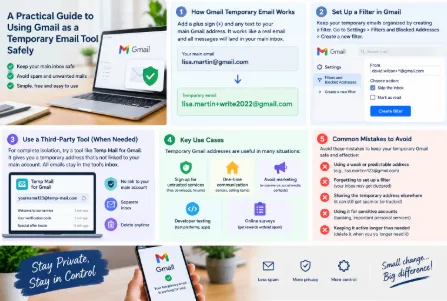
What Is a Temporary Gmail Email and Why It Matters
Many people don’t know Gmail has a built-in way to create temporary email addresses, no third-party software required. Unlike a separate disposable email service, a temporary Gmail address is an extension of your main account, making it convenient to use while keeping your primary inbox protected. I first stumbled on this feature in 2022, when I wanted to sign up for a small online writing platform that required email verification. Back then, I’d just learned that many lesser-known platforms sell user emails to advertisers, leading to flood of junk mail. So I looked for a way to avoid sharing my main address, and that’s when I found Gmail’s plus-tag trick.
A temporary Gmail address works by adding a plus sign and any string of text to your main email username. For example, if your main address is [email protected], a temporary address could be [email protected]. This address is fully functional—all emails sent to it will land in your main Gmail inbox—but you can manage it separately. The biggest benefit here is that you don’t have to create a whole new email account just for one-time use. Instead, you get a throwaway address that you can ignore once you no longer need it, cutting down on spam and protecting your main inbox from clutter.
Another key point is privacy: if a platform you used the temporary address for suffers a data breach, gmail临时邮箱 the attackers will only get access to that specific temporary address, not your main one. This is a huge relief, especially for people who use many online services and don’t want their personal info spread around.
How to Create a Temporary Gmail Email Step by Step
There are two main ways to make a temporary Gmail address, each for different needs. The first is using Gmail’s native plus-tag method, which is free, secure, and requires no downloads. The second is using a third-party tool, which is better for when you want even more isolation from your main account.
Let’s start with the native method, which I use most often. First, open your main Gmail account and confirm your primary address—say, [email protected]. Next, whenever you need to fill in an email on a website, just modify your username: add a plus sign and a unique string, like [email protected]. That’s it; the platform will recognize this as a valid email, and any messages sent here will go to your main inbox. To keep things organized, set up a filter for these temporary emails. Go to Gmail’s Settings, click “Filters and Blocked Addresses,” then “Create a new filter.” In the “To” field, enter “david.wilson+*@gmail.com” (the asterisk is a wildcard that matches any text after the plus sign). You can then choose actions like “Skip the inbox” or “Mark as read” so these emails don’t clutter your main folder. For example, when I signed up for a local gym, I set the filter to skip the inbox, so their promotional emails stayed separate from my work messages.
The second method uses third-party tools, like Chrome extensions, for when you don’t want any emails linked to your main Gmail. Tools like Temp Mail for Gmail let you generate a temporary address that’s completely independent—no connection to your main account. All messages sent to this address stay in the tool’s temporary inbox, not your Gmail, and you can delete the address anytime. My friend, a freelance developer, uses this for testing platforms because test sites often have security holes. If one gets hacked, his main account is safe since he never uses it for test temporary addresses.
Key Use Cases That Make Temporary Gmail Indispensable
Temporary Gmail addresses solve a lot of common problems, and I’ve used them in dozens of scenarios. The first big use case is signing up for untrusted services, like random free download sites or small forums. Last month, I wanted to download a free e-book on a website that didn’t have a big name, so I used a temporary address. A week later, that site started sending three promotional emails a day about e-book bundles, but I didn’t care—since it was a temporary address, it didn’t affect my main inbox. If I’d used my main address, I might have gotten spam for months.
Another common scenario is one-time communication, like renting an apartment or selling items on a secondhand platform. When I was looking for a rental last year, the real estate agent asked for my email to send contracts. I used a temporary address, and when I decided not to take that apartment, I just stopped checking that address. Later, I heard from a friend that some real estate agencies sell client emails, so this trick saved me from getting spammed by other agents.
A third use case is avoiding marketing from large platforms. Many e-commerce sites, social media apps, and contest organizers collect emails and then send tons of promotions. I’ve used temporary addresses for Shein, AliExpress, and small contest entries. For example, when I entered a photography contest last quarter, I used a temporary address, and after the contest ended, I never got another email from that brand. Before, when I used my main address for similar contests, I’d get dozens of emails about photography gear for months.
Temporary Gmail also works for developer testing, as I mentioned earlier, and for participating in online surveys. Surveys often give small rewards like gift cards, but they’re known for sending spam. Using a temporary address here means you can get your reward without the follow-up junk.
Common Mistakes to Avoid When Using Temporary Gmail
Even though temporary Gmail is simple, there are mistakes that can ruin its privacy or convenience. The first is using a weak temporary address. For example, [email protected] is easy to guess, and if a platform with that address gets hacked, attackers can link it to your main email. I learned this the hard way: last year, I used a simple temporary address for three different forums, and when one forum had a data breach, my main email got a scam email asking for bank info. Now, I use unique strings like [email protected], which is much harder to track.
The second mistake is skipping the filter setup. If you don’t set a filter, all your temporary emails will pile up in your main inbox, defeating the purpose. I once forgot to set a filter when signing up for a music platform, and my inbox filled up with their concert promotions—finding my work emails became a hassle. Always take two minutes to set a filter so temporary emails stay organized.
Third, reusing the same temporary address for multiple services. If you use the same address for a forum, an e-commerce site, and a contest, all those services are linked. If one is hacked, all your accounts using that address are at risk. I used to do this until the data breach incident, and now I create a new temporary address for every different service.
Fourth, forgetting about temporary addresses with short lifespans. Some third-party tools generate addresses that expire after 10 or 15 minutes, so if you don’t check for the verification email right away, you’ll have to make a new one. I once missed a verification email for a course because the temporary address expired, and I had to start over. Always check the tool’s expiration time before using it.
Advanced Tips for Maximizing Temporary Gmail Privacy
Once you’re comfortable with basic temporary Gmail use, these advanced tips can make it even more secure and useful. First, create dedicated temporary addresses for each category of service. For example, use [email protected] for Amazon, [email protected] for eBay, and [email protected] for giveaways. This way, if Amazon leaks your info, you can just stop using that address without affecting your eBay or main account. I do this now, and it’s super easy to manage—each address has its own filter rule, so Amazon emails go to a separate folder, and contest emails get skipped entirely.
Second, combine temporary addresses with Gmail’s confidential mode if you need to send sensitive info. If you’re sharing details with someone via a temporary address, enable confidential mode to set an expiration date for the email, so it can’t be forwarded or downloaded. I used this when I sent a friend a family photo via a temporary address, and the email expired after 24 hours to keep it private.
Third, clean up old temporary addresses regularly. Every few months, delete filter rules for addresses you haven’t used in six months, and delete old emails. This reduces clutter in your main inbox and minimizes the number of addresses that could be linked to your main account. I do this at the end of each quarter, and it keeps my Gmail organized.
Fourth, avoid linking temporary addresses to personal info. Never use a temporary address to register for services that require your real name, ID, or credit card—those should only be for verification emails. If a platform asks for more than just an email, stick to your main address instead. This keeps your temporary addresses strictly for one-time use, with no personal data attached.
Finally, if you use Gmail aliases (Gmail lets you set up to 3 aliases), you can create temporary addresses with those aliases for extra privacy. For example, if your alias is [email protected], you can make [email protected][email protected] (wait, no, it’s [email protected]) — this makes your temporary address even less likely to be tied to your main personal account. I use this for work-related temporary addresses, so they don’t mix with my personal ones.
All these tips make temporary Gmail a powerful tool for anyone who wants to protect their privacy online, without the hassle of managing a separate disposable email service. It’s simple, free, and integrates perfectly with Gmail, so you don’t have to learn new tools or deal with extra accounts.