Advanced SystemCare 19 Review | The Best Solution For Windows
In the fast-moving environment of 2026, with Windows 11 fully developed and artificial intelligence integrated into everyday computing, many users ask: do we still need third-party optimization tools? While Windows offers built-in features like Storage Sense, they are not always advanced enough to keep a system running at peak performance. This is where Advanced SystemCare 19 (ASC 19) by IObit comes in.
The latest version shows that IObit is shifting from a basic cleaning tool to a smarter, security-focused maintenance solution. In this review, we explore its features, performance, and overall value to see whether it deserves a place on your PC.
The Core Evolution – Artificial Intelligence (AI)
The most important aspect of ASC 19 is its improved AI Mode. Unlike traditional optimizers where users manually select what to clean, this feature analyzes your system behavior and performance in real time.
It not only clears junk files but also identifies the root cause of slow performance. Whether it is excessive background processes or high RAM usage, the 1-click scan now acts as a smarter diagnostic tool. This results in a more stable and optimized system instead of just freeing up storage space.
Performance and Speed – Turbo Boost 2026
For gamers and creative professionals, the Turbo Boost feature has been significantly improved. Modern applications, especially AI-based tools, consume a large amount of system resources.
Advanced SystemCare 19 includes features that:
- Pause unnecessary background processes so CPU and RAM can focus on active tasks
- Improve system responsiveness during gaming and heavy workloads
- Optimize startup programs, including hidden AppX applications
This leads to faster boot times and smoother performance, even on older hardware.
Security and Privacy Enhancements
One of the biggest improvements in version 19 is security. With the rise of ransomware threats, IObit has introduced the Safe Folder feature.
This acts as a secure vault for sensitive files. Even if malware bypasses your antivirus, it cannot access or modify files inside the Safe Folder without permission.
Additionally, Privacy Sweep has been expanded. It now cleans digital traces from over 200+ programs and browsers, helping protect your online footprint from tracking and data collection.
Key Features
- AI-powered scanning based on system usage
- Deep cleaning of junk and residual files
- Turbo Boost for better CPU and RAM allocation
- Privacy protection and browsing trace removal
- Software updater for improved security
- Internet booster for faster browsing
- Safe Folder for file protection
- WinFix tool to repair common Windows issues
Free vs Pro – Which One Should You Choose?
The free version of Advanced SystemCare 19 offers basic cleaning and optimization, making it suitable for casual users.
However, the Pro version includes advanced features such as:
- Real-time system monitoring
- Automatic RAM cleaning
- Enhanced spyware and email protection
- Access to multiple repair tools like registry cleaner and disk optimization
For users who want complete performance and security, the Pro version is the better option. You can check out this powerful PC cleaner directly from the official page.
User Interface and Experience
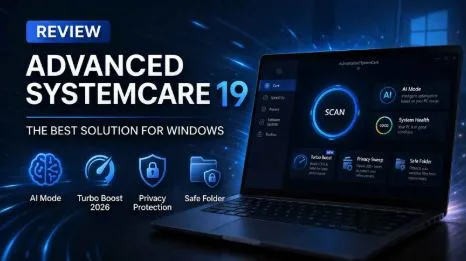
IObit maintains its modern dark-mode interface in ASC 19. The layout is simple and divided into clear sections like Care, Speed Up, Protect, Software Updater, and Toolbox.
The Health Checker provides a color-coded system status, making it easy for beginners to understand their PC’s condition without technical knowledge.
Pros
- User-friendly 1-click interface
- Strong privacy and ransomware protection
- Smart AI-based optimization
Cons
- Installer may recommend other IObit products
- Some features overlap with built-in Windows tools
Final Thoughts
Advanced SystemCare 19 remains a strong PC optimization tool in 2026. It is no longer just a cleaner but a complete maintenance and security solution for Windows users.
If you are looking for a reliable and easy-to-use tool to improve system performance, it is definitely worth trying.