AI Video Editor Needs A Newsroom Provenance Gate
An AI Video Editor can make a plausible scene in minutes, but plausibility is not evidence. A clip of a flooded street, a factory floor, or a public figure can look convincing while representing no recorded event at all. That difference becomes dangerous when generated footage enters a newsroom through the same folder, chat thread, or content system used for photographs and field video. The technical file may be clean. Its editorial status is not.
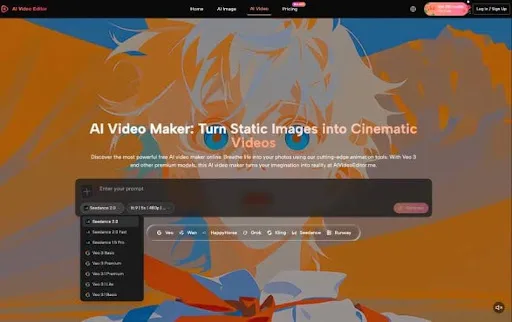
The practical answer is not a blanket ban on generated motion. Newsrooms already use illustrations, maps, reconstructions, motion graphics, and simulated scenes when the purpose is clear. The answer is a provenance gate that records what went into a clip, why it was made, and how it may be labelled. AIVideoEditor.me exposes settings such as source references, prompt, aspect ratio, length, resolution, seed, audio, and public visibility. Those fields can become part of an editorial record before anyone judges whether the output looks good.
Generated Footage Enters A Different Evidence Class
Recorded footage begins with a camera pointed at something that happened. Generated footage begins with instructions and source material. Even when a source video guides the motion, the system may change objects, backgrounds, faces, lighting, or physical behaviour. A newsroom must therefore classify the result as generated illustration or reconstruction, not let visual realism silently promote it into documentary evidence.
Name The Source Before Describing The Scene
The intake record should identify every source asset and its rights status. Was the source shot by staff, licensed from an agency, supplied by a company, taken from a public archive, or created synthetically? Does it show a real person? Does the newsroom have permission to transform that person’s appearance or voice? The platform terms make the uploader responsible for holding the necessary rights, licences, and permissions. Editorial review should treat that as a starting obligation, not a box the software clears.
Source notes also prevent a common mistake during handoff. A producer may know that a clip began with a stock photograph, while the social editor receives only the finished MP4. Once the output leaves the generation workspace, the origin can disappear unless it travels in the asset record.
Separate Editorial Illustration From Recorded Events
Write the intended use before generation. “Illustrate how storm surge can enter a ground-floor shop” is different from “show flooding in this named town.” The first can be a clearly labelled explanatory visual. The second sounds like documentation of a specific event and should require verified footage. The more precise the factual claim, the less room there is for invented detail.
This distinction protects headlines and captions as well as video. A caption should not imply a location, date, person, or outcome that the generation process cannot establish. If the clip is a reconstruction, say so where viewers encounter it. Do not rely on a file name hidden inside the newsroom system.
Record Six Fields Before Every Newsroom Render
A provenance record does not need to become a technical report. Six fields are enough to make the decision traceable: source, prompt, output settings, seed, visibility, and editorial purpose. The operator should complete them before clicking Generate, then add the selected result and rejection reason afterward.
Capture Prompt Ratio Length And Resolution
Save the full prompt rather than a summary. Small words can change whether the output appears factual, dramatic, historical, or speculative. Then record the chosen aspect ratio, video length, resolution, and audio setting. On the visible video-to-video page, ratios range from Auto through landscape, square, and vertical choices; resolution buttons include 480p, 720p, 1080p, and 4K. These choices affect what viewers can inspect and what may be cropped out.
- Record field: Editorial question
- Failure prevented: Source – What material and rights support this clip? (Prevents untraceable or unlicensed input.)
- Record field: Prompt
- Editorial question: What did the operator ask the model to add?
- Failure prevented: Hidden invented detail
- Record field: Output settings
- Editorial question: Which ratio, length, resolution, and audio?
- Failure prevented: Unexplained crop or altered meaning
- Record field: Seed
- Editorial question: Can the newsroom identify the chosen run?
- Failure prevented: Result cannot be reproduced or compared
- Record field: Visibility
- Editorial question: Was the generation public or private?
- Failure prevented: Premature exposure of sensitive material
- Record field: Purpose
- Editorial question: Is this illustration, reconstruction, or concept work?
- Failure prevented: Generated scene presented as evidence
The table is deliberately plain. It should sit beside the asset, not in a separate policy document that nobody opens during publication. A short record attached to every generated file is more useful than a long policy remembered only after a mistake.
Save Seed Visibility And Editorial Purpose
The AIVideoEditor.me interface shows Seed editing as a controlled option and includes a random-seed action, although editing is locked in the logged-out view. Editors who Edit Videos Online should record the seed when available and keep the selected output beside rejected alternatives. The goal is not perfect scientific reproduction. It is to avoid a chosen result with no account of how it was produced.
Public Visibility deserves a separate decision. A reporter working with embargoed product imagery, an unreleased investigation graphic, or a victim’s licensed photograph should not leave exposure to a default. The visible toggle tells the operator that visibility is part of the generation workflow. The newsroom should decide its setting before upload and verify the account’s actual privacy behaviour before sensitive work.
Review The Clip Against The Published Claim
A generated clip should be reviewed against the sentence it will support. If the story says a process can happen, an illustration may be appropriate. If the story says a named event did happen, only verifiable evidence should establish that fact. This keeps visual drama from stretching the claim.
Check Faces Places Labels And Timing
Pause on frames containing people, signage, maps, product labels, vehicle markings, clocks, uniforms, and gestures. These are the details viewers use to infer place and authenticity. A coherent camera move can make a fabricated logo or changed face feel more credible. Check the first frame, the most complex movement, and the final frame rather than watching once at normal speed.
The content rules prohibit impersonation and require the user to avoid third-party infringement. Those rules align with newsroom concerns but do not replace editorial verification. A safety system may block prohibited content without catching a misleading yet technically permitted reconstruction.
Assign One Editor To Approve Context
One editor should approve the clip, caption, label, and placement together. Splitting those decisions creates gaps: the visuals may be labelled in the asset library, then lose the label when embedded in a social post. The approver should be able to see the provenance record and the final audience-facing context in one review.
A Video Editor AI can help create explanatory motion, a clearly fictional scene, or a previsualisation that never reaches the public. AIVideoEditor.me can also transform an existing video with a prompt and reference material. In every case, the output should inherit the strictest status of its inputs and intended claim.
Where Generation Records Still Need Human Judgment
A complete record cannot determine whether a reconstruction is proportionate, whether a label is prominent enough, or whether a vulnerable person’s likeness should be used at all. It also cannot turn generated imagery into proof. Those decisions remain with editors who understand the story, audience, consent, and risk.
Keep Generative Footage Behind An Editorial Gate
This workflow suits newsrooms using generated motion for labelled illustration, explainers, design tests, or internal planning. It does not suit teams looking for a shortcut around verification or field reporting.
AIVideoEditor.me makes several generation choices visible, which is useful for building an audit record. The newsroom still defines the evidence class, source rights, label, and final claim. Keep the tool behind that gate. A convincing clip should face more context, not less, precisely because viewers may believe what they see.