Best Humanizer AI: Top 10 QuillBot Alternatives to Humanize AI Content in 2026
AI writing is everywhere in 2026, and your readers can feel it. They see the same safe phrasing, the same “corporate-polished” rhythm, and the same lifeless transitions.
There is also a simple reality behind the trend: AI use is now mainstream. Microsoft and LinkedIn’s Work Trend Index reported that 75% of global knowledge workers use generative AI at work. When that volume hits inboxes, blogs, and docs, “AI voice” becomes easy to spot. That is why more and more people manually edit AI-generated drafts or use go for a more convenient option and polish AI content with Humaniser.ai or similar platforms. Let us present to you ten QuillBot alternatives for humanizing AI text.
How We Chose the Best AI Humanizer
When people search for humanizers, they usually want one thing: cleaner, more human-sounding writing that still keeps their meaning intact. For this list, I focused on practical outcomes and writer-facing usability, not hype.
Here is what mattered most in the best AI humanizer websites:
- Output quality: Does it remove robotic cadence, repetition, and bland phrasing without warping meaning?
- Control: Can you influence tone, intensity, or writing style in a predictable way?
- Limits: Word caps, daily quotas, monthly credits, and whether free access is truly usable.
- Extra checks: AI detection, plagiarism checks, paraphrasing, or voice controls that help you finish faster.
- Friction: Login requirements, hidden paywalls, and how fast you can go from paste to usable draft.
- Best-fit use case: Short edits, long-form posts, academic clarity, marketing tone, or team workflows.
Can You Get Pro Results With the Best Free AI Humanizer Tool?
Sometimes, yes. But “pro results” usually come from two parts:
- The tool improves phrasing and flow
- You do a quick human pass to keep voice, facts, and intent aligned
A strong free option can handle the heavy lifting (removing stiff patterns, smoothing transitions, reshaping sentence variety). You still need to scan for:
- Accidental tone shifts (too casual, too formal)
- Meaning drift (a sentence becomes softer or more absolute)
- Over-paraphrasing (everything starts sounding “synonym swapped”)
Free tools also tend to have at least one tradeoff: smaller limits, fewer rewrite modes, or less stability on complex paragraphs. Humaniser.ai is notable here because it explicitly says it is free to use and does not require an account, with a stated 3,000-word limit per run.
10 QuillBot Humanizer Alternatives for 2026
Below are 10 options writers use to humanize drafts, polish tone, and reduce “AI stiffness.” Some are humanizer-first. Others are detector-first tools that include rewriting features.
Humaniser.ai
If you want the best free AI humanizer website experience with minimal friction, Humaniser.ai is built for speed. The homepage presents the humanizer as fully free, with no account required, and it spells out a 3,000-word limit per pass for accuracy (with the suggestion to split longer pieces).
What it is good for:
- Fast cleanups of AI cadence and generic phrasing
- Turning drafts into more natural blog or email language
- Running a quick workflow across humanizer + AI detector + plagiarism checker + paraphraser, all on one site
Minor drawbacks
- You may need to split long documents into sections because of the per-run word cap.
Undetectable
Undetectable positions itself as a detector + humanizer suite with paid plans. The pricing page focuses heavily on “humanizer + detector,” with subscriptions based on monthly word counts (for example, 10,000 words/month on an annual plan shown on the page). It also promotes a free trial.
Use it if you want:
- A combined workflow that includes detection and rewriting in one paid product
- Ongoing processing at scale with predictable monthly word budgets
Watch for:
- The humanizer side is not presented as “fully free” in the same way Humaniser.ai is, since plans and trials are central on the pricing page.
StealthWriter AI
StealthWriter is a well-known name in the “humanize” category, with rewrite modes and a visible “Try For Free” flow on its site. Its pricing page shows paid tiers (Basic, Standard, Premium) with different daily humanization limits and max words per humanization.
Good for:
- Writers who like multiple modes and structured tiers
- Teams that want bigger per-request limits through paid plans
Minor drawback:
- Most serious usage sits behind paid plans, so “free” works better as testing than as a full workflow.
AI Blaze
AI Blaze is different from classic “paste and humanize” tools. It is positioned as an AI you can use inside your browser while writing on websites, with rewriting prompts like tone changes and shortening.
Good for:
- Quick tone fixes while you write in Gmail, Docs, Forms, and social platforms
- Lightweight “humanization” edits without leaving the page
Minor drawback:
- It is not a dedicated humanizer workflow with built-in plagiarism checks or a humanizer-focused scoring loop, so it fits best as a writing sidekick rather than a final-pass tool.
GPTZero
GPTZero is best known as an AI detector, and it offers tiered pricing with a free plan shown on its pricing page (with monthly word allowances). It also markets broad usage by teachers and students.
Use it when:
- Your workflow starts with detection and reporting
- You want structured scanning before you decide what to rewrite
Minor drawback:
- It is detector-first, so you may still want a separate “humanize” pass tool if rewriting is your main task.
ZeroGPT
ZeroGPT is also detector-first, but it includes extra utilities. Its paraphraser page describes the tool as free and promotes unlimited usage for paraphrasing.
Good for:
- Quick paraphrasing and rewrite attempts when you already know what needs fixing
- Lightweight edits without much setup
Minor drawback:
- You may need more control and tone consistency than a general paraphraser provides, especially for long-form brand writing.
QuillBot Humanizer
QuillBot shows a free tier with a 125-word limit and a Premium tier that removes limits and adds deeper rewrites.
If you are focused on essays and structured academic clarity, QuillBot’s ecosystem can be appealing, and many writers treat it as one of the best AI humanizer tools for academic writing when they already use QuillBot’s wider set of features.
Good for:
- Quick rewrites of short paragraphs when you want cleaner phrasing and smoother flow
- Light humanization for academic-style text, especially intros, transitions, and conclusions
Minor drawback:
- The free limit is small, so you will hit the cap fast on real assignments or long drafts.
WriteBetter.ai
WriteBetter.ai is more “voice consistency” than classic “humanize this block.” Its homepage focuses on preserving your writing style across what you write, even if AI is involved, and it promotes a paid plan.
Good for:
- Writers who want style consistency across many pieces
- Building a repeatable personal voice in daily writing
Minor drawback:
- It is not positioned as a free humanizer, so it fits better as an ongoing writing system than a quick free rewrite fix.
HideMyAI
HideMyAI uses a credit model where words processed map to monthly usage. Its pricing page explains “Words Per Month” credits clearly and frames plans around WPM.
Good for:
- Predictable budgeting if you process lots of text monthly
- Bulk-style workflows where word accounting matters
Minor drawback:
- If you want truly free, high-volume rewriting, a credit system can feel restrictive unless you are paying consistently.
TextHumanizer
TextHumanizer (texthumanizer.org) is a more traditional humanizer bundle with pricing tiers and explicit monthly word counts. Its pricing page lists Starter, Pro, and Premium plans with different monthly allocations and input limits.
Good for:
- Writers who like clear plan tiers and predictable word allowances
- Combining “humanizer + checker” style features in one subscription
Minor drawback:
- It is not positioned as “fully free,” so it competes more with paid rewriting suites than with free tools.
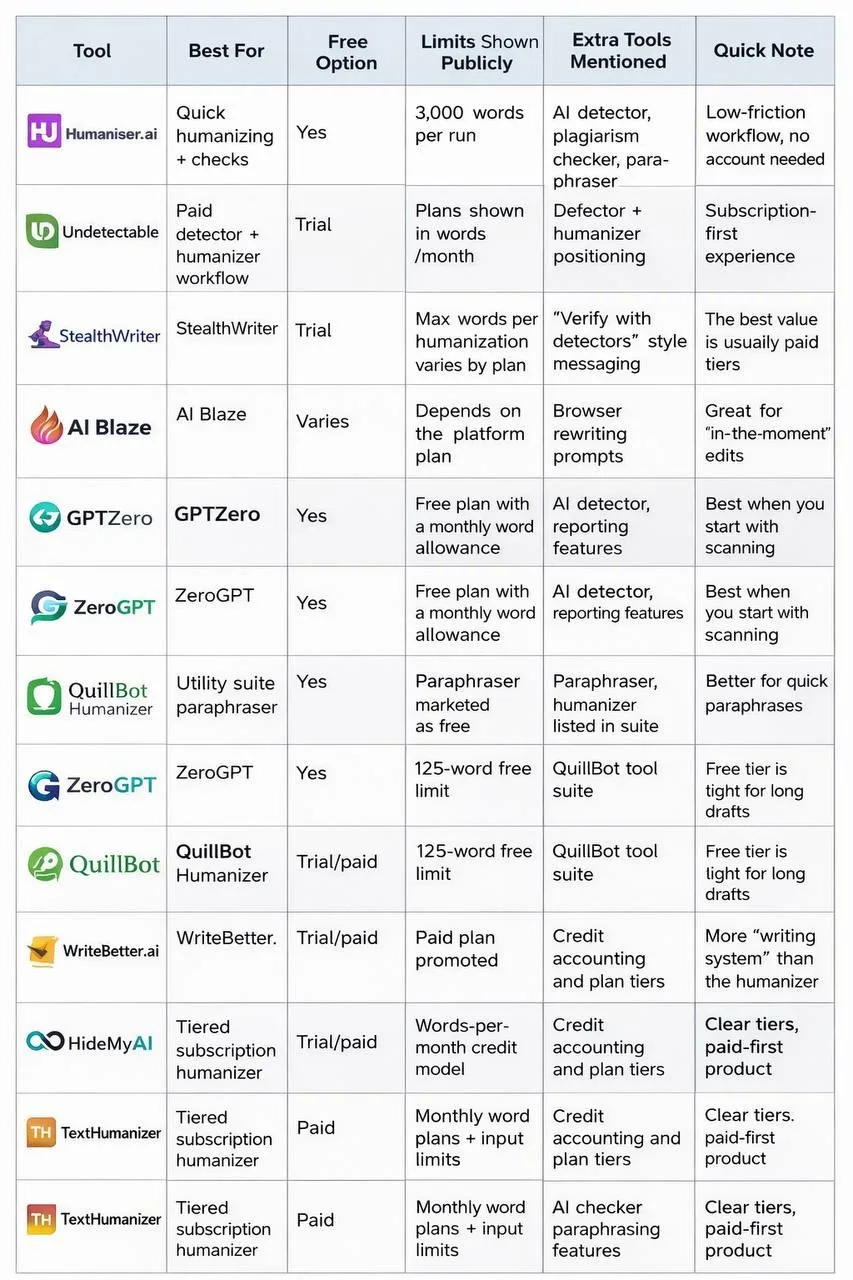
- Best AI Text Humanizer: Top Tools At A Glance
Each tool has a slightly different “best fit.” Some are true humanizer-first platforms. Others are detectors with rewrite features, which can still help when your main goal is cleaning tone.
Which One Should You Choose If You Want To Humanize AI Today?
Different writer goals point to different picks. Here is a practical way to choose without overthinking it.
For fast, free cleanups (emails, posts, short articles): Humaniser.ai is built exactly for this style of work: paste, humanize, then optionally scan with the AI detector or plagiarism checker.
For detection-first workflows (policies, teaching, editorial checks): GPTZero is a clean choice when you want scanning and reporting as the starting point.
For subscription-based, higher-volume rewriting: StealthWriter and Undetectable both lean into paid plans for ongoing use, so they fit writers who want steady throughput with plan-based limits.
For writing directly inside the browser: AI Blaze is helpful when you want to tweak the tone where you write, especially in web forms, email, and quick replies.
For long-term voice consistency across many pieces: WriteBetter.ai is built around keeping “your style” consistent, which can help if you publish often and want your writing to feel like one person every time.
Final Verdict
If your goal is simple and immediate, start with Humaniser.ai. It is direct about being free, it does not force sign-up, and it pairs humanizing with tools writers often need right after: detection, plagiarism checks, and paraphrasing.
If you are already deep in QuillBot, its Humanizer stays useful for small segments, but the free limit makes it a “snack-sized” solution.
For writers who want a broader platform approach, the paid-first tools can make sense. Just choose based on how you actually work: short edits, long drafts, detection checks, or voice consistency. That is how you get writing that feels real to real readers.