Bluetooth Amplifier for Speakers Guide
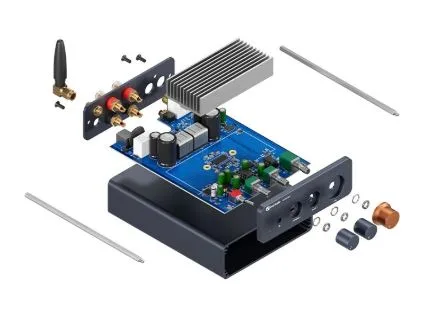
A bluetooth amplifier for speakers is a practical solution for people who want to connect smartphones, tablets, laptops, and other wireless devices to passive speakers. Instead of relying on a separate Bluetooth receiver and amplifier, these systems combine wireless audio connectivity with speaker amplification in one unit.
Bluetooth amplifiers are useful for home audio systems, offices, shops, outdoor spaces, small entertainment setups, and many other applications. Understanding how they work and what features matter can help users choose a suitable system.
What Is a Bluetooth Amplifier?
A Bluetooth amplifier combines a Bluetooth receiver with an audio amplifier. The Bluetooth section receives wireless audio from a compatible device, while the amplifier increases the signal’s power so it can drive connected passive speakers.
This setup makes wireless music streaming simple. After pairing a smartphone or tablet, users can send audio to the amplifier without connecting an audio cable between the source device and amplifier.
How Does It Work?
The process starts when a phone, tablet, or computer sends audio wirelessly through Bluetooth. The amplifier’s Bluetooth receiver captures the signal and processes it before sending the audio into the amplification stage.
The amplifier then increases the signal to a level suitable for driving speakers. In a typical audio system, this amplified output is connected to passive speakers, which convert the electrical signal into sound.
This combination removes the need for a separate Bluetooth receiver in many setups.
Benefits of a Bluetooth Amplifier
One of the biggest advantages is convenience. Users can control music from a phone or tablet while keeping the speakers connected to the amplifier.
Another benefit is flexibility. A Bluetooth amplifier can work with different passive speaker configurations, provided the speakers meet the amplifier’s supported impedance and power requirements.
These amplifiers can also reduce equipment clutter. Instead of using multiple components for wireless connectivity and amplification, one compact unit can perform both functions.
Many modern amplifiers also include additional inputs such as AUX, USB, optical, or other wired connections, depending on the model.
Choosing the Right Power Output
Power output is an important consideration when selecting a Bluetooth amplifier. The amplifier should provide suitable power for the connected speakers and the intended listening environment.
A small desktop or bedroom setup generally has different requirements from a large room or outdoor installation.
Users should look at the amplifier’s rated output and compare it with the speakers’ power handling and impedance. Using an amplifier outside its recommended operating range can result in poor performance or equipment damage.
Check Speaker Compatibility
Not every speaker should be connected to every amplifier. Before purchasing, check the speaker impedance and the amplifier’s supported impedance range.
For example, many home audio Bluetooth amplifiers are designed to work with common passive speaker impedances, but the exact supported range varies by model.
It is also important to distinguish passive speakers from powered speakers. Passive speakers require an external amplifier, while powered speakers already contain their own amplification system.
Bluetooth Connectivity
Bluetooth performance can affect the overall user experience. Buyers should consider Bluetooth version, connection stability, wireless range, supported codecs, and the number of devices that can be paired.
The actual range can vary depending on walls, interference, device capabilities, and the surrounding environment.
For normal home listening, a stable connection may be more important than simply choosing the newest Bluetooth version.
Other Useful Features
Some Bluetooth amplifiers include tone controls, bass and treble adjustment, remote controls, microphone inputs, subwoofer outputs, and multiple audio inputs.
A compact Class-D design can also be useful when efficiency and small size are priorities. Class-D amplifiers are generally more efficient than traditional linear amplifier designs, making them suitable for compact audio equipment.
The right features depend on how the amplifier will be used.
Installation and Setup
Setting up a Bluetooth amplifier is usually straightforward. Connect the passive speakers to the appropriate speaker terminals, connect the amplifier to its power source, and activate Bluetooth pairing.
Once the amplifier appears in the source device’s Bluetooth settings, select it and complete the pairing process.
Always follow the manufacturer’s instructions and confirm the correct speaker polarity and impedance before operating the system.
Conclusion
A bluetooth amplifier for speakers combines wireless audio streaming with the power needed to operate passive speakers. It can simplify home audio setups while providing convenient control from smartphones and other Bluetooth-enabled devices.
Before buying one, consider power output, speaker compatibility, Bluetooth performance, available inputs, additional features, and installation requirements. Selecting an amplifier that matches the speakers and intended environment can help create a reliable and enjoyable audio system.