Building a Landscape Plan With AI: Start With the Space in Front of You
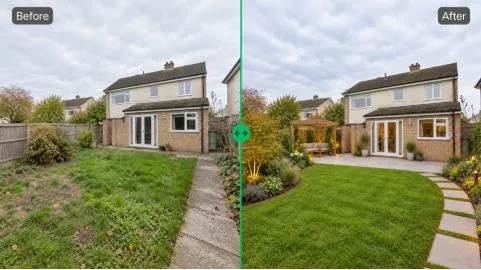
A backyard can look perfectly fine and still feel unfinished. Maybe there is too much lawn. Maybe the patio ends too suddenly. Or there is an empty strip beside the fence that has bothered you for two years, but you still have no idea what should go there. Looking at other gardens helps, until you realize that none of them actually looks like your property.
Designing From a Real Site Changes the Question
There is a big difference between asking, “What kind of garden do I like?” and asking, “What could work in this exact space?”
The second question is usually harder.
With a landscape plan, you can start with a photo of the place itself. That might be a backyard, front entrance, courtyard, rooftop, small park, streetscape, or the outdoor area in front of a shop. The building is already there. So are the trees, walls, awkward corners, paving, and everything else you have to work around.
You are not designing an imaginary site anymore.
Say What You Want to Keep
Imagine a front yard with one large tree near the driveway. The owner likes the tree. What they dislike is everything around it: a wide patch of grass, almost no planting near the house, and a concrete path that feels too exposed.
The prompt does not need to sound technical. Something like “keep the mature tree, add layered planting near the house, soften the edge of the path, and use less lawn” is enough to test the thought.
This is one reason a landscape plan can be useful early on. It gives you a way to work around the parts of a property that are already fixed, or simply worth keeping.
Sometimes the result also tells you that your original idea was not quite right. That is useful too.
See Whether a Style Actually Fits
Saved images can be misleading.
A Mediterranean courtyard may look great on Pinterest, but place the same idea beside a very contemporary house and you may feel differently. The opposite happens too. A clean Modern treatment can look slightly cold once it is applied to a shaded backyard full of older trees.
Testing several styles on the same photo is much easier than trying to settle the argument in your head.
A landscape plan gives you that comparison without asking you to commit to one direction. You can try Modern, Natural, Cottage, or Mediterranean, look at each for a minute, and decide what feels wrong before worrying about what feels right.
That is often how early design decisions happen.
Look at the Change, Not Just the New Image
There is a temptation with AI design tools to focus on the generated image by itself. I think that is usually the less interesting part.
What matters more is what changed.
Before and After Makes Small Problems Obvious
Take a patio as an example. The redesigned version may look better immediately. More planting, softer edges, a place to sit.
Then you compare it with the original.
Now you notice that the new seating area blocks a useful walking route. Or the plants have taken over a part of the patio that was actually needed. Maybe the old layout was not as bad as you thought; it just needed one or two changes.
That is why Before / After matters in a landscape plan. It keeps the existing space in the discussion instead of letting the new image replace it completely.
For a homeowner, it is useful for making up your own mind. For a designer or property team, it is also a much easier thing to show someone else than a paragraph describing the idea.
Fix One Area Without Losing the Rest
There is another very ordinary problem: most of the image is fine, but one part is annoying.
The planting looks good. The paving is better. The entrance finally makes sense. Then there is a strange bench in the middle of everything.
You probably do not want another full generation.
With Landscape Editor, a specific area can be selected and changed with another prompt. So the landscape plan does not have to be treated as one finished image. You can keep the parts that work and adjust the part that does not.
That sounds like a small feature, but it changes the workflow quite a bit. Real design rarely improves by throwing everything away every time one detail is off.
Smaller Gardens Need Different Decisions
A typical home garden has its own set of questions. How dense should the planting feel? Should the backyard have a water feature at all? Would the patio look better with more greenery, or would that make the space feel cramped?
For this narrower kind of project, a garden planner can be useful because the controls are more focused on residential garden choices, including garden type, planting density, water features, time, and weather.
A broader landscape plan becomes more relevant when the site itself is broader: a rooftop, commercial entrance, public courtyard, street, plaza, or park where the problem is not only about planting.
Most People Do Not Start With a Proper Design Brief
They start with comments.
“I want this corner to feel less empty.”
“Can we make the entrance greener without hiding the building?”
“There is too much concrete.”
Those are not bad instructions. They are actually quite close to how people talk about outdoor spaces in real life