Corporate Event Stage Lighting Checklist
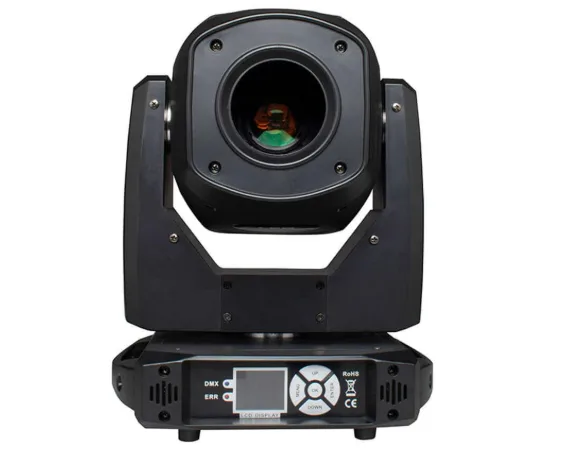
A corporate event lighting plan is ready for load-in when the team knows what must be visible, where it will be viewed from, which program changes need cues, and who will verify the result.
Guest count can describe the event, but it cannot determine the right lighting layout by itself. Room geometry, stage positions, screens, cameras, venue rules, control needs, and rehearsal time all affect the plan.
Use this checklist before ordering equipment or sending a request to a lighting supplier. It is a planning handoff for event planners, AV coordinators, venue teams, and lighting operators. Electrical, mounting, rigging, and compliance decisions still belong with the venue and qualified personnel.
1. Confirm the room and viewing conditions
Begin with the information that shapes every later decision.
- Room length, width, and ceiling height
- Stage width, depth, and available working areas
- Presenter travel paths and panel positions
- Demonstration tables, award handoff points, and photo positions
- Audience seating and important sightlines
- Screen, projection, LED wall, or presentation display locations
- Camera and still-photography positions
- Window light, house light, and other ambient sources
- Permitted floor, stand, wall, or overhead positions
- Load-in, setup, focus, programming, and rehearsal windows
This step prevents the team from choosing lighting from a generic event label. A presenter who moves across a wide stage may need a different coverage plan from a speaker who stays at a lectern. A product demonstration may also require a separate check for the working surface and the camera frame.
2. Map the run of show to lighting jobs
Corporate programs often combine several lighting tasks in one event. Write down what each segment needs before comparing fixture categories.
For a keynote, ask whether the presenter can move through the planned speaking area while remaining clear to the audience and camera.
For a panel, check every seated position rather than building the entire look around one chair. Include the expected camera frame and the relationship between faces, screens, and scenic elements.
For a product demonstration, identify both the presenter and the object or work surface that must remain visible. Check whether the display content, product finish, or camera angle creates glare or unwanted spill.
For awards or walk-on moments, mark the route from the entrance or seating area to the stage, handoff point, and photo position. The lighting state may need to support more than the main speaking area.
For networking, decide whether the formal stage look should remain, soften, or change. Keep the transition simple enough for the operator to prepare and test.
These are planning questions, not universal equipment packages. Each answer depends on the room and program.
3. Build the look in three passes
A useful order is visibility, separation, and special moments.
First, protect visibility. Identify the people, products, lectern, panel, demonstration surface, award area, and other task zones that must be seen. Check whether one stable look can cover several formal segments or whether the positions change enough to require separate states.
Second, add separation. Plan light for backdrops, scenic surfaces, sponsor areas, or architectural features after the main subjects are clear. Brand colors may work well on scenic elements, but they should be reviewed on the actual set and camera frame before being used near people.
Third, add programmed moments. Opening cues, walk-ons, reveals, award handoffs, and the transition to networking may justify a change. Add only the changes that support the agenda and fit the operator’s preparation and rehearsal time.
This order keeps decorative effects from taking attention away from the communication task.
4. Match lighting categories to the job
Once the visual jobs are clear, compare categories by placement, coverage, control, and verification needs. The category name is only a starting point; exact models can differ in optics, control options, noise, color behavior, and mounting requirements.
Broad coverage or scenic color may lead you to review PAR or wash categories. A focused presenter, product, or photo position may call for a spotlight or profile-capable category. A moving wash or spot category may be useful when the program requires repositioning or planned movement.
If repeatable looks are important, document the scenes the operator must recall, such as keynote, panel, demonstration, awards, photo, and networking states. Verify compatibility across the selected fixtures, controller, connectors, and control method.
After the brief is complete, teams can compare relevant SHEHDS stage lights by lighting job and exact model information.
5. Close venue and control questions
- Who approves the planned fixture positions?
- Which cable routes and access paths are permitted?
- Who reviews power access and distribution?
- Which control method will the operator use?
- Which fixtures, controller, connectors, and protocol details must work together?
- What is the stable fallback look if a planned cue is unavailable?
- Who can approve a change during setup or rehearsal?
Keep these questions in the event record. A lighting plan becomes easier to review when each decision has a responsible person and a clear status.
6. Rehearse the actual presentation
Test with the real or representative presentation content, not an empty screen.
Place people in the keynote, panel, demonstration, awards, and photo positions. Review the result from the audience and every planned camera angle. Check screen readability, reflections, scenic spill, presenter movement, and the transition between cue states.
Camera behavior should be tested with the actual fixture, camera, settings, subject position, and intended frame. A product description alone cannot prove that a setup will behave correctly in every recording environment.
Run the cues in program order and keep one stable fallback state that the operator can use if a transition is not ready. Record each observation, correction, reviewer, and owner before doors open.
A complete corporate event stage lighting checklist does not need to predict every technical detail in advance. It needs to expose the decisions that affect visibility, coordination, control, venue approval, and rehearsal. When those decisions are documented early, the production team can compare equipment more carefully and resolve gaps before load-in.