Dadan vs Screen Studio: Which Mac Screen Recorder Fits Your Work in 2026?
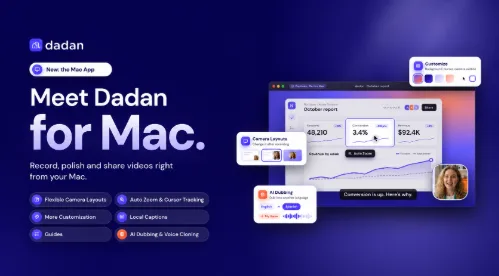
Screen Studio is known for creating polished screen recordings on Mac. But recording is only one part of the workflow. Dadan takes things further with a powerful recording and video creation platform that works across Mac and Windows, bringing together screen recording, AI-powered editing, workflow documentation, and audience engagement.
While Screen Studio focuses primarily on producing polished recordings, Dadan helps you put those recordings to work. Turn screen recordings into step-by-step Guides, dub videos into 40+ languages with AI, create interactive videos with lead forms and CTAs, and capture meetings with AI-powered summaries.
Another important difference is platform flexibility. Dadan gives teams a consistent video creation workflow across Mac and Windows, making it easier for businesses with different operating systems to collaborate without being restricted to a single desktop platform.
Both tools offer capabilities such as automatic zoom, cursor enhancements, and transcript-based editing. However, their approaches differ significantly. Screen Studio focuses on recording polish, while Dadan combines recording, editing, documentation, meeting intelligence, and engagement in one platform.
If you simply want beautiful screen recordings on your Mac, Screen Studio is worth considering. But if you want a platform that grows with your team’s recording, communication, documentation, and marketing needs, Dadan offers considerably more.
Dadan vs Screen Studio at a glance
Pick Screen Studio for polished launch clips and iPhone app demos you’ll post elsewhere. Pick Dadan when the video needs to capture leads, become written documentation or reach viewers in other languages.
| Feature | Screen Studio | Dadan for Mac |
|---|---|---|
| Platform | macOS only, 13.1+ recommended | macOS, Windows, plus Dadan’s web platform |
| Price | $9/mo billed yearly, or $29/mo | Free plan; Pro $8/mo billed yearly, or $11/mo |
| Free plan | No | Yes, 25 videos up to 5 min each |
| Auto zoom on clicks | Yes, classic and loupe zoom | Yes, on clicks and typing, pans with the cursor |
| Camera layouts | 5, including background-removed cutout | 4, from full camera to screen only |
| Live annotation while recording | Keystrokes and speaker notes | Step numbers, drawing, arrows, text, keystrokes, speaker notes |
| Edit by transcript | Yes, removes filler words and pauses | Yes, removes filler words and pauses, long form to short form videos |
| Captions | On-device, styled, .srt export | Auto, styled, translatable |
| AI voice | Voiceover from a typed script | Your cloned voice, dubbed into 40+ languages |
| Step-by-step written guide | Not offered | Generated from the recording, translated into 180+ languages |
| Share link | 1080p60, up to 30 min, comments, view counts | Hosted page with viewer insights |
| Video analytics | Not offered | Yes, can see views, engagements, and more insights |
| CTAs and lead forms in the player | Not offered | Yes, at any second of the video |
| In-built Video editor | Not offered | Yes, professional video editor |
| Meeting Recording | Not offered | AI-powered meeting recording, summaries, and recaps |
Recording, auto zoom and cursor polish
Screen Studio still sets the bar for motion. Its team built a real-time upscaler, trained on over 5,000 macOS screenshots, that keeps text sharp at deep zoom levels, and it adds optics-based motion blur so fast pans look filmed. You choose between a classic zoom and a loupe that magnifies one spot. Smart framing keeps your webcam bubble off the cursor.
A few Screen Studio details I’d miss if I switched: plug in an iPhone or iPad over USB and it wraps the recording in a matching device frame. It saves your take to disk every two seconds, so a crash or a dead battery won’t cost you the recording. And you can loop the cursor back to its start point for GIFs that repeat without a jump.
Dadan zooms on clicks and on typing, and the zoom pans with your mouse so the action stays in frame. You can drag any zoom on the timeline or drop a manual one with Add Zoom Here. After recording you can change cursor style, size and click effect (ripple or pulse), turn on a spotlight, and switch smoothing on or off.
The recording toolbar is where Dadan pulls ahead. While you record, you can number each step 1, 2, 3, circle a button, draw an arrow or drop a text label, and your keystrokes show on screen. Screen Studio’s site lists keystroke display and speaker notes, but I couldn’t find live drawing or step markers. For a support tutorial, those numbered steps save a viewer from pausing to hunt for the button you clicked.
Editing, captions and layouts
On editing, the two apps sit close. Both let you delete a sentence from the transcript to cut it from the video, and both clear filler words and long pauses in one pass. Both blur emails or API keys after the fact, save your look as a preset, and turn a 16:9 take into a vertical or square cut with zooms and captions re-aimed for the new shape.
Screen Studio has the stronger camera tools. Its camera cutout removes the background behind you on your Mac, face tracking keeps you centered, and the camera can step aside when you stop talking. Its noise reduction and Podcast mode clean up a laptop mic without uploading your voice.
That on-device approach runs through the whole app. Screen Studio transcribes captions locally with Whisper or Apple’s speech recognition and stores projects on your Mac. Cloud features, such as share links and cloud transcription, are opt-in. If your security team blocks cloud recorders, start your trial there.
Dadan’s layouts cover full camera, split screen, a camera bubble and screen only, and it animates each switch. You’d open on your face, shrink to a bubble while you click, then let the screen take over. Captions arrive the moment you stop recording, timed to your voice, and you can translate them before you share.
Sharing, CTAs and analytics: what happens after you hit stop
This is the widest gap. Screen Studio added share links in version 3.0, and they work well for internal use: 1080p at 60 fps, videos up to 30 minutes, private links, view counts and comments pinned to the exact second. You can also copy the finished video and paste it into Slack or Linear, or send a teammate the whole editable project, up to 20 GB.
Screen Studio stops there. For a sales demo or a landing-page video, you export the MP4 and upload it to a second tool to add a button, a form or real analytics.
Dadan treats the share page as the product. You can place a CTA at any second, so a Book a Demo button appears the moment your demo hits its best feature. Viewers fill in name and email inside the player without leaving the page, and you see who watched, how far they got and what they clicked.
Picture a founder sending a 3-minute product tour to 200 prospects. With Screen Studio, the founder learns how many people opened the link. With Dadan, the founder gets a list of the 14 people who watched past the pricing screen and clicked the button.
Dadan also ships an MCP server, so you can ask an AI assistant to search, edit and share your Dadan videos from chat.
Step-by-step guides, translation and AI dubbing
Dadan turns one recording into three deliverables. Stop recording and it writes a how-to guide with one screenshot per click, the click highlighted and the instruction written for you. You can share the video, the guide or both, and translate the whole guide in one click while the screenshots and highlights stay in place.
For narration, Dadan clones your voice from the recording and dubs it into 40+ languages, keeping your tone, pace and pauses. A customer in Madrid hears you speaking Spanish, not a stock narrator.
Screen Studio offers an AI voiceover: you type a script and it generates a voice you can edit later. You can also export an .srt caption file that matches your cut. Its feature page doesn’t list guide generation, caption translation or voice dubbing, so a support team would need a documentation tool and a dubbing service on top.
If you write help-center articles, this section decides it. Recording a 2-minute walkthrough and getting the written article with it removes the slowest part of support content work: taking and cropping 12 screenshots by hand.
Pricing
On yearly billing Dadan costs $96 a year and Screen Studio costs $108, and Dadan adds a free plan you can use before paying anything.
| Plan | Screen Studio | Dadan |
|---|---|---|
| Free | None | 25 videos, 5 min each, 1 GB storage |
| Monthly | $29/mo | $14/mo |
| Yearly | $9/mo, $108/yr | $8/mo, $96/yr |
Which One Should You Pick?
Choose based on what you want to accomplish with your screen recordings. If you need polished clips for social media, Screen Studio is worth considering. But if you want a complete platform to record, edit, document, engage, and convert viewers, Dadan offers significantly more.
Screen Studio fits you if:
- You primarily create polished product launch videos, changelog clips, or social media content.
- You demonstrate iPhone or iPad apps and need device frames without additional editing.
- You prefer to keep recordings locally on your Mac.
- You already have a separate video hosting and sharing platform and only need a polished recording tool.
Dadan is the better choice if:
- You want more than screen recording, with built-in video editing, AI-powered tools, and sharing capabilities in one platform.
- You create product demos, software tutorials, and step-by-step Guides to document workflows without manually creating documentation.
- You need interactive videos with CTAs, polls, quizzes, and lead forms to turn passive viewers into potential customers.
- You work with international audiences and need AI-powered dubbing and multilingual video capabilities.
- You regularly conduct meetings and want recordings, AI summaries, transcripts, and action items.
- You want to understand viewer engagement through video analytics and make better decisions based on how people interact with your content.
- You want to start with a free plan and access a broader set of video creation and collaboration tools as your needs grow.
Our verdict: Screen Studio is a strong choice for Mac users who prioritize polished screen recordings. However, Dadan is the more versatile solution for businesses, marketing teams, SaaS companies, and agencies that need screen recording, video creation, workflow documentation, meeting intelligence, and audience engagement in one platform. If you want a complete video workflow rather than just a recording tool, Dadan is the stronger choice.