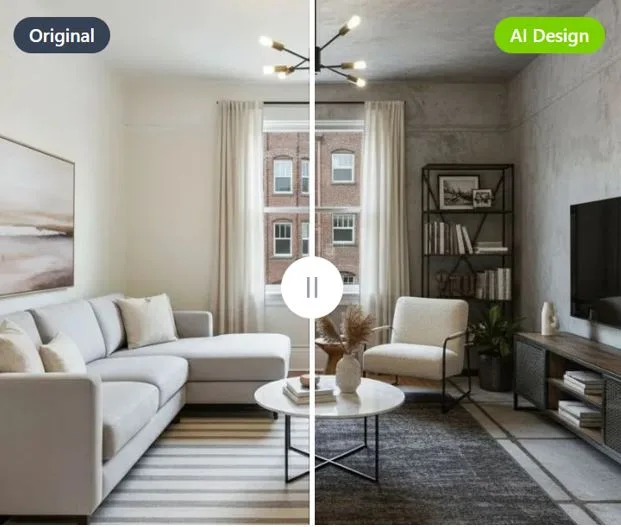
Dehome: Paint Color Visualizer – Transforming Your Home Design Experience
Choosing the perfect paint color for your home can be both exciting and overwhelming. A shade that looks beautiful on a tiny swatch or in a showroom can appear completely different once applied to your walls. Lighting, room size, furniture, and even the time of day can influence how a color looks in your space. This is where Dehome: Paint Color Visualizer steps in as a powerful and innovative solution, helping homeowners, designers, and DIY enthusiasts make confident color choices without the guesswork.
What is Dehome: Paint Color Visualizer?
Dehome: Paint Color Visualizer is a modern digital tool designed to help users experiment with different paint colors in real-time. Instead of relying solely on imagination or small paint samples, this tool allows you to virtually apply colors to your walls using photos or live camera views of your space. It bridges the gap between imagination and reality, making interior design more accessible and precise.
Whether you are redecorating a single room or planning a full home makeover, Dehome provides a realistic preview of how colors will look in your actual environment.
Why Paint Color Selection is So Challenging
Before diving deeper into the features of Dehome, it’s important to understand why choosing paint colors can be difficult:
1. Lighting Variations
Natural and artificial lighting can dramatically change how a color appears. A shade that looks warm in daylight might seem dull or cooler under LED lighting.
2. Room Size and Layout
Dark colors can make small rooms feel even smaller, while lighter tones can create a sense of openness.
3. Surrounding Elements
Furniture, flooring, and décor all interact with wall colors. A color that looks perfect in isolation may clash with existing elements.
4. Psychological Impact
Colors influence mood and emotions. For example, blues are calming, while reds can be energizing. Choosing the wrong tone can affect how a space feels.
Dehome eliminates much of this uncertainty by allowing users to preview colors in their own environment before making a final decision.
Key Features of Dehome: Paint Color Visualizer
1. Real-Time Visualization
One of the most powerful features of Dehome is its ability to show paint colors directly on your walls in real-time. By using your smartphone camera or uploading a photo, you can instantly see how different shades will look.
2. Extensive Color Library
Dehome offers a wide range of colors, from classic neutrals to bold, modern tones. This extensive palette ensures that users can find exactly what they’re looking for.
3. Smart Surface Detection
The tool intelligently identifies walls and surfaces within your image, making the application of colors smooth and realistic. This eliminates the need for manual editing or technical skills.
4. Save and Compare Options
Users can save multiple color options and compare them side by side. This feature is especially helpful when you are torn between two or more shades.
5. User-Friendly Interface
Even beginners can use Dehome effortlessly. Its clean and intuitive design ensures a smooth experience without requiring advanced technical knowledge.
6. Customization and Flexibility
You can experiment with different rooms, lighting conditions, and color combinations. This flexibility allows for creative exploration without any commitment.
Benefits of Using Dehome
1. Saves Time
Instead of testing multiple paint samples on your walls, you can try dozens of colors within minutes.
2. Reduces Cost
Buying paint samples and repainting walls can be expensive. Dehome helps you get it right the first time, saving money.
3. Boosts Confidence
Seeing a realistic preview of your chosen color gives you confidence in your decision, reducing the chances of regret.
4. Encourages Creativity
With no risk involved, users can experiment with bold and unique color combinations they might not otherwise consider.
5. Ideal for Professionals and Beginners
Interior designers can use it to present ideas to clients, while homeowners can use it for personal projects.
How to Use Dehome: Paint Color Visualizer
Using Dehome is simple and straightforward:
- Capture or Upload a Photo
Take a picture of your room or upload an existing one. - Select a Surface
The tool will automatically detect walls, or you can manually select the area you want to paint. - Choose a Color
Browse through the color library and pick a shade. - Apply and Preview
Instantly see how the color looks on your wall. - Save and Compare
Save your favorite options and compare them before making a final decision.
Practical Use Cases
1. Home Renovation
If you are remodeling your home, Dehome helps you visualize the final look before starting the project.
2. Rental Spaces
For renters who want to plan future designs, this tool provides a safe way to experiment without making permanent changes.
3. Interior Design Projects
Professionals can use Dehome to present multiple design options to clients quickly and effectively.
4. DIY Projects
For DIY enthusiasts, it simplifies the decision-making process and makes home improvement more enjoyable.
Tips for Getting the Best Results
To maximize the effectiveness of Dehome, consider the following tips:
- Use High-Quality Photos: Clear images provide more accurate results.
- Test Multiple Lighting Conditions: Try visualizing colors during the day and at night.
- Consider Furniture and Décor: Ensure the chosen color complements existing elements.
- Don’t Rush: Take time to compare different options before deciding.
The Future of Home Design with Visualizer Tools
Digital tools like Dehome represent the future of home design. As technology continues to evolve, we can expect even more advanced features such as:
- Augmented reality (AR) for immersive experiences
- AI-based color recommendations
- Integration with furniture and décor planning tools
These innovations will make designing a home more interactive, efficient, and personalized than ever before.
Conclusion
Dehome: Paint Color Visualizer is a game-changer in the world of interior design. It removes the uncertainty and stress associated with choosing paint colors by offering a realistic and interactive preview of your space. With its user-friendly interface, advanced features, and practical benefits, it empowers users to make smarter design decisions.
Whether you are a homeowner planning a makeover, a designer working with clients, or simply someone who loves experimenting with colors, Dehome provides the tools you need to bring your vision to life. In a world where first impressions matter, having the right color on your walls can make all the difference—and Dehome ensures you get it just right.