Elevate Your Creative Content: How Tripo Studio’s AI 3D Tools Transform Music, Fashion & Lifestyle Visuals
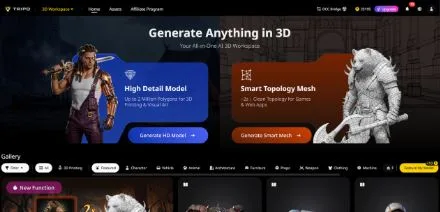
In the world of music, fashion, and lifestyle content, visuals are everything. Whether you’re a musician creating album art, a fashion brand designing 3D lookbooks, or a content creator crafting eye-catching social media posts, 3D assets can take your work to the next level. But until now, 3D creation has been out of reach for most—requiring expensive software, years of training, and hours of tedious work. You have a vision for a 3D stage setup for your music video, a 3D fashion accessory, or a lifestyle prop—but turning that vision into reality feels impossible. Enter Tripo Studio: the AI 3D Model Generator that’s making 3D creation accessible to creators in music, fashion, and lifestyle. With its intuitive AI tools, you can turn text prompts, photos, and sketches into stunning 3D assets—no technical skills required.
Tripo Studio’s Core Features: Create 3D Visuals That Stand Out
Tripo Studio’s six AI-driven features are designed to help music, fashion, and lifestyle creators create 3D assets that align with their brand and vision. Each tool is fast, easy to use, and tailored to the unique needs of creative professionals in these industries.
- Text to 3D Model
Text to 3D Model lets you turn your creative ideas into 3D assets with a simple prompt. Musicians can generate 3D stage props (e.g., “a neon-lit DJ booth with speakers and LED screens”), fashion brands can create 3D accessories (e.g., “a sleek 18k gold necklace with a pendant”), and lifestyle creators can design 3D home decor (e.g., “a modern marble coffee table with a glass top”). It solves the problem of translating creative concepts into 3D, saving you hours of manual modeling. The result is a production-ready 3D model that you can use in album art, lookbooks, or social media content.
- Image to 3D Model
If you have a photo of a fashion item, a music prop, or a lifestyle product, Image to 3D Model turns it into a fully 3D asset. This is perfect for fashion brands that want to create 3D lookbooks from product photos, musicians who want to 3D-ify their stage setup, or lifestyle creators who want to showcase home decor in 3D. It solves the problem of accurately converting 2D images to 3D, preserving every detail—from the texture of a fabric to the shine of a metal accessory. With this tool, you can create dynamic 3D visuals that stand out from the crowd.
- AI Model Segmentation
For music, fashion, and lifestyle creators, customization is key. AI Model Segmentation automatically splits your 3D model into individual parts, making it easy to modify or replace elements. Need to change the color of a fashion accessory? Or adjust the lighting on a stage prop? Use Segmentation/Split 3D Model to isolate the part you want to edit, without disrupting the entire asset. It’s perfect for creating multiple versions of a 3D asset (e.g., different colors of a necklace, different lighting for a stage) and ensuring your visuals align with your brand.
- AI Retopology
3D assets for music, fashion, and lifestyle content often need to be smooth, clean, and optimized for use in videos, social media, or lookbooks. Tripo Studio’s AI Retopology automates the process of refining a model’s mesh, ensuring it’s smooth and efficient. It solves the problem of messy, unoptimized meshes that look unprofessional or cause lag in videos. Whether you’re creating a 3D accessory for a fashion lookbook or a stage prop for a music video, this tool ensures your 3D assets look polished and perform well.
- AI Texturing
Textures are what make 3D assets feel real—whether it’s the fabric of a fashion item, the metal of a stage prop, or the wood of a home decor piece. AI Texture in Tripo Studio applies high-quality, context-aware textures that match your asset’s theme. The AI analyzes your model (e.g., a silk dress, a metal DJ mixer, a wooden shelf) and applies textures that look authentic. It solves the problem of manual texture painting, saving you time and ensuring your 3D assets look professional and on-brand.
- AI Rigging
For creators who want to animate their 3D assets—e.g., a fashion accessory rotating in a lookbook, a stage prop moving in a music video—AI Rigging is essential. Tripo Studio’s AI Rigging automates the process of creating a skeletal structure, making your 3D model ready for animation. It solves the problem of manual rigging, which is often a barrier for creators without advanced 3D skills. Even beginners can rig a 3D accessory or prop in minutes, allowing them to create dynamic, engaging visuals for their content.
Use Cases for Music, Fashion & Lifestyle Creators
Tripo Studio is a versatile tool that adapts to the needs of creators in music, fashion, and lifestyle:
- Music: Create 3D stage setups, album art assets, music video props, or virtual avatars for live streams.
- Fashion: Design 3D lookbooks, accessory models, clothing prototypes, or virtual fashion shows.
- Lifestyle: Generate 3D home decor, beauty product models, or social media props to enhance your content.
- Content Creation: Create eye-catching 3D visuals for Instagram, TikTok, YouTube, or brand campaigns.
Why Tripo Studio Is a Game-Changer for Creative Professionals
For music, fashion, and lifestyle creators, Tripo Studio offers three key advantages:
- Accessibility: No advanced 3D skills required—create professional 3D assets even if you’ve never modeled before.
- Speed: Create 3D assets in minutes, not hours—perfect for meeting tight deadlines or updating content quickly.
- Brand Alignment: Customize every aspect of your 3D assets to match your brand’s aesthetic, ensuring consistency across all visuals.
Tutorial: Create a 3D Fashion Accessory in 5 Steps
Want to create a 3D necklace for your fashion lookbook? Follow these simple steps with Tripo Studio:
- Sign up for Tripo Studio’s free trial and log in.
- Choose “Text to 3D” and type a prompt: “A dainty silver necklace with a small heart pendant, delicate chain, and a lobster clasp.”
- Click “Generate” and wait a few seconds for the AI to create your 3D necklace model.
- Use AI Model Segmentation to split the necklace into the chain and pendant, then use AI Retopology to optimize the mesh.
- Apply AI Texturing to add a silver finish to the chain and pendant, then export the model to use in your lookbook or social media.
Ready to Elevate Your Creative Visuals?
Tripo Studio is the ultimate tool for music, fashion, and lifestyle creators who want to take their visuals to the next level. Whether you’re a musician, fashion brand, or content creator, this AI 3D Model Generator will save you time, reduce frustration, and help you create 3D assets that stand out. Sign up for a free trial today and start creating stunning 3D visuals for your brand. Visit Tripo Studio to get started—your next viral visual is just a prompt away.