Free AI Music Tool Selection Guide: MakeBestMusic is All You Need
In today’s digital creative landscape, AI music tools are rapidly transforming how musicians compose. From melody generation and chord arrangement to lyric writing and voice synthesis, AI makes music creation faster, simpler, and more engaging. For beginners and music enthusiasts, especially, free AI music tools serve as the gateway into the world of music production.
However, with numerous AI music tools available, their free features vary significantly. Which one is best suited for beginners? Which proves more efficient in actual creation? This article will conduct a comparative analysis based on free features and user experience, helping you quickly identify and select the free AI music tool that best fits your needs. It will also highlight the advantages and applicable scenarios of MakeBestMusic.
Key Features of AI Music Tools
Before comparing various music generation tools, we first need to understand the core functionalities of common music generation tools. The most frequently available free features on the market include:
Automatic Music Generation
AI automatically generates melodies, accompaniments, and complete music segments—the most essential function. This primarily includes:
- Automatic melody and rhythm generation
- One-click chord progression creation
- AI-assisted arrangement
Editing and Mixing Capabilities
Tools for editing and enhancing existing compositions, including:
- Track separation
- Smart mixing and mastering
- Audio restoration
Lyric Generation and Melody Alignment
AI music creation software enables users to automatically compose lyrics that align with melodies:
- Intelligent lyric generation
- Customizable lyric styles (romantic, inspirational, pop, etc.)
- Automatic melody-lyric synchronization
Free AI Music Tools Side-by-Side Comparison
MakeBestMusic Free Features
Text-to-Music Generation (Including Lyrics + Vocals)
- MakeBestMusic: Supports custom lyrics, styles, beats, keys, and gender-specific vocal tones.
- Suno: Supports automatic generation of lyrics and singing based on input prompts.
- Udio: Supports text-to-music but with limited control over details.
- AIVA: Does not support songs with vocals.
Pure Music Generation
- MakeBestMusic: Supported
- Suno: Supported
- Udio: Supported
- AIVA: Supported (strengths in instrumental composition)
Lyrics Custom Editing
- MakeBestMusic: Built-in free lyrics editor with lyric completion and rhyme assistance.
- Suno: Handwritten lyrics supported; no advanced editing tools.
- Udio: Lyrics can be entered manually without a lyrics database.
- AIVA: Lyrics editing not available.
Multi-Track Instrument Selection for Arrangement
- MakeBestMusic: Piano, guitar, organ, bass, brass instruments, ensemble, etc.
- Suno: Paid features
- Udio: Not supported
- AIVA: Not supported
One-Stop Process from Lyrics to Finished Product
- MakeBestMusic: Composition → Arrangement → Mixing → Restoration → Separation (specialty)
- Suno: Generates only
- Udio: Generates only
- AIVA: Composition only
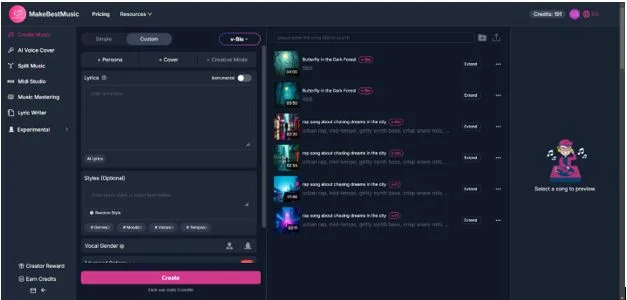
Create Music: Generate highly customized songs using AI
Within MakeBestMusic’s free system, users can generate songs using points. Each creation requires only 3 points to complete a full AI composition process. The platform supports end-to-end customization from lyrics to musical style:
- Users can input complete lyrics or first utilize the platform’s built-in free lyric editing tool for creation and refinement. MakeBestMusic also offers AI-generated lyrics for beginners unfamiliar with lyric writing—simply input descriptive terms for desired scenes, themes, or emotions to generate custom AI-crafted lyrics.
- For style selection, it supports mainstream genres like Rap, Pop, Country, Electronic, Rock, Jazz, and Folk. Users can further specify musical details such as beat structure, emotional progression, tempo, and tonal color.
- Additionally, users can choose the singer’s gender and vocal characteristics during generation, or even generate instrumental backing tracks without lyrics.
This one-stop generation process—from lyrics to melody to finished song—enables short-video creators to quickly obtain copyright-free background music, independent musicians to efficiently produce song demos, and advertising and game developers to batch-generate cohesive soundtrack assets.
- MIDI Studio: Experience a professional-grade multitrack sequencing environment for free.
MakeBestMusic’s MIDI Studio module empowers everyday users to compose music with the same ease as professional digital audio workstations (DAWs).
- Users can generate chord progressions and melodic frameworks, freely select key signatures and scale structures, and layer different instrument sounds track by track.
- Whether it’s keyboard sounds like piano, electric piano, or organ; string sections like guitar, bass, and strings; or brass, ensemble, drum kits, and electronic beats—all can be stacked layer by layer like building blocks.
- Each track allows precise control over rhythm entry points, volume balance, and layering, while tempo adjustments shape the overall rhythm and atmosphere of the piece.
This visual, modular approach empowers users without professional arranging backgrounds to create musically coherent works featuring well-defined sections and natural emotional progression.
- A Free End-to-End Processing Experience from Lyric Inspiration to Finished Sound Quality
MakeBestMusic’s free features extend beyond mere “melody generation,” covering the most overlooked yet critical post-production and lyric stages in music creation. The platform integrates lyric assistance, mixing processing, mastering optimization, and audio restoration into a seamless creative workflow.
Lyric Creation Phase
- Built-in intelligent editing tools automatically suggest related semantics, rhyming phrases, and common sentence structures based on input keywords. This helps users rapidly expand inspiration, refine paragraph logic, make choruses more memorable, and enhance the narrative flow of verses.
- Whether it’s emotional expression in pop songs or rhyme density in rap works, effective support is available from the earliest stages of creation.
After Melody and Lyrics Take Shape
- Users can also apply free 10- to 60-second mix processing to music clips. AI algorithms automatically balance volume, shape, spatial presence, optimize frequency clarity, and adjust stereo width.
- This feature is ideal for creating demo previews, short video cover music, advertising samples, and social media promotional clips—instantly lending professional polish to your work’s first impression.
Mastering Capabilities
- Users can upload local audio files for loudness normalization, dynamic range control, low-frequency thickness enhancement, high-frequency detail restoration, and overall tonal consistency.
- Even recordings made with ordinary microphones or home studios can achieve fuller, more stable sound quality closer to commercial release standards through AI mastering algorithms.
Audio Restoration & Sound Extraction
- For audio files affected by noise, distortion, aging, or compression artifacts, the system automatically cleans and restores them.
- It also supports separating vocals from accompaniment in music or videos, providing high-quality source material for cover practice, secondary creation, video editing, and podcast production.
The entire workflow seamlessly integrates “lyric writing → composition → arrangement → mixing → mastering → restoration → separation,” creating a truly free, end-to-end music production environment.
MakeBestMusic: Effortless AI Music Creation and Cover Songs for Beginners
Driven by the digital creation wave, MakeBestMusic stands out among free AI music tools with its ultra-high generation efficiency, user-friendly interface, and beginner-friendly experience. It not only meets professional music creation needs but also offers rich entertainment features for novices, making it an essential tool for creating cover songs.
- Ultra-High Creation Efficiency: One-Click Access to Lightning-Fast Music Production
Optimizing the entire creative workflow, MakeBestMusic achieves comprehensive enhancements in music generation efficiency through technological advancements, making “creating a complete song in minutes” a reality.
- At the core song-generation stage, MakeBestMusic employs a points-based creation model. Each full AI composition requires only 3 points, enabling users to satisfy high-frequency creation needs within the free tier.
- Users need not switch between platforms, as MakeBestMusic supports end-to-end customization from lyrics to musical style. Whether inputting complete lyrics directly or using the platform’s built-in tools for lyric writing and refinement, everything is completed in one place.
- For style selection, the platform covers mainstream genres like Rap, Pop, Electronic, and Rock, while also enabling precise customization of beats, mood, tempo, key, and other details. It can even generate pure instrumental accompaniments directly, eliminating the time cost of repeated adjustments.
- Simultaneously, MakeBestMusic integrates post-processing into its closed-loop creation system. After generating melodies and lyrics, users can immediately access free AI mixing for 10-60 second clips. Algorithms automatically handle volume balancing, spatial shaping, and stereo adjustments—eliminating manual parameter tweaking and instantly delivering professional-grade sound quality.
- For users requiring bulk creation—such as short-video creators and advertising developers—the platform rapidly generates royalty-free background music and soundtrack assets, significantly boosting content production efficiency.
Unlike other AI music tools, MakeBestMusic eliminates lengthy generation waits. From inputting creative requirements to obtaining complete audio, the entire process can be completed in minutes, truly realizing “inspiration as creation” and enabling creators to swiftly transform ideas into tangible works.
- User-friendly interaction design with zero learning curve, tailored to user habits
MakeBestMusic’s interaction design deeply aligns with everyday users’ habits, abandoning the complex operational logic of professional music software. It delivers a visual, modular interaction experience where every feature is easily discoverable and instantly usable.
MIDI Studio Module
- It simplifies professional-grade multitrack arranging into an intuitive workflow. Users can intuitively generate chord progressions and melodic frameworks without specialized skills, freely select song keys and scales, and add instrument sounds like piano, guitar, bass, and drums track by track.
- Every track operation is visualized: rhythm entry points, volume balance, and layering can be adjusted with a single click. Tempo changes preview effects in real time, making the entire arrangement process intuitive and easy to grasp. Even first-time users can master basic operations within minutes.
Lyric Creation and Post-Processing
- The lyric editor automatically suggests rhyming phrases, semantic connections, and sentence structures based on keywords, providing real-time creative guidance. Users simply click to refine lyrics.
- Audio restoration and vocal separation operate with “one-click” functionality. After uploading audio, the system automatically cleans noise, repairs distortion, and separates vocals from accompaniment—no parameter adjustments required, minimizing the learning curve.
Additionally, MakeBestMusic features a clear functional layout. Core modules like “Create Music,” “MIDI Studio,” “Lyric Creation,” and “Audio Processing” are categorized for easy access directly from the homepage. This eliminates complex menu hierarchies, allowing users to focus on their creative content without wasting time searching for features.
- Ultra beginner-friendly—create effortlessly with zero music theory knowledge
The barrier to music creation lies not only in technical operation but also in music theory knowledge. MakeBestMusic completely breaks down this barrier, offering comprehensive support for absolute beginners with zero music theory or experience—from feature design to user experience. This empowers every music enthusiast to boldly take their first creative step.
- The platform truly requires zero music theory knowledge. Whether composing, arranging, or mixing, all professional musical logic is handled by AI algorithms. Users needn’t understand chord progressions, key combinations, or mixing parameters. Simply describe your creative vision in words—like “a cross-genre modern pop song with a slow tempo and cyberpunk vibe”—and the AI will precisely generate a piece that meets your specifications.
- For users unfamiliar with lyric writing, the platform’s intelligent lyric tool automatically generates lyrics based on theme and style. It also optimizes paragraph logic, making choruses more memorable and verses more narrative-driven, solving the common pain points of “unable to write lyrics” or “struggling to write good lyrics.”
- To help beginners master creation techniques, every feature in MakeBestMusic comes with simple operation guides, eliminating the need for additional tutorials and enabling quick mastery.
- Simultaneously, the platform’s free features cover the entire workflow—”lyric writing → composition → arrangement → mixing → mastering → restoration”—allowing beginners to experience the complete music creation process without paying, eliminating cost concerns that might otherwise deter experimentation.
Unlike other partially free AI music tools, MakeBestMusic imposes no hidden feature restrictions. Free users gain access to core creation and processing capabilities, truly safeguarding beginners’ musical journeys. Supporting multiple mainstream audio formats, finished creations can be exported directly for saving or shared instantly on social platforms. This enables newcomers’ work to gain rapid visibility, significantly boosting their sense of accomplishment and motivation.
Conclusion
In the era of AI music creation, the choice of tools directly determines the creative experience and efficiency. With its core strengths of efficiency, ease of use, full functionality, and diverse creative modes, MakeBestMusic perfectly caters to both beginners’ entry-level needs and music enthusiasts’ professional aspirations.
Whether you seek a quick taste of musical creation, aspire to craft your own original works, or want to experiment with cover songs, MakeBestMusic delivers comprehensive support.
It breaks down professional barriers in music creation, empowering ordinary individuals with no musical background to become “music creators.” It enriches the forms of musical expression, transforming creation from an exclusive domain into an accessible form of entertainment for all. In today’s digital creation landscape, MakeBestMusic isn’t just an exceptional AI music tool—it’s a bridge connecting music enthusiasts to their musical dreams. It empowers every music lover to effortlessly explore music creation and express themselves through melody.