From AIVA to MBM: How AI Music Generators Become Creators’ Partners
The Inception of AI Music Creation: The Era of Accompaniment Generation Represented by AIVA
Early explorations in AI music creation centered on solving a practical problem: how to provide the content industries—such as film, television, and gaming—with a vast supply of customizable background music at lower costs and with lower professional barriers. Against this backdrop, the first generation of AI music generators, represented by AIVA, came into being. These tools can automatically generate background music based on simple parameters, covering a wide range of common moods and rhythms, such as lively, tense, and soothing, and meeting the practical background music needs of scenarios like film and game production.
This method of generating background music marked the first step in AI music—it helped creators quickly obtain usable assets, making the creative process more efficient. Creators could delegate repetitive, standardized background music components to AI, thereby focusing more energy on storytelling, visuals, and creative expression. However, first-generation tools have limitations: the generated music lacks personalized expression and cannot carry the structure and narrative of a complete song. At this stage, AI music generation tools function more like an intelligent material library than a creative partner.
AI Music Enters a New Phase: The One-Stop Creative Platform Represented by MBM
With technological advancements, AI music has entered a new phase, marked by the rise of one-stop creation platforms like MakeBestMusic. It not only supports text-to-music generation but also automatically creates song lyrics and offers AI Cover and music track separation to deliver an integrated workflow from inspiration to finished product. Creators can complete the entire process without switching platforms. Compared to earlier tools, MakeBestMusic functions more like a true creative partner, empowering everyone to craft personalized sounds and musical assets and embark on their own era of creation.
- Full-Path Creation: Text-to-Music + AI Lyrics
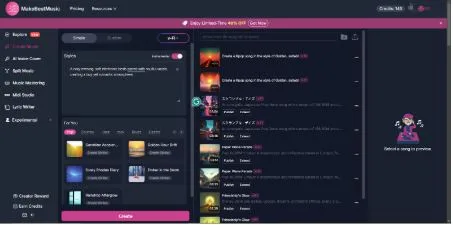
On the MakeBestMusic platform, users no longer need to master music theory, arrangement, or recording knowledge to complete full music compositions. Creators can enter the Create Music section to quickly transform inspiration into complete musical works from scratch. Once in Create Music, creators can choose between Simple Mode or Custom Mode based on their needs, each offering distinct advantages and suitable scenarios.
- Simple Mode
Primarily designed for users who want to quickly turn inspiration into music. Operation is extremely simple: just enter a natural language description in the Styles text box at the center of the interface—for example, “A cozy evening, soft electronic beats paired with soulful vocals, creating a lazy yet romantic atmosphere.” Without any complex settings, click Create, and the system will automatically generate a complete music piece with vocals matching the description. MakeBestMusic also supports instrumental creation; simply enable the Instrumental option in Styles mode to generate melodies and accompaniments without vocals.
In addition, users can preview music of various styles in the For You section below Styles. Whether it’s Country, Blues, Jazz, R&B, or any other style you want to experiment with, you can find it on MakeBestMusic. When you come across a style you particularly like, just click Create Similar, and the system will automatically populate the prompt of the previewed track into the Styles text box, allowing you to quickly generate music pieces of a similar style based on it.
Simple mode is ideal for creators with no prior experience, quick sketch artists, and all types of content creators. For users unfamiliar with music production or lacking musical theory knowledge, Simple mode requires no complex settings—simply input a natural language description to generate music. This significantly lowers the creative barrier, enabling users to swiftly transform fleeting inspirations into audible works. It’s perfectly suited for scenarios demanding high efficiency and instant creative feedback.
- Custom Mode
For advanced creators seeking precise control over every aspect of their music. In Custom mode, users first input structured lyrics into the Lyrics text box, clearly distinguishing verses, choruses, and bridges to ensure complete emotional progression and structural depth. Next, users specify detailed musical parameters in the Styles box—including genre, tempo, overall mood, and primary instrumentation—for targeted personalization. Finally, clicking Create generates the music.
For example, if a K-pop fan wants to create an upbeat, high-energy pop anthem that stirs the soul, they can follow these steps:
Enter the lyrics in the Lyrics box: The verse builds from a low point to a shift in emotion toward self-affirmation. The chorus focuses on themes of shining, breaking through, and confidence. The bridge briefly tightens the emotion, transitioning into the final chorus. Lyrics needn’t be overly complex, but should feature clear structure and distinct emotional direction.
Then fill in the specifications in the Styles box, e.g.: K-pop/Pop, Upbeat, Energetic/Inspiring, Synth, Electric Guitar, Drums.
Click Create, and the system will generate a complete track with an overall sound closely matching the user’s expectations based on the lyric structure and style settings.
In this way, creators not only gain full control over the overall direction of their music but also craft nuanced expressions in terms of melody, rhythm, and mood. Even without professional production experience, they can produce highly polished, stylistically cohesive, and commercially viable music pieces.
Custom Mode is designed for advanced creators who seek mastery over musical structure and details, as well as independent musicians in need of crafting high-quality, stylistically cohesive works. While offering a high degree of creative freedom, this mode provides professional tools that allow users to take control of every detail of their work, just like music producers, and create high-quality, commercially viable music pieces.
- AI Lyric Writer
MakeBestMusic also offers an AI lyric-writing feature, allowing you to use the Lyrics Generator to have AI complete your lyric creation. On the Lyrics Generator page, creative parameter settings are available on the left side, including Topics, Keywords, Style of Music, and Language, while the AI-generated lyric results appear in the text box on the right side.
First, confirm the theme the lyrics should convey—for instance, a warm, soulful R&B love song. The AI will generate initial lyrics based on this theme. Next, enter keywords you want in the lyrics under Keywords, such as“midnight, slow burn, heartbeats, or lost in you“. The AI will naturally weave these words into the lyrics, ensuring the piece aligns with the emotional atmosphere and creative intent. Then, select the music style in the Style of Music section. The options here aren’t limited to R&B—you can freely choose from Pop, Soul, Jazz, Neo-Soul, Lo-fi, Acoustic, and many other genres. Finally, choose your desired language, click Generate, and you’ll receive lyrics with a complete structure, consistent style, and clear emotional tone. This provides a solid foundation for subsequent melody and arrangement creation.
- Flexible Editing: AI Cover & Music Multi-Tracking
- AI Singing
- AI Singing
After generating the complete music track, users can access the AI Voice Cover feature page to create different vocal renditions of their work. Select the audio file you wish to cover from the Audio file to be covered section on the right side of the interface, or click Select From Library to directly choose songs created on the MakeBestMusic platform.
Next, select a cover voice in Cover Audio Timbre. MakeBestMusic offers an extensive public voice library featuring diverse styles like warm, sweet, and magnetic. Moreover, MakeBestMusic supports uploading custom-trained voice models for personalized covers. After selecting a timbre, you can further adjust the cover’s pitch based on the song’s key and tonal characteristics. This ensures the cover version sounds more natural and aligns with the original track or your creative vision.
After completing these settings, simply click Cover to generate the corresponding vocal rendition. Users can then preview, fine-tune, or directly export the output. With AI Voice Cover, creators can effortlessly produce multiple vocal versions of the same song without requiring real singers, experimenting with diverse vocal tones and styles to enhance expressiveness and creative possibilities.
- Split Music
In the Split Music feature, users can effortlessly separate a complete music track into individual tracks. Simply click Upload or drag and drop the audio file directly into the designated upload area, and the system will automatically begin processing. Split Music offers two modes to meet the diverse needs of creators:
Normal Mode: Generates up to 5 separate tracks, including lead vocals, backing vocals, and primary instruments. This mode suits most everyday creation or mixing needs, allowing users to quickly obtain foundational tracks for secondary creation or adaptation.
Advanced Mode: Generates up to 12 separate tracks, including MIDI tracks alongside vocals and instruments, delivering more precise separation results. With Advanced Mode, creators can independently adjust or edit each instrument, harmony, and MIDI track, enabling more complex arrangement, mixing, and secondary creation.
The advent of MakeBestMusic allows creators to complete the full creative process—from melody generation, lyric writing, and music separation to multi-version covers—all on a single platform. MakeBestMusic delivers a true one-stop service, empowering every user to effortlessly turn their inspiration into polished, release-ready music pieces, freely explore a diverse range of genres and expressive styles, and bring their creative ideas to life from conception to the final product.
Why One-Stop AI Music Platforms Are Becoming the Mainstream Trend
- Full-Process Integration: Making Creation Faster, More Cost-Effective, and Easier
Traditional music creation typically involves multiple stages, including composition, arrangement, recording, mixing, lyric writing, and vocal tracking, with professional specialization and significant time investment required for each step. For individual creators or small teams, producing a complete piece can take days or even weeks, and the costs are not insignificant either.
On a one-stop AI platform like MakeBestMusic, these capabilities are integrated into a single interface, making the entire creative process smoother and more efficient than ever before. Specifically, MakeBestMusic offers:
Text-to-Music Generation: Simply input text descriptions or inspiration, and AI will generate melodies and accompaniments. Supports multiple styles and moods—from pop and electronic to lo-fi and rock—offering a comprehensive range.
AI Lyric Creation: Based on themes and keywords, AI automatically generates lyrics that match the melody. Supports rhyming and multilingual lyrics, freeing creation from language or technical constraints.
AI Cover: Experiment with different vocal tones and styles without real singers, effortlessly creating multiple renditions.
Music Track Separation: Users can independently fine-tune each audio track, achieving precise control over melody, rhythm, and instrument layers.
The entire process requires virtually no professional music theory knowledge. Simply input inspiration or textual descriptions, and in just a few steps, generate melodies, lyrics, vocal performances, and mixed versions. Complete the full creative journey from inspiration to finished product within minutes. The results are remarkably intuitive: a dramatic boost in creative efficiency, a significant reduction in costs, and a much lower barrier to trial and error. Anyone can easily get started, rapidly evolving from a novice into a creator capable of consistently producing works.
- Long-Term Value Accumulation: Building a Personal IP
In traditional music creation, many works are one-off pieces with distinct styles for each song, making it difficult to build a consistent brand or leave a memorable sonic identity. MakeBestMusic’s all-in-one creation feature parameterizes your personal style and preserves it as reusable templates, allowing you to effortlessly maintain stylistic consistency. Each piece isn’t just a song—it’s an asset that builds your personal music brand and content library.
With MakeBestMusic, you can:
Build a Unique Musical Style: Leverage AI-generated melodies and lyrics combined with a consistent vocal style to ensure each song maintains cohesion. As your body of work grows, your musical style will become increasingly distinct, allowing listeners to instantly recognize your creations.
Monetize Your Music Assets: Each piece can be exported as an audio file, multitrack file, or AI Cover. These assets are versatile for short videos, YouTube soundtracks, album production, content marketing, and more. Every creation builds your future content library.
Empowering Personal IP and Content Creation: For creators, music isn’t just a piece—it’s part of your personal brand. MakeBestMusic enables systematic output of stylistically consistent works, fostering stable audience recognition. This transforms music into a vital tool for content creation, brand promotion, and fan engagement.
In short, MakeBestMusic is more than just an AI music generator; it is a platform that empowers you to build a personal music brand, a distinctive sonic identity, and a sustainable creative system. Whether you are a new creator or an individual or team looking to produce long-term music content, MakeBestMusic ensures that every creative endeavor generates lasting value, transforming your musical works into genuine assets that belong exclusively to you.
Conclusion
MakeBestMusic is a one-stop AI platform that makes music creation more free and efficient than ever before. It integrates text-to-music generation, AI-generated lyrics, AI covers, and track-by-track editing into a single platform, enabling the entire creative process from inspiration to finished product. Creators without professional backgrounds can produce high-quality, stylistically consistent, and commercially viable works. Today, AI music is no longer just a tool—it has become a long-term partner for every creator.
Open MakeBestMusic to embark on your very own music era and turn every inspiration into reality.