How AI Desktop Assistants Are Simplifying Modern Workflows
Digital workflows have become increasingly complex over the last few years. Most professionals now work across browser tabs, communication apps, documents, dashboards, and project management tools simultaneously. Instead of staying inside one platform, users constantly move between environments throughout the workday.
Although modern software has improved productivity in many ways, it has also introduced a new challenge: workflow fragmentation.
Small repetitive actions such as switching tabs, searching for information, opening applications, or manually handling routine desktop tasks slowly reduce efficiency over time. Individually these actions seem minor, but repeated continuously across the workday, they interrupt focus and reduce momentum.
This is one reason AI desktop assistant is becoming increasingly important in modern productivity environments.
Instead of functioning as isolated chat tools, an AI desktop assistant works directly beside the user, helping manage workflows across applications while reducing unnecessary interaction steps.
Why Workflow Friction Continues to Grow
Modern work is distributed across many different tools.
A single workflow may involve:
- browser-based research
- communication platforms
- collaborative documents
- task management systems
- meetings and notes
- productivity dashboards
Each tool serves a purpose individually, but together they create constant context switching.
Users repeatedly move between applications just to complete small actions. Over time, this creates unnecessary interaction overhead that makes work feel slower and more fragmented.
Common workflow interruptions include:
- repeated switching between apps
- manually handling repetitive desktop tasks
- searching across multiple windows
- copying information between platforms
- reopening the same tools repeatedly
The issue is no longer a lack of software capability.
The real challenge is the amount of interaction required to manage modern digital workflows efficiently.
AI Desktop Assistants as a Productivity Layer
Traditional AI tools usually operate through separate interfaces. Users often need to:
- open an AI platform
- type instructions manually
- wait for responses
- move outputs back into their workflow
While functional, this process interrupts workflow continuity.
AI desktop assistants are changing this model by becoming part of the desktop environment itself.
Instead of functioning like isolated applications, they stay accessible throughout the workflow and help users complete tasks without constantly changing contexts.
This creates a more fluid productivity experience where assistance feels integrated directly into the workflow.
A desktop workflow assistant helps reduce friction by:
- minimizing manual navigation
- reducing repetitive actions
- supporting multitasking
- improving workflow continuity
- helping users stay focused longer
The result is a smoother relationship between users and software.
Why Context-Aware Assistance Matters
One of the biggest productivity challenges today is repeated interaction overhead.
Users constantly re-enter information, switch windows, explain context, and manage disconnected workflows across applications.
A context-aware AI desktop assistant helps solve this problem by understanding what is already happening on screen.
Instead of requiring users to repeatedly explain their work, the assistant can support actions based on the active workflow itself.
This allows users to:
- continue tasks across applications
- access support without breaking concentration
- reduce repetitive prompting
- manage workflows more naturally
- keep momentum while multitasking
As workflows become increasingly distributed, context-aware desktop assistance becomes more valuable.
Invoko and Embedded Desktop Productivity
Invoko reflects this broader movement toward embedded desktop productivity systems.
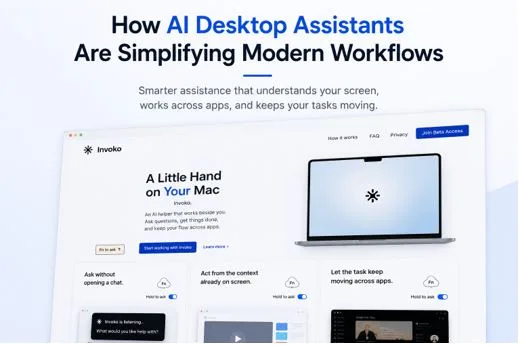
Rather than positioning itself as a standalone chatbot, Invoko functions as an AI desktop assistant designed to work directly within the macOS environment.
It acts as a desktop workflow assistant that helps users interact with applications more efficiently while reducing unnecessary workflow friction.
Because Invoko can use the context already visible on screen, users do not need to constantly describe what they are working on. The assistant can understand the active workflow and help tasks continue across applications.
This makes it easier to:
- move between apps without losing momentum
- gather information across tools
- reduce repetitive manual actions
- maintain workflow continuity
- simplify multitasking environments
Instead of interrupting work, the assistant remains part of the workflow itself.
The Future of AI Desktop Assistance
The broader shift happening across productivity software is centered around reducing friction.
Users increasingly prefer systems that:
- remain available continuously
- integrate naturally into workflows
- reduce repetitive interaction
- support multitasking efficiently
- adapt around user behavior
AI desktop assistants represent this shift clearly.
Rather than functioning as isolated utilities, they are becoming integrated workflow layers that help users interact with software more naturally and efficiently.
As digital work environments continue evolving, desktop workflow assistants may become a core part of how professionals manage productivity across apps and devices.
Final Thoughts
Modern workflows are becoming increasingly complex, but users want simpler and more natural ways to get work done.
AI desktop assistants help address this challenge by reducing context switching, minimizing repetitive interaction, and supporting workflows directly within the desktop environment.
Invoko reflects this new direction by functioning as a desktop workflow assistant that helps users work across applications more smoothly while keeping tasks moving naturally.
As productivity software continues evolving, the most valuable systems will not be the ones that add more complexity, but the ones that remove unnecessary friction from everyday work.