How AI Jewelry Photo Generators Help Online Sellers Create Better Product Listings
Selling jewelry online is highly visual. A customer cannot touch the metal, try on the ring, feel the chain, or see how an earring moves in real life. Before they read the full description, they usually judge the product by its photos. That is why jewelry images play such an important role on platforms like Etsy, Shopify, Amazon, and independent online stores.
For small jewelry brands, however, creating professional product photos is not always easy. A complete photo shoot may require a model, lighting equipment, a studio setup, editing time, and multiple rounds of retouching. This can become expensive, especially when a seller launches new designs often. AI image tools are starting to change that workflow by helping sellers create more listing-ready visuals from simple product images.
Why Jewelry Listings Need More Than One Product Photo
A single white-background image is useful, but it is rarely enough. Jewelry buyers usually want to understand three things: what the item looks like, how it looks when worn, and whether the details match their expectations.
For example, a necklace buyer may want to see the pendant shape, the chain length, and how it sits around the collarbone. An earring buyer may want to understand scale, drop length, and how the design looks on an ear. A ring buyer may want to see the stone, band thickness, side profile, and how it looks on a hand.
This is why many strong jewelry listings include a mix of image types:
- A clean hero image
- A model try-on photo
- A close-up detail shot
- A second product angle
- A lifestyle or gift-style scene
Together, these images help customers feel more confident before purchasing. They also make a product listing look more complete and professional.
How AI Can Make Jewelry Photo Creation Faster
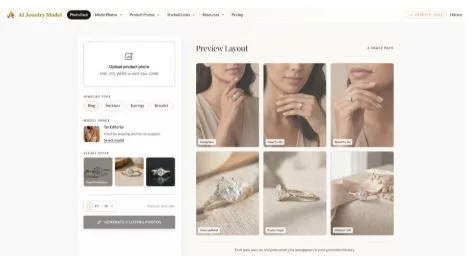
AI tools can help sellers turn one product image into multiple visual assets for a listing. Instead of arranging a new photo shoot for every product, sellers can use an AI jewelry photo generator to create model try-on photos, close-up images, product angles, and lifestyle-style visuals.
This does not mean traditional photography is no longer useful. High-quality original product photos still matter. The better the input image, the better the final result can be. But AI can reduce the amount of time needed to create supporting images, especially for small brands that need to publish listings quickly.
For handmade sellers, this can be especially helpful. Many Etsy and Shopify sellers work with limited inventory, limited budgets, and fast-moving product collections. If they can create more complete listing visuals without booking a full shoot every time, they can test more products and update their store more often.
Model Try-On Photos Build Buyer Confidence
One of the biggest challenges in jewelry e-commerce is scale. A product can look beautiful in a standalone photo, but customers still need to imagine how large it is in real life.
Model try-on images help solve this problem. They show how a necklace sits on the neck, how an earring hangs from the ear, how a bracelet fits around the wrist, or how a ring looks on a hand. These photos make the product feel more real.
Tools such as AIJewelryModel.app are designed around this type of jewelry-specific workflow. Instead of generating random fashion images, the focus is on creating visuals that support product listings, including try-on photos and listing image packs for online sellers.
This matters because jewelry is detail-sensitive. A useful AI photo should not simply look pretty. It should keep the product recognizable, preserve the design, and present the item in a way that makes sense for online shopping.
Close-Up and Lifestyle Images Also Matter
Model images are important, but they are only one part of a strong listing. Close-up photos help highlight stones, metal texture, engraving, clasps, chains, and handmade details. Lifestyle images can add warmth and context, especially for giftable items.
A simple lifestyle scene with soft lighting, neutral props, or gift packaging can make a product feel more premium. For handmade jewelry, this can also communicate brand personality. A minimal studio image may work well for marketplace clarity, while a warm boutique-style image may fit better for handmade or gift-focused products.
Sellers who are not sure what kind of images they need can look at jewelry photo examples before deciding what to create. Comparing different image types can make it easier to plan a complete listing instead of relying on one or two basic photos.
A Better Workflow for Small Jewelry Sellers
The most practical approach is not to replace every part of photography with AI. A better workflow is to start with a clear product image, then use AI to create additional listing assets.
For example, a seller could upload a clean photo of a ring and generate a model try-on image, a close-up detail shot, a second angle, and a lifestyle scene. This gives the listing more visual depth without requiring a full studio session.
The same workflow can apply to earrings, necklaces, bracelets, and other jewelry categories. Each product type needs slightly different framing, but the goal is the same: help the buyer understand the product faster.
Final Thoughts
Jewelry shoppers make decisions visually. They want to see the item clearly, understand its size, and imagine how it will look when worn. For online sellers, that means better listing photos can directly improve the shopping experience.
AI jewelry photo tools give small brands a faster way to create complete product listings. When used carefully, they can help sellers save time, present products more clearly, and build a more polished online store without needing a full photo shoot for every new item.