How to Choose the Best Portable TV for Streaming Apps
Entertainment no longer waits for you to get home. Whether you’re commuting, camping, or simply moving between rooms, the demand for portable streaming has exploded—and with it, the challenge of finding a screen that truly delivers. Portable TVs have evolved far beyond the grainy, antenna-dependent sets of the past. Today’s options promise crisp 1080p Full HD or even stunning 4K UHD resolution, built-in streaming apps, and the processing power to handle your favorite platforms without a hitch. But with so many models flooding the market, choosing the right one requires more than a glance at specs.
This guide cuts through the noise for tech-savvy consumers who refuse to compromise on quality while staying mobile. We’ll explore how display resolution impacts your viewing experience on smaller screens, why streaming app compatibility matters more than you might think, and what role operating systems like Android TV play in your daily entertainment. By the end, you’ll have a clear, step-by-step framework to select a portable TV that matches your streaming habits perfectly.
Understanding Portable TVs and Modern Streaming Demands
A portable TV today bears little resemblance to the bulky, rabbit-eared boxes your parents lugged to the beach. Modern portable TVs are lightweight, rechargeable screens ranging from 10 to 24 inches that connect to Wi-Fi and run dedicated streaming platforms right out of the box. They’re designed to deliver a full smart TV experience without being tethered to a wall mount or power outlet.
This evolution was driven almost entirely by how we consume content now. Streaming services have replaced scheduled programming, and viewers expect instant access to their libraries anywhere—a hotel room, a backyard gathering, or a kitchen counter. The shift created a gap that smartphones and tablets couldn’t fully fill: people wanted a larger, more immersive screen without sacrificing mobility.
For tech-savvy users, the appeal goes deeper than convenience. These devices now offer robust processors capable of smooth 4K decoding, dual-band Wi-Fi for stable connections, and operating systems that receive regular security and feature updates. The best portable TVs function as self-contained entertainment hubs, eliminating the need for external streaming sticks or dongles. What makes them particularly compelling is the convergence of display quality, app ecosystems, and true portability—three pillars that, when balanced correctly, create a viewing experience that rivals what you’d find mounted in your living room.
Evaluating Display Quality: 1080p Full HD TV vs 4K UHD TV
Display resolution is arguably the single most consequential spec when shopping for a portable TV meant for streaming. It determines how sharp text appears in menus, how much detail you catch in dark cinematic scenes, and whether fast-moving action looks fluid or muddy. On a portable screen—where your eyes sit closer than they would to a living room set—resolution differences become surprisingly noticeable. A panel that looks acceptable from across the room can reveal soft edges and visible pixel grids when held at arm’s length.
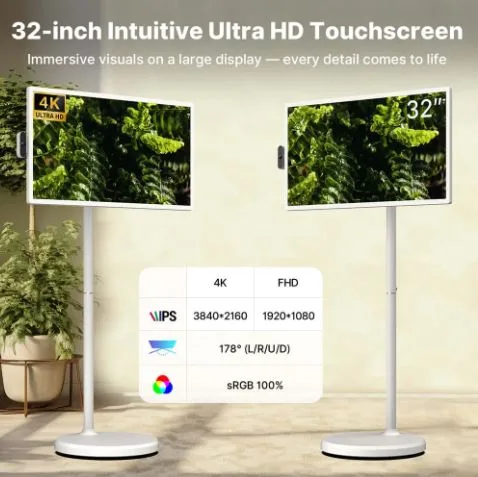
The two dominant resolution tiers in today’s portable market are 1080p Full HD TV and 4K UHD TV. A 1080p Full HD TV delivers 1,920 by 1,080 pixels, which remains the baseline for most streaming content and provides a clean, detailed image on screens up to about 18 inches. A 4K UHD TV quadruples that pixel count to 3,840 by 2,160, packing dramatically more detail into every frame. The practical difference shows up most in close-up viewing: fine textures in nature documentaries, subtle facial expressions in dramas, and crisp on-screen graphics all benefit from the extra resolution. However, the advantage of 4K diminishes as screen size shrinks, so the right choice depends heavily on how and where you plan to watch.
Benefits of 1080p Full HD for Portable Viewing
For most portable use cases, a 1080p Full HD TV hits a sweet spot between visual quality and practical efficiency. Fewer pixels mean the processor works less aggressively, which translates directly into longer battery life—a critical factor when you’re streaming away from an outlet. The majority of content on platforms like Netflix and Hulu still streams natively at 1080p, so you’re viewing material at its intended resolution without unnecessary upscaling. On screens under 16 inches, individual pixels are virtually invisible at normal viewing distances, making the image appear sharp and satisfying without the added cost or power draw of a higher-resolution panel.
When to Opt for 4K UHD TV for Superior Detail
A 4K UHD TV becomes worth the investment when your portable screen sits in the 18-to-24-inch range and you frequently watch content mastered in ultra-high definition. Platforms like Netflix, Disney+, and Apple TV+ now offer extensive 4K libraries, and the difference is immediately apparent in HDR-graded films where color gradients and shadow detail matter. Close viewing distances—common with portable setups on desks or tray tables—amplify the clarity advantage, letting you appreciate textures and depth that 1080p simply cannot resolve. Just keep in mind that 4K streaming demands more bandwidth and battery, so reliable Wi-Fi and access to charging are practical prerequisites for getting the most from that extra resolution.
Ensuring Access to Top Streaming Apps and Services
A gorgeous display means nothing if you can’t actually run the apps you watch every day. Streaming app availability should rank just as high as resolution on your checklist, because not every portable TV grants access to the same platforms. Some budget models ship with proprietary or stripped-down operating systems that support only a handful of apps—often missing major services like HBO Max, Peacock, or international platforms you might rely on. Before committing to any device, visit the manufacturer’s app listing or check user forums to confirm that Netflix, Hulu, Disney+, Amazon Prime Video, and any niche services you subscribe to are natively supported.
Native support matters more than workarounds. Sideloading apps or connecting an external streaming stick defeats the purpose of a self-contained portable device and introduces extra bulk, cables, and battery drain. The operating system powering the TV determines its app ecosystem, so pay close attention to whether the device runs Android TV, Roku OS, Fire OS, or a custom Linux-based platform. Android TV and Roku OS tend to offer the broadest app libraries, while proprietary systems can leave gaps that frustrate users months after purchase. Also verify that the OS receives regular updates—streaming apps frequently revise their minimum software requirements, and a TV stuck on an outdated firmware version may lose access to services over time. Choosing a platform backed by an active developer community ensures your portable TV remains functional and feature-rich well beyond its first year of use.
The Role of Android TV in Portable Streaming Devices
Among the operating systems available on portable TVs, Android TV stands out as the most versatile option for streaming enthusiasts. Built on Google’s ecosystem, Android TV provides access to the Google Play Store, which hosts thousands of apps including every major streaming service, live TV platforms, and gaming titles. This breadth of choice means you’re unlikely to encounter the app gaps that plague proprietary systems. Beyond sheer volume, Android TV benefits from Google’s commitment to regular software updates, delivering security patches and feature improvements that keep your device current as streaming platforms evolve their requirements.
The integration with Google services adds practical value that competitors struggle to match. Built-in Chromecast support lets you cast content directly from your phone, while Google Assistant enables voice search across multiple apps simultaneously—say “find action movies” and results pull from Netflix, YouTube, and Prime Video in a single view. The interface itself is intuitive, organizing your content into a unified home screen that surfaces recommendations from all installed services rather than forcing you to open each app individually. Compared to Roku OS, which excels in simplicity but offers less customization, or Fire OS, which leans heavily toward Amazon’s own content, Android TV strikes a balance between openness and polish. Brands like ApoloSign have embraced Android TV in their portable lineups, recognizing that tech-savvy users want granular control over their streaming experience—including sideloading apps, adjusting developer settings, or connecting Bluetooth peripherals—with a flexibility that closed ecosystems simply cannot provide.
A Step-by-Step Guide to Choosing Your Portable TV
Knowing what matters is one thing—applying that knowledge systematically is what separates a satisfying purchase from buyer’s remorse. The following framework walks you through each decision point in logical order, ensuring you weigh display quality, app compatibility, and real-world usability before spending a dollar. Treat each step as a filter that narrows your options until only the best-fit devices remain.
Step 1: Assess Your Streaming Needs and Preferences
Start by listing every streaming service you actively use—Netflix, Disney+, YouTube TV, or regional platforms—and note whether your preferred content is available in 4K or primarily streams at 1080p. Then define your typical viewing environment: will you watch mostly outdoors at campsites, during commutes, or at a desk? This clarity shapes every subsequent choice.
Step 2: Compare Display Technologies and Resolutions
Match resolution to screen size and viewing habits. For screens under 16 inches used at arm’s length, a 1080p Full HD TV delivers excellent clarity without unnecessary cost. If you’re considering an 18-inch or larger panel and regularly stream HDR content, a 4K UHD TV justifies the premium. Factor in whether HDR10 or Dolby Vision support matters for your content library.
Step 3: Check Operating System and App Support
Confirm the device runs an OS with proven app breadth—Android TV remains the safest bet for comprehensive coverage. Verify that your must-have apps appear in the platform’s store, check the manufacturer’s update history, and look for pre-installed services that reduce setup friction on day one.
Step 4: Evaluate Portability and Additional Features
Weigh battery capacity against your longest expected unplugged session. Examine connectivity options including dual-band Wi-Fi, Bluetooth for headphones, and HDMI input for gaming consoles. Assess physical dimensions and build quality—rubberized edges and lightweight construction matter if the TV travels in a backpack regularly.
Step 5: Make an Informed Decision and Final Selection
Cross-reference your shortlist against verified user reviews, paying attention to real-world battery performance and app stability rather than marketing claims. Prioritize devices that excel in your top two criteria—whether that’s display quality, app ecosystem, or ruggedness—and accept reasonable trade-offs elsewhere. A focused choice always outperforms chasing every feature simultaneously.
Balancing Display, Apps, and Portability for the Perfect Streaming Setup
Selecting the right portable TV for streaming comes down to balancing three core elements: display resolution, app ecosystem, and real-world portability. A 1080p Full HD TV remains the practical choice for smaller screens and extended battery-powered sessions, while a 4K UHD TV earns its place on larger portable panels where close viewing distances reveal every detail in HDR content. Neither resolution matters, though, if your device can’t run the streaming apps you depend on daily—making operating system selection, particularly platforms like Android TV with broad app support and regular updates, a decision that shapes your experience for years.
The step-by-step framework outlined here gives you a repeatable process: define your streaming habits first, match display technology to your actual viewing conditions, verify app compatibility before purchasing, and then weigh portability features against your lifestyle demands. By filtering options through these criteria in sequence, you avoid the common trap of chasing headline specs that don’t align with how you actually watch. Take this guide, apply it to your shortlist, and you’ll land on a portable TV that feels less like a compromise and more like a genuine extension of your home entertainment setup—one that travels wherever you do.